---
title: "Process Automation With AI: The Fastest ROI Most SMBs Are Missing"
url: "https://www.krishaweb.com/blog/ai-process-automation-fastest-roi/"
date: "2026-10-01T12:31:02+00:00"
modified: "2026-10-01T12:31:04+00:00"
type: "Article"
resource: "https://www.krishaweb.com/blog/ai-process-automation-fastest-roi/"
timestamp: "2026-10-01T12:31:04+00:00"
author:
name: "Parth"
url: "https://www.krishaweb.com/"
categories:
- "Web Development"
word_count: 3007
reading_time: "16 min read"
summary: "Most SMBs chasing AI reach for the flashy stuff, a clever chatbot, a content generator, and miss the boring workflows sitting right next to them that would pay back in weeks. That's the opportunity..."
description: "AI process automation delivers big cost reductions and fast payback for SMBs, if you automate the right workflows. Here are the fastest-ROI use cases, costs,..."
keywords: "AI process automation, Web Development"
language: "en"
schema_type: "Article"
related_posts:
- title: "Custom AI Development vs Off-the-Shelf AI Tools: Which Does Your Business Need?"
url: "https://www.krishaweb.com/blog/custom-ai-development-vs-off-the-shelf/"
- title: "AI Implementation and Integration: Connecting AI to the Systems You Already Run"
url: "https://www.krishaweb.com/blog/ai-implementation-integration-guide/"
- title: "AI Strategy Before AI Tools: Why Most AI Projects Fail Without It"
url: "https://www.krishaweb.com/blog/ai-strategy-before-ai-tools/"
---
# Process Automation With AI: The Fastest ROI Most SMBs Are Missing
_Published: Thursday,October 1, 2026_
_Author: Parth_
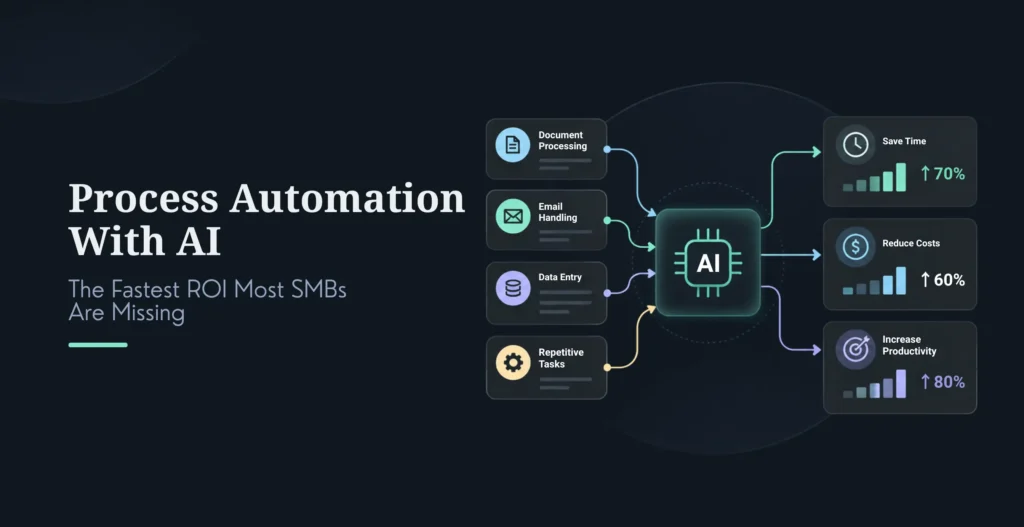
Most SMBs chasing AI reach for the flashy stuff, a clever chatbot, a content generator, and miss the boring workflows sitting right next to them that would pay back in weeks. That’s the opportunity being left on the table.
AI process automation delivers meaningful operational cost reductions for small and mid-sized businesses, and for the right workflows the payback is fast, often 3 to 6 months, sometimes weeks. The fastest returns don’t come from ambitious, novel use cases. They come from automating repetitive, high-volume, measurable work: document processing, invoice handling, lead follow-up, support triage, and reporting. These are the tasks your team does hundreds of times a month, where the cost of doing it manually is both high and easy to measure, which is exactly what makes the ROI show up quickly.
This guide covers what AI process automation actually is, the use cases with the fastest payback (with honest ROI ranges), what it costs, a 90-day implementation plan, and the five mistakes that quietly sink SMB automation projects. It’s written for the owner, ops leader, or CFO who wants measurable value fast, not a science project.
One honesty note up front, and it runs through the whole piece: the impressive ROI figures in this space are mostly “labor-equivalent value,” the worth of the hours saved, not always direct cash that lands in your bank account. And roughly one in five automation projects never reaches payback at all, usually because of the mistakes in the challenges section. So treat the numbers as directional planning ranges, and read to the end. When you’re ready to act, **[process automation](https://www.krishaweb.com/process-automation-solutions/)** is exactly the kind of fast-ROI work we help SMBs scope and ship.
## What Is AI Process Automation?
AI process automation, sometimes called intelligent process automation or IPA, combines AI with traditional automation to handle complex, messy workflows that older tools couldn’t. The key difference from classic RPA (robotic process automation): rule-based automation follows fixed rules on structured data, while AI automation can read documents, understand language, make judgment calls, and improve from patterns.
| | **Traditional Automation (RPA)** | **AI Process Automation** |
|---|---|---|
| Handles | Structured, rule-based tasks | Unstructured, complex workflows |
| Decisions | Fixed rules only | Judgment based on patterns |
| Data | Structured only | Documents, emails, images |
| Learning | Static | Improves over time |
| Typical examples | Data entry, file transfers | Document processing, support triage, lead scoring |
A useful way to think about scope is the automation hierarchy, from fastest payback to slowest. Micro-automations (a single prompt chain, a support macro) pay back in under two months. Workflow automations (intake, scheduling, lead qualification, invoicing) pay back in roughly 2 to 6 months, and this is the sweet spot where most SMBs should start. Departmental systems (full support deflection, marketing ops) take 6 to 12 months. Enterprise-wide transformation runs 12 to 24 months. The lesson: start small and specific, not big and ambitious, the fast money is in the workflow tier.
## AI Process Automation ROI: Benchmarks by Use Case
Here’s where the value actually is, with ranges corroborated across multiple 2026 sources. Two caveats apply to every number: these are typical vendor-reported ranges that vary widely with your volume and baseline, and much of the “ROI” is labor-equivalent value rather than direct cash. With that said, the pattern is real and consistent.
| **Use Case** | **Typical First-Year ROI** | **Typical Payback** |
|---|---|---|
| Report generation / data sync | High (fast, low effort) | ~1–3 months |
| Document processing | ~200–400% | ~3–6 months |
| Invoice / AP processing | ~200–400% | ~3–6 months (often 60–90 days at SMB scale) |
| Lead management / follow-up | ~150–350% | ~2–4 months |
| Customer support triage | ~250–450% | ~3–6 months |
| Customer / HR onboarding | ~120–300% | ~4–12 months |
The clearest, best-documented case is invoice processing, because the manual cost is so measurable. Manual AP runs roughly $8 to $15 per invoice fully loaded; AI automation brings it to about $1 to $3 at high straight-through rates, a 75 to 90% cost reduction, and SMB implementations commonly recover their cost in 60 to 90 days. Document processing follows the same shape (200-400% first-year ROI, 3-6 month payback), because it shares the three traits that make automation pay back fast.
Those three traits are the real takeaway, more useful than any single percentage: the fastest-payback workflows all have high repetition (the same task hundreds or thousands of times a month), measurable output (easy to quantify the time and cost saved), and no long data-collection cycle (value appears immediately, not after months of model training). When you’re deciding what to automate first, screen for those three, not for what sounds most impressive.
By organization size, the shape holds but the numbers scale: small businesses often see the fastest payback (weeks to a few months) on a single targeted bottleneck, mid-market lands around 3-6 months across several workflows, and enterprise runs longer (6-18 months) because the integration surface is bigger. And the essential balancing fact, from Gartner: about 41% of enterprises reach ROI within 12 months, but roughly 19% of agentic automation projects never reach payback at all. The difference between those two groups is almost always execution, which is what the rest of this guide is about.
A simple ROI formula you can run today: annual savings divided by annual cost, times 100. For example, an invoice workflow costing two people $80,000/year, automated for about $25,000/year all-in, saves $55,000, a 220% return, paying back in under four months. Run this on your own real numbers before believing anyone’s benchmark, including these.
## The Highest-ROI Use Cases for SMBs
Rather than a generic list, here are the workflows that consistently pay back fastest, grouped by function, with what each automates and who it fits.
Finance and accounting is the richest vein, because the work is repetitive, structured, and its cost is easy to measure. Invoice processing (extract data, match to POs, route for approval, post to your accounting system) is the flagship, 75-85% less manual time, best for anyone handling 100+ invoices a month. Expense report processing (extract receipts, check against policy, route, post) and financial report generation (pull from multiple systems, generate, distribute) round it out, the latter often the single fastest payback of all because reporting is pure repetition with near-zero data-collection lag.
Sales and marketing pays back through speed and coverage. Lead management and scoring (capture from all sources, score by fit and engagement, route to sales, trigger follow-up) is the standout for any B2B team with real lead volume, faster follow-up directly lifts conversion. Customer onboarding (welcome sequences, account setup, progress tracking) and content production (drafting, SEO optimization, scheduling) also deliver, though content sits a bit lower on ROI because quality review claws back some of the time saved.
Customer service is one of the best-evidenced categories for sub-6-month payback. Support triage (classify tickets, route to the right team, suggest responses, escalate the hard ones) cuts handling time 40-60% and fits anyone above a few hundred tickets a month. FAQ and knowledge-base automation (answer the repetitive questions, escalate the rest) deflects a meaningful share of volume outright.
HR and operations quietly offer some of the fastest payback of all. Employee data synchronization across HRIS, payroll, and benefits can cut manual data entry almost entirely and pays back in 1-2 months, it’s unglamorous and enormously effective. HR onboarding (collect info, provision accounts, schedule training, track completion) pays back over a longer window but reliably.
Operations and IT round out the list. Document processing and classification (extract, classify, route, archive) is a top-tier ROI play for any business handling large document volumes. IT ticket routing and resolution (classify, route, suggest fixes, auto-resolve the common ones) cuts handling time 40-60%.
The pattern across all of them, worth stating plainly: automate the boring, high-volume, measurable work first. Lead follow-up, support triage, invoice and receipt processing, and automated reporting are where the fastest money is, precisely because they’re repetitive and their savings are easy to prove. The exciting-sounding use cases can wait.
## Cost and Pricing
Costs have dropped sharply, AI API prices fell dramatically since 2023, so automation that once needed enterprise budgets is now within SMB reach. Treat these as vendor-reported 2026 ranges and get a scoped quote, but the shape is reliable.
| **Engagement** | **Typical Cost** |
|---|---|
| AI readiness / process audit | ~$3,500 one-time |
| Single-workflow pilot | ~5,000–15,000 one-time |
| SMB managed retainer | ~500–2,000/month (1–2 workflows) |
| Mid-market managed retainer | ~3,000–9,000/month (3–5 workflows) |
| Enterprise / dedicated team | ~20,000–35,000+/month |
A useful benchmark: most small-to-mid-sized businesses spend roughly $4,500 to $9,000 a month on managed AI automation, less than a single full-time hire, with measurable results often within 4 to 8 weeks. The costs SMBs underestimate are integration with legacy systems (can add 20-40%), change management and training (10-20%), ongoing optimization (budget 15-25% of the build per year), and compliance for regulated industries (10-30%).
Now, the honest reconciliation. A fast micro or single-workflow automation genuinely can hit 200%+ first-year ROI and pay back in weeks; that headline is real for the right workflow at the right volume. But a heavier mid-market engagement won’t. Take a realistic mid-market invoice automation: about $15,000 to build plus about $3,000/month to run is roughly $51,000 in year one, against about $80,000 of manual labor saved, that’s roughly a 7-8 month payback and a solid but not spectacular first-year return, growing strongly in years two and three as the one-time cost falls away. Both pictures are true. The takeaway: the eye-popping ROI numbers describe lean, high-volume, single-workflow automations; larger multi-workflow builds pay back more slowly but compound. Pick the fast, measurable workflow first to fund the rest.
## A 90-Day Implementation Roadmap
You don’t need a year. A focused SMB automation program runs in three 30-day phases.
Days 1-30, Foundation and discovery. Map your workflows and find the repetitive, high-volume tasks. Build a simple 2×2, business impact against implementation complexity, and pick one or two high-impact, low-complexity workflows for a pilot. Critically, capture a baseline now (current time, cost, and error rate for that workflow), because without it you can’t prove ROI later. You should end the month with a prioritized backlog, a chosen pilot, and a baseline.
Days 31-60, Pilot. Build the automation for that one workflow, integrate it with your systems, test it on real data, refine, train the team, and go live. Instrument KPI tracking from day one. You should end with a working, integrated automation and live measurement against your baseline.
Days 61-90, Scale and optimize. Measure the real results against the baseline, honestly, then apply what you learned to two or three more workflows and put light governance around it. You should end with an ROI report and 3-5 workflows running.
Five things separate the projects that work from the 19% that never pay back: start with one workflow (not a suite of tools bought at once), define success and baseline upfront, track KPIs from day one, design human-in-the-loop for exceptions only (not routine review, which erases the savings), and scale only after reliability holds under real volume. Do those, and you’re in the group that gets the fast payback.
## Five Common SMB Automation Mistakes (and How to Avoid Them)
Most automation failures aren’t technology problems, they’re these five patterns. Each is avoidable.
Tool sprawl. Buying three or four AI products before deciding what job each should do, wasted budget, integration mess, no ownership. Avoid it by naming the job before buying the tool, and starting with one workflow on one tool. Red flag: three-plus tools bought in the first 90 days.
No system of record. Building automations on top of spreadsheets or a tool’s own storage, so everything breaks when you switch tools. Avoid it by anchoring automation to a real system of record (CRM, ERP, database) that outlives any single tool. Red flag: your automation’s data lives inside the automation tool itself.
Automating chaos. Wiring automation onto an unstable, undocumented process just makes the broken outcome happen faster. Avoid it by mapping and stabilizing the process first, its steps, handoffs, exceptions, then automating. Red flag: the process has no documented steps or owner.
AI review overhead. Saving hours with AI, then handing them right back by manually correcting its output. Avoid it by designing human review for genuine exceptions only, setting clear boundaries on what AI can decide versus what needs a human, and starting with high-accuracy use cases (document processing, data entry) before creative ones. Red flag: your team spends more time checking the AI than the task used to take.
Integration brittleness. Building the whole stack on no-code glue that collapses when any one service changes. Avoid it with robust patterns (proper APIs, webhooks, error handling, monitoring) for anything critical, and don’t lean on fragile glue for mission-critical workflows. Red flag: a critical workflow depends on five-plus chained no-code integrations.
The thread through all five: the discipline lives in the process and data work, not the AI. Get the boring foundations right and the automation delivers; skip them and you join the projects that never pay back.
## When to Hire an Automation Partner
DIY is genuinely fine for a single, well-documented workflow with simple modern-SaaS integrations and someone in-house who’s done it before. Start there, it’s cheap and fast.
Bring in a partner when you’re automating multiple workflows, integrating with legacy or custom systems, lack in-house expertise, operate in a regulated industry, or run high-volume, mission-critical workflows where failure would hurt. The signals are usually loud: you’ve already hit tool sprawl, integrations keep breaking (a majority of SMBs report legacy-integration difficulty), compliance worries are stalling you, you can’t staff the work, or a DIY attempt already failed to deliver. A good partner brings process expertise (not just tools), real integration experience with your systems, a measured ROI track record, change-management support so the team actually adopts it, and ongoing optimization rather than a one-and-done build. The honest rule: DIY the first simple win to build confidence, partner up the moment complexity, compliance, or scale enters the picture.
##### Additional Read
- [Custom AI Development vs Off-the-Shelf AI Tools: Which Does Your Business Need?](https://www.krishaweb.com/blog/custom-ai-development-vs-off-the-shelf/)
- [AI Implementation and Integration: Connecting AI to the Systems You Already Run](https://www.krishaweb.com/blog/ai-implementation-integration-guide/)
- [AI Strategy Before AI Tools: Why Most AI Projects Fail Without It](https://www.krishaweb.com/blog/ai-strategy-before-ai-tools/)
### Frequently Asked Questions
**What is AI process automation?**It combines AI with traditional automation to handle complex, unstructured workflows, reading documents, understanding language, making decisions, and improving over time, where older rule-based automation (RPA) could only follow fixed rules on structured data. For SMBs it delivers meaningful operational cost reductions, and for repetitive high-volume workflows the payback is fast, commonly 3-6 months and sometimes weeks. It’s best applied to boring, measurable, high-frequency work rather than novel or creative tasks.
**Which AI automation use cases pay back fastest?**The fastest are report generation and data sync (~1-3 months), invoice and document processing (~3-6 months, often 60-90 days at SMB scale), lead follow-up (~2-4 months), and support triage (~3-6 months). They share three traits: high repetition, easily measured output, and no long data-collection cycle before value appears. Screen your candidate workflows for those three traits rather than automating whatever sounds most impressive.
**How much does AI process automation cost?**Ranges widely by scope: roughly $3,500 for a process audit, 5,000-15,000 for a single-workflow pilot, 500-2,000/month for an SMB managed retainer, 3,000-9,000/month for mid-market, and $20,000+/month for enterprise or a dedicated team. Most SMBs spend around 4,500-9,000/month on managed automation, less than one full-time hire. Watch hidden costs: legacy integration, change management, ongoing tuning, and compliance. Get a scoped quote, since volume and integration complexity drive the number.
**What ROI can I realistically expect?**Directionally, document and invoice processing deliver ~200-400% first-year ROI with 3-6 month payback; lead and support automations are similar. But two honest caveats: much of this is labor-equivalent value (the worth of hours saved), not always direct cash, and about 19% of automation projects never reach payback, usually due to poor execution. A lean single-workflow automation can genuinely pay back in weeks; a heavier multi-workflow build pays back more slowly (often 6-9 months) but compounds. Run the formula on your own real numbers.
**What repetitive tasks should I automate first?**Start with high-volume, rule-heavy, measurable work: invoice and receipt processing, document classification, lead follow-up, support ticket triage, employee data sync, and automated reporting. These pay back fastest because the manual cost is large and easy to quantify. Pick one, measure a baseline, ship it, and prove the ROI before expanding, rather than buying several tools and automating everything at once.
**How do I implement AI process automation?**Use a 90-day, three-phase approach: Days 1-30, map workflows, prioritize by impact vs complexity, pick a pilot, and capture a baseline; Days 31-60, build, integrate, test, train, and go live on that one workflow with KPI tracking from day one; Days 61-90, measure results honestly, then scale to 3-5 workflows with light governance. The success factors are starting with one workflow, defining success upfront, human-in-the-loop for exceptions only, and scaling only after reliability holds.
**What are the most common automation mistakes?**Five patterns cause most failures: tool sprawl (buying products before defining the job), no system of record (building on storage that vanishes when you switch tools), automating chaos (automating an unstable process, which just breaks faster), AI review overhead (manually correcting output until the time savings vanish), and integration brittleness (fragile no-code glue that collapses when a service changes). All are avoidable with process and data discipline before automation.
**When should I hire an automation partner versus doing it myself?**DIY a single, well-documented workflow with simple integrations and some in-house skill, it’s the right way to get a fast first win. Hire a partner when you’re automating multiple workflows, integrating legacy or custom systems, lack expertise, operate in a regulated industry, or run high-volume or mission-critical work. Clear signals you need help: tool sprawl, repeated integration breakage, compliance concerns, staffing gaps, or a failed DIY attempt.
### Conclusion
The fastest ROI in AI isn’t the exciting stuff, it’s the boring, repetitive, high-volume workflows most SMBs overlook while chasing flashier ideas. Invoice and document processing, lead follow-up, support triage, and automated reporting pay back quickly precisely because they’re repetitive and their savings are easy to measure.
The playbook is simple: pick one high-volume, measurable workflow, capture a baseline, automate it, prove the ROI, then scale to three to five. Avoid the five mistakes, tool sprawl, no system of record, automating chaos, review overhead, brittle integrations, and you land in the group that gets the fast payback rather than the fifth that never does. And keep the honesty in view: the impressive numbers are largely labor-equivalent value, so measure against your own baseline, not a vendor’s benchmark.
Ready to find your fastest win?
**[Explore our Process Automation Solutions](https://www.krishaweb.com/process-automation-solutions/)** to see how we help SMBs automate the right workflows for fast, measurable ROI.
**[Book a consultation](https://www.krishaweb.com/contact-us/)** to map your workflows and identify the one that will pay back fastest.
**[AI Implementation & Integration](https://www.krishaweb.com/ai-implementation-integration/) · [Custom AI Development](https://www.krishaweb.com/custom-ai-development/)**

###### Parth Pandya
Founder & CEOFounder & CEO of KrishaWeb, leads an Enterprise Web Agency. With contributions to WordPress and organization of WordCamps, he pioneers innovation and community engagement in the digital realm.
 Interact With Me- [ ](https://twitter.com/imparthpandya)
- [ ](https://www.linkedin.com/in/parthjpandya/)
- [ ](mailto:parth@krishaweb.com)
---
_View the original post at: [https://www.krishaweb.com/blog/ai-process-automation-fastest-roi/](https://www.krishaweb.com/blog/ai-process-automation-fastest-roi/)_
_Served as markdown by [Third Audience](https://github.com/third-audience) v3.6.1_
_Generated: 2026-10-01 12:31:04 UTC_