---
title: "AI Webflow Development in 2026: How Designers Are Building Smarter"
url: "https://www.krishaweb.com/blog/ai-webflow-development/"
date: "2026-06-24T12:58:43+00:00"
modified: "2026-06-24T12:58:45+00:00"
author:
name: "Nisarg"
categories:
- "Web Development"
word_count: 2477
reading_time: "13 min read"
summary: "I have been designing and building in Webflow for years, and I have never seen the workflow change as fast as it has in the last eighteen months. Not because Webflow added a few AI buttons. Because..."
description: "I have been designing and building in Webflow for years, and I have never seen the workflow change as fast as it has in the last eighteen months. Not because..."
keywords: "Web Development"
language: "en"
schema_type: "Article"
related_posts:
- title: "React vs Vue vs Angular in 2026: Frontend Framework Decision Guide"
url: "https://www.krishaweb.com/blog/react-vs-vue-vs-angular/"
- title: "How to Build a Multi-Tenant SaaS with Laravel: A Product Manager’s Step-by-Step Guide"
url: "https://www.krishaweb.com/blog/laravel-multi-tenant-saas/"
- title: "IT Staff Augmentation vs Outsourcing in 2026: Which One Your Team Actually Need"
url: "https://www.krishaweb.com/blog/it-staff-augmentation-vs-outsourcing/"
---
# AI Webflow Development in 2026: How Designers Are Building Smarter
_Published: Wednesday,June 24, 2026_
_Author: Nisarg_
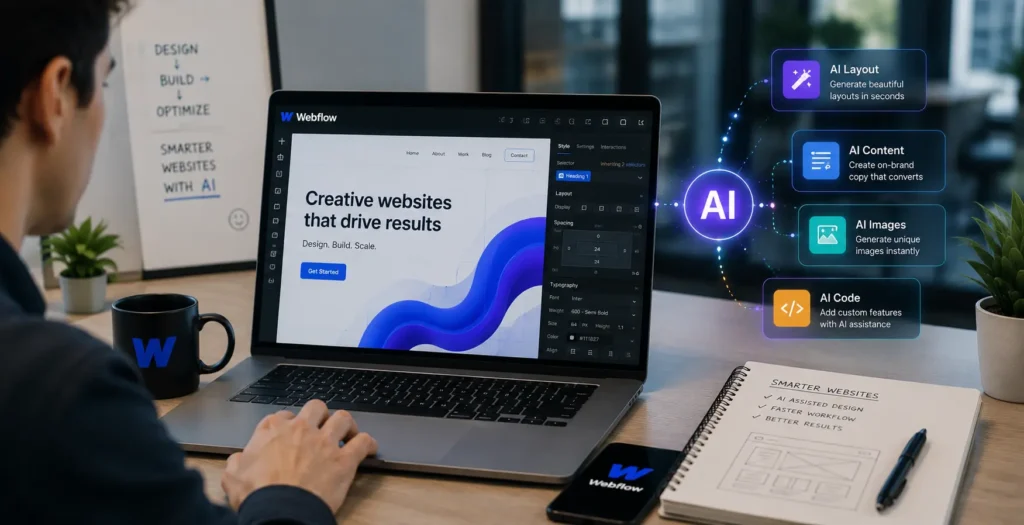
I have been designing and building in Webflow for years, and I have never seen the workflow change as fast as it has in the last eighteen months. Not because Webflow added a few AI buttons. Because AI moved from being a thing you used around Webflow to a thing you use inside it.
Here is why this matters more on Webflow than almost anywhere else. Webflow was already a visual builder. It already sat at the meeting point of design and production, where a designer could build the real thing instead of mocking it up and handing it off. AI slots into that gap naturally. On a code-first platform, AI helps the developer. On Webflow, it helps the designer build, personalize, and optimize without waiting on anyone. That is why designers are adopting AI faster here than on any platform I work with.
This is the practical breakdown of what that actually looks like in 2026. What Webflow does natively, which external AI tools genuinely fit the workflow, where AI personalization is real and where it is hype, and the honest limits of what Webflow can do with AI before you need something custom.
## Webflow’s Native AI Features in 2026
Webflow has built AI directly into the platform rather than bolting on a single chatbot. The pieces that matter to a working designer are these.
**The Webflow AI Assistant** is the centerpiece, and it is more than a copy generator. Webflow rebuilt it as a conversational, agentic partner that understands your site, aligns with your design system, and can plan, preview, and apply changes directly on the canvas. You can ask it to reason through a task and take action, not just answer a question. For day-to-day work, that means layout guidance, copy generation, and contextual suggestions that pull from the site you are actually building rather than generic output.
**AI code generation** inside the Assistant is the bigger leap. You describe what you need, an animated hero, a pricing calculator, and an interactive booking tool, and it generates a production-grade code component that pulls from your existing design system to stay on brand. You can iterate in the chat or edit the code directly and watch changes in real time, all without leaving Webflow. Those components drop onto the canvas with props, slots, and variants, and they can even be added to A/B tests. This used to require a developer. Now a designer can ship it.
**Webflow Optimize** uses machine learning to run A/B tests, multivariate tests, and personalization automatically, with AI-powered suggestions for what to test. This is where Webflow stopped being just a build tool and became a tool for improving a site after launch.
**Webflow Localize** uses machine learning to translate and adapt sites for global audiences, built into the CMS workflow rather than bolted on as a generic translation engine, with locale-specific asset swaps and SEO localization.
**The Webflow MCP server** is the piece most people miss, and it is genuinely powerful. Webflow was one of the first in the industry to ship an MCP server, which lets tools like Claude and Cursor connect directly to your Webflow site structure and CMS in real time. It now works with both the Data and Designer APIs, which means an AI agent can read and manage your content, run SEO tasks, and help build directly against your real site. On our team, this is the connection that turns AI from a suggestion engine into something that actually does work inside the project.
## AI Design Tools That Integrate With Webflow
The native features are only half the story. The bigger shift in our workflow at KrishaWeb has been the chain of AI tools that feed into a Webflow build. Here is the handoff process we actually use.
**Relume** is the one that changed our process most. You describe a site in a prompt, and Relume generates a full sitemap in seconds, then wireframes for every page, then populated copy built from a library of over 1,000 components designed for both Webflow and Figma. The intended workflow, and the one we use, is to generate the site’s structure in Relume, export to Figma for design refinement, and then to Webflow for final build and launch. The honest value is in the tedious early stages. Sitemapping and wireframing that used to eat hours happen in minutes, which, on a real project, translates to cutting 25 to 40% off the timeline. It does not replace the designer. It removes the blank-page grind so the designer spends time on craft instead of scaffolding.
**Figma AI** sits in the middle of that chain. Once structure comes out of Relume, Figma’s AI features speed up the design refinement, generating variations, adjusting layouts, and filling content before the build moves to Webflow.
**Midjourney, Adobe Firefly, and Lexica** handle the visual assets. Hero imagery, backgrounds, textures, and illustrations. We generate and refine brand-appropriate imagery in these tools and bring it into the Webflow build, rather than relying on stock.
**Jasper** integrates directly with Webflow through the marketplace for on-brand content generation, useful when a site needs a volume of copy that stays consistent with brand voice.
The thing to understand about this stack is that the tools no longer produce mockups that need rebuilding. They produce assets a development team can actually use. That is the difference between AI in 2024 and AI now, and it is why the handoff between these tools and Webflow has become the backbone of how we build.
## AI-Powered Personalization in Webflow
Personalization is where AI earns real money for a website, and it is also where the marketing around it runs ahead of reality. Here is the honest version.
**Webflow Optimize** is the native answer. Its machine learning runs A/B tests and personalization rules across audience segments, showing different content to different visitors based on their behavior and attributes, then learning which version performs best. For most businesses, this is enough. You can personalize a hero, a CTA, or a whole section by segment without writing code or bolting on a third-party tool.
**Third-party personalization** through Webflow’s embed and custom code sections covers what Optimize does not. Tools that personalize based on richer visitor data, firmographic data for B2B, and behavior from your CRM integrate through embed codes and the Webflow APIs. We have built these for clients who needed personalization tied to data living outside Webflow.
**AI chatbots** are the most common personalization request we get, and they are straightforward to add. A chatbot embeds into a Webflow site through custom code, and in 2026 the interesting versions are the ones connected to your actual content and data, so they answer questions about your specific products and services rather than reciting generic responses.
The realistic guidance: start with Webflow Optimize, because most businesses never exhaust what it can do. Move to third-party AI personalization when you need to personalize based on data that lives outside Webflow. The mistake is reaching for a heavy external personalization platform before you have used the capable one already built into your site.
## Webflow + AI for SEO and Content
This is where AI quietly delivers the most consistent value, because SEO and content work is repetitive at exactly the scale AI handles well.
Webflow’s AI now runs sitewide SEO and AEO audits that flag missing alt text, missing meta descriptions, absent schema, and accessibility issues, and it can generate fixes in bulk. For a content-heavy site, fixing alt text and meta descriptions one page at a time is the kind of task that never gets finished. AI doing it across the whole site in one pass is a genuine time saver.
Inside the CMS, AI generates structured content at scale while staying on brand, drafts meta descriptions across hundreds of pages, and produces alt text for image libraries that would otherwise go undescribed. Through the MCP server, an AI agent can manage these CMS operations directly against your live site.
The 2026 angle that matters most is GEO and AEO. Webflow’s AI tools explicitly support improving reach through both SEO and AEO, which means structuring content not just to rank in Google but to be cited by AI engines like ChatGPT, Gemini, and Perplexity. Clean schema, structured data, and answer-first content are what get a site surfaced in AI answers, and Webflow’s AI tooling now helps build that in. Our SEO team treats this as standard on every Webflow build, because being citable by AI is becoming as important as ranking in search.
## Webflow’s Limitations When It Comes to AI
I would not be doing my job if I only told you what AI can do in Webflow. Here is where it cannot be, and where I tell clients honestly that Webflow is the wrong choice for their AI ambitions.
Webflow is a front-end platform. It is exceptional at design, content, and the visitor-facing experience. It is not a place to run heavy server-side AI. If your AI need is a custom machine learning model trained on your data, large-scale data processing, real-time inference at volume, or an AI feature that is the core product rather than an enhancement to a marketing site, Webflow is not the foundation for that.
The native AI features and integrations are built for building, personalizing, and optimizing a website. They are not built for running an AI product. A SaaS platform whose entire value is an AI engine should be built on a custom stack like Laravel or Node, with Webflow potentially handling the marketing site in front of it.
The honest dividing line: if AI makes your website smarter, Webflow handles it well. If AI is your product, you need custom development, and often the right answer is both: a custom AI application with a Webflow marketing site in front of it. We build on both sides of that line, and we will tell you which one your project actually needs rather than forcing everything into the platform we happen to be discussing.
## What to Check on Your Webflow Site Before Adding AI
Before you start adding AI features, a few things on your existing site determine whether it goes smoothly or creates problems.
#### Your Webflow plan
API access, which most serious AI integrations and the MCP server depend on, requires the right plan tier. Confirm your plan supports the API access your intended AI features need before you scope the work.
#### Your existing integrations and custom code
AI embeds and third-party tools go into custom code sections. Know what custom code you already have running so new AI integrations do not conflict with it.
#### Your page speed
AI chatbots, personalization scripts, and embeds add weight. If your site is already slow, every AI feature makes it slower. Check your performance baseline first and fix it before piling on scripts.
#### Your CMS structure
AI content generation and population only work well if your CMS is structured cleanly. A well-organized CMS with clear collections and fields lets AI populate content reliably. A messy one produces messy results.
This is exactly the kind of review we run as a Webflow audit before any AI work, because the cost of finding these issues after you have started is always higher than finding them first.
##### Additional Read
- [Best Webflow Development Agencies in 2026: Ranked and Reviewed](https://www.krishaweb.com/blog/best-webflow-development-agencies/)
- [Switching to Webflow From WordPress in 2026: A Full Migration Guide](https://www.krishaweb.com/blog/wordpress-to-webflow-migration/)
- [AI-Powered CRO: 7 Webflow Tests That Move Revenue Fast](https://www.krishaweb.com/blog/webflow-ab-testing-ai-cro/)
## Webflow + AI in 2026: The Designer’s Competitive Edge
The shift is real, and it is not slowing down. AI inside Webflow means a designer builds faster, personalizes without a developer, optimizes after launch automatically, and ships components that used to require code. A task that took two hours takes twenty minutes. That is not a marginal gain. It changes what a small team can deliver and what a designer can own end to end.
The designers and agencies using this well in 2026 are pulling ahead of the ones treating AI as a novelty. Not because AI replaces design skill; it does not. The taste and judgment still have to be human, but because it removes the grind that used to sit between a good idea and a shipped site.
At KrishaWeb, AI is now part of how our [**Webflow development**](https://www.krishaweb.com/webflow-development/) team works, from Relume-driven structure and Figma refinement to AI-assisted build, personalization, and SEO. If you are planning a Webflow build or want to [**implement AI**](https://www.krishaweb.com/ai-implementation-integration/) on your site, that is the conversation worth having.
***Tell us what you are building.*** [***Schedule a call***](https://api.leadconnectorhq.com/widget/bookings/book-a-call-with-parth-krishaweb) ***to talk it through, or*** [***contact us***](https://www.krishaweb.com/contact-us/) ***with your project.***
### Frequently Asked Questions
**Does Webflow support AI natively?**Yes. Webflow has built AI directly into the platform in 2026. The Webflow AI Assistant is an agentic conversational tool that can build, generate copy, and create production-grade code components from your design system. Webflow Optimize uses machine learning for A/B testing and personalization; Webflow Localize handles ML-driven translation; and the Webflow MCP server connects AI tools like Claude and Cursor directly to your site structure and CMS. These are native features, not third-party add-ons.
**Can I add a chatbot to my Webflow site?**Yes, and it is one of the easier AI features to add. Most chatbot tools give you a snippet of code; you paste it into a custom code block in Webflow, and it is live. The chatbots worth adding in 2026 are the ones hooked up to your own content and data, so they actually answer questions about your pricing, your products, and your services instead of falling back on generic replies. As long as your Webflow plan allows custom code, you are good to go.
**Is Webflow good for AI-powered websites?**Webflow is excellent for websites made smarter with AI: AI-assisted design, personalization, content generation, SEO automation, and chatbots. It is not built to run an AI product, meaning custom machine learning models, large-scale data processing, or an application where the AI engine is the core product. For those, you need custom development. A common setup is a custom AI application with a Webflow marketing site in front of it. If AI enhances your site, Webflow is a strong choice. If AI is your product, you need a custom build.
**How does Webflow compare to WordPress for AI?**Both have moved aggressively on AI in 2026. Webflow builds AI into a visual design platform, which suits designers and marketing teams who want to build, personalize, and optimize without code. WordPress 7.0 added a native AI infrastructure layer (the WP AI Client) that suits sites needing a large plugin ecosystem and deeper content management flexibility. Webflow tends to win for design-led marketing sites where the visual build and personalization matter most. WordPress tends to win for content-heavy sites and those needing extensive plugin-based functionality. The right choice depends on whether your priority is design control and visual building or content volume and ecosystem breadth.
***Sources:***
1. [*Webflow*](http://webflow.com/feature/ai)*, AI Features Overview 2026*
2. [*Webflow Updates*](http://webflow.com/updates/webflow-ai)*, Advancing Webflow AI*
3. [*Webflow*](http://webflow.com/feature/code-gen)*, Code Components and AI Generation*
4. [*Relume*](http://relume.io/webflow)*, AI Site Builder for Webflow 2026*
5. [*Flow Ninja*](http://flowninja.com/blog/framer-vs-webflow)*, Framer vs Webflow 2026 Practitioner Guide, April 2026*

###### Nisarg Pandya
Project ManagerExperienced Project Manager and Scrum Master at KrishaWeb, delivers expertise in Scrum methodologies, Laravel, React.js, UX design, and project management, ensuring efficient project delivery and agile implementation.
 Interact With Me-
-
- [ ](mailto:)
---
_View the original post at: [https://www.krishaweb.com/blog/ai-webflow-development/](https://www.krishaweb.com/blog/ai-webflow-development/)_
_Served as markdown by [Third Audience](https://github.com/third-audience) v3.5.3_
_Generated: 2026-06-24 12:58:46 UTC_