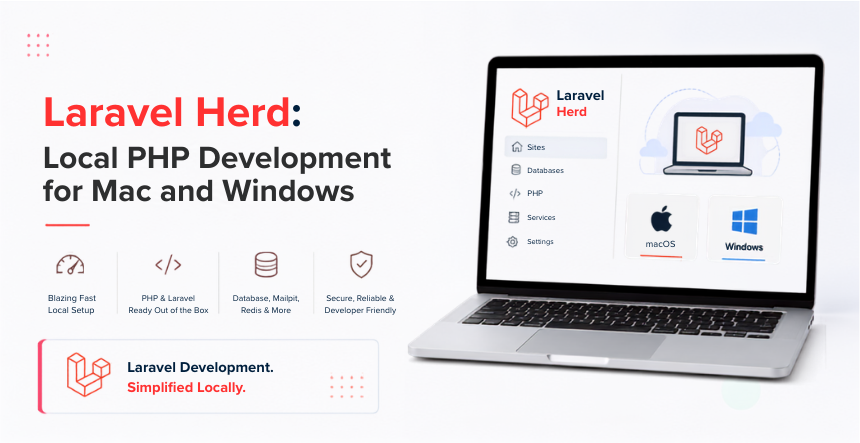
Laravel Herd is a native local development environment for PHP and Laravel. One app installs PHP, Nginx, and DNS routing for your local sites, no Docker, no manual server configuration. It now runs on both macOS and Windows. It supports PHP versions 7.4 through 8.5, and ships Xdebug out of the box, all of which differ from what a lot of older guides still say about it.
A free Basic tier covers the core environment. A Pro tier, $99 a year, adds integrated debugging, mail testing, and service management for tools like MySQL, Redis, and Meilisearch. If you tried Herd early on and moved away from it, or you’ve never used it, here’s where it actually stands today.
What Is Laravel Herd, and What’s Changed?
Herd started as a Mac-only app built on top of Laravel Valet. It meant to strip away the setup friction of local PHP development. That origin story still gets repeated in a lot of coverage. But it undersells where the tool actually is now. Amature, actively maintained environment with monthly updates, a real Pro tier, and native Windows support.
Every new Laravel hire on our team gets Herd as their default local environment now, on whichever OS their laptop runs. That wasn’t true two years ago, when Windows support didn’t exist and we were still pointing half the team toward WSL workarounds just to get a comparable setup.
Herd Now Runs on macOS and Windows
Windows support is the biggest change since Herd launched, and it’s easy to miss if you haven’t checked back recently. Herd for Windows needs Windows 10 or later and installs Composer. The Laravel installer, and Expose alongside PHP and Nginx, the same core bundle as the Mac version. Site management, *.test domain routing, and Node version management all work the same way across both platforms, so a mixed Mac and Windows team can standardize on one tool instead of maintaining two different local setups.
PHP Version Support: 7.4 Through 8.5
Herd currently supports PHP 7.4 through 8.5, with 8.5 available as an alpha build for developers testing ahead of its stable release. You can pin a specific PHP version to each site individually, which matters if you’re maintaining an older client project on 8.1 next to a fresh 8.4 build. Updating every installed PHP version used to mean going through them one at a time. A single command now updates them all.
Xdebug Is Included Now, Not Missing
This is worth stating plainly because it’s a common point of outdated information: Herd ships Xdebug’s PHP extensions out of the box. You still need to manually point your php.ini file at the correct Xdebug binary for your PHP version and architecture and enable it, but the extension itself is already there. Herd Pro goes a step further, detecting breakpoints in your code automatically and enabling Xdebug only when it’s actually needed, so it isn’t running, and slowing things down, the rest of the time.
Herd Basic vs Herd Pro vs Herd Teams
Herd’s free Basic tier covers the core local environment: PHP, Nginx, DNS routing, Composer, the Laravel installer, and Expose for sharing a local site. Pro and Teams add on top of that, and pricing comes straight from Herd’s own site.
Integrated dumps and debugging, mail testing, log viewer, service management (MySQL, Redis, Meilisearch, Reverb), automatic Xdebug detection
Teams
$299/year
10 Pro licenses for macOS and Windows, managed from one license portal
A Pro license can run on two devices, and purchases come with a 14 day money back guarantee if it isn’t the right fit. For a solo developer doing straightforward Laravel work, Basic genuinely covers most of what you need. Pro earns its price once you’re debugging regularly or need MySQL and Redis running locally without standing them up separately.
What’s New in Herd This Year
Herd’s changelog moves fast enough that a post like this goes stale within months if it isn’t checked. A few additions worth knowing about right now: the Laravel Forge integration supports organizations, not just individual accounts, which matters if your team recently moved its servers under a shared Forge org. RustFS was added as a service for S3-compatible local storage, so you can test file uploads against something that behaves like S3 without touching a real bucket. And a growing set of CLI herd commands now covers PHP version management and service control directly from the terminal, for developers who’d rather script their setup than click through a menu bar app.
Why Local Speed Still Matters With AI Coding Agents in the Loop
It’s easy to assume local environment speed matters less now that AI tools write a lot of the code. In practice, it matters more. An AI coding agent working through Claude Code, Cursor, orLaravel Boost and the Laravel AI SDK doesn’t write one change and stop. It runs a loop: write code, execute it through Tinker, check the result, adjust, and run it again, often ten or more times in a single session.
An AI agent iterating through Tinker repeatedly feels the cost of a slow local environment more than a human does, because it isn’t thinking between requests. It’s just waiting. A native environment like Herd, with statically compiled PHP and Nginx binaries instead of a containerized stack, keeps that loop fast enough that an agent session doesn’t spend most of its time waiting on infrastructure instead of writing code.
Migrating From Laravel Valet
Herd is built on top of Valet, so moving over doesn’t mean reconfiguring everything from scratch. The first time you install Herd, it detects an existing Valet setup and offers to migrate your sites, isolated PHP versions, and SSL certificates automatically. If Herd doesn’t end up working for you, quitting it and starting Valet again works without any cleanup, since Herd doesn’t touch your system in ways that need to be undone.
Getting Started
Download Herd from its official site. Drag it into your Applications folder on Mac or run the Windows installer. And follow the setup flow, either starting fresh or importing an existing Valet configuration. If you want a second opinion on your local setup before committing your whole team to one workflow, our list ofLaravel development tools worth using covers where Herd fits. Alongside the rest of a typical Laravel toolchain, and our Laravel performance optimization tips go beyond the local environment into production-level speed.
Yes. Herd has a native Windows version that requires Windows 10 or later and installs the same core bundle as the Mac version: PHP, Nginx, Composer, the Laravel installer, and Expose. Teams no longer need to standardize on macOS just to use Herd.
Do I need Herd Pro?
Not necessarily. The free Basic tier covers PHP, Nginx, DNS routing, Composer, and the Laravel installer, which is enough for a lot of day-to-day Laravel work. Pro, at $99 a year, is worth it once you want integrated debugging, mail testing, or local MySQL and Redis management without setting those up separately.
Does Herd support Xdebug?
Yes. Herd ships Xdebug’s PHP extensions out of the box, though you need to manually point your php.ini file at the correct binary for your PHP version and enable it. Herd Pro can detect breakpoints automatically and enable Xdebug only when needed.
Can I use an older PHP version with Herd?
Herd currently supports PHP 7.4 through 8.5, and you can pin a specific version to each individual site. That means you can run a legacy project on an older PHP version right alongside a current build on a newer one, without any conflict.
Is Herd free?
The Basic tier is free and includes the core local development environment. Pro, at $99 a year, and Teams, at $299 a year for 10 licenses, add debugging tools, service management, and team license administration on top of that.
Do I still need Docker if I use Herd?
Not for most typical Laravel projects. Herd replaces the need for a Docker-based local setup like Laravel Sail for straightforward PHP, Nginx, and MySQL workflows. Docker still makes sense if your project depends on a specific container topology or services beyond what Herd’s native binaries cover.
Hire the right Laravel development company with confidence
Lead of the Custom Development team at KrishaWeb, holds AWS certification and excels as a Team Leader. Renowned for his expertise in Laravel and React development. With expertise in cloud solutions, he leads with innovation and technical excellence.




 KrishaLabs
 KrishaStudio
 KrishaStore