By 2025, generic websites will simply not be enough to stay competitive in an incredibly competitive digital landscape. Custom Webflow Development is in hot demand for businesses that want unique, high-performing web experiences. The real question is not if you will customize your Webflow site, but how you plan to do so in a way that creates maximum conversion potential and separates you from the herd.
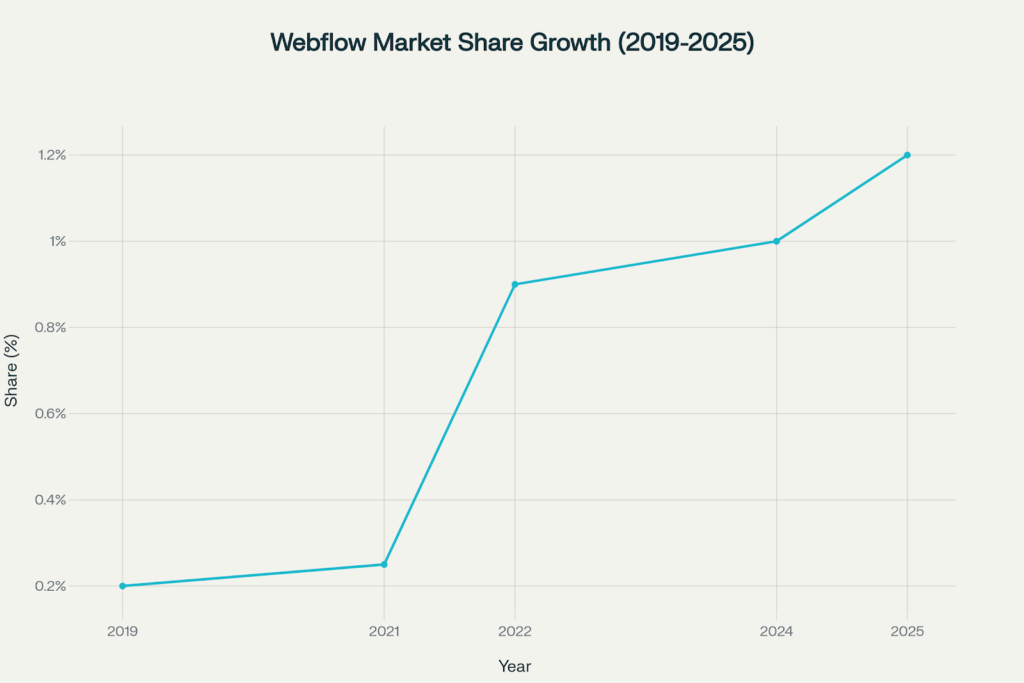
The numbers tell a different story. According to W3Techs, Webflow’s global market share in terms of usage has grown from 0.2% in 2019 to 1.2% in 2025, or a compound annual growth rate of 10%. Use cases and growth are not abundant alone; it’s the activation of businesses’ understanding of the power of custom Webflow development. Organizations such as Upwork, Discord, and Dell have made the switch to a custom Webflow site for a simple reason. Custom Webflow sites convert better, load faster, and provide the flexibility that modern businesses demand.
The Evolution of Webflow: From Template Tool to Custom Development Powerhouse
From its inception as a straightforward visual web design tool, Webflow has experienced a complete evolution. It has progressed from its original premise—creating customizable websites without code—to evolve into what Webflow now characterizes as a complete “Website Experience Platform” (WXP). This shift signals much more significant moves in the business model than just incremental product enhancements. This is a fundamental rethinking of how we build, manage, and optimize websites.
The share of Webflow’s CMS, as a percentage of the overall CMS market share, has continuously increased from only 0.2% in 2019 to over 1.2% in 2025—something to enhance the excitement about the platform adoption and its market acceleration.
Recent acquisitions for the platform summarize the transition. In April 2024, Webflow announced that it acquired Intellimize—an AI-powered personalization platform—and along with that acquisition, the company announced the launch of their own “Webflow Analyze” and “Webflow Optimize”. At this point, it is easy to see that Webflow will move beyond design tools and into what will be referred to as “martech,” reconciling their vision of a design-first platform where marketing teams can work without code dependencies.
AI-Powered Design Revolution
Webflow’s AI Assistant, introduced in 2025, has been transformed into an intelligent, conversational partner across the platform. Whether you’re building new layouts and refactoring sections to conform to your class naming system, customizing styles, updating CMS content, or converting sections into components, the AI Assistant understands the anatomy of your site and knows your styles and CMS particularly well.
This isn’t speculation—real agencies are experiencing remarkable results. As one Webflow specialist shared, “I generated a features section with icons, headings, and descriptions in less than 10 minutes. Typically, this would take over an hour to complete before the AI Assistant, and the features section aligned with the design system perfectly.”
Next-Generation CMS Architecture
Webflow’s next-generation CMS is an entirely new architecture bringing unprecedented flexibility and scale for not only storing data but also managing and designing from dynamic data. This isn’t a minor versioning improvement—this is a rebuild from the ground up, specifically built to handle the intricate data-driven websites modern businesses must have today.
The upgraded CMS platform offers:
Increased enterprise scalability for content management
Increased performance from optimized data delivery
Advanced content type relationships
AI-generated and optimized content
Real-time collaboration capabilities for teams
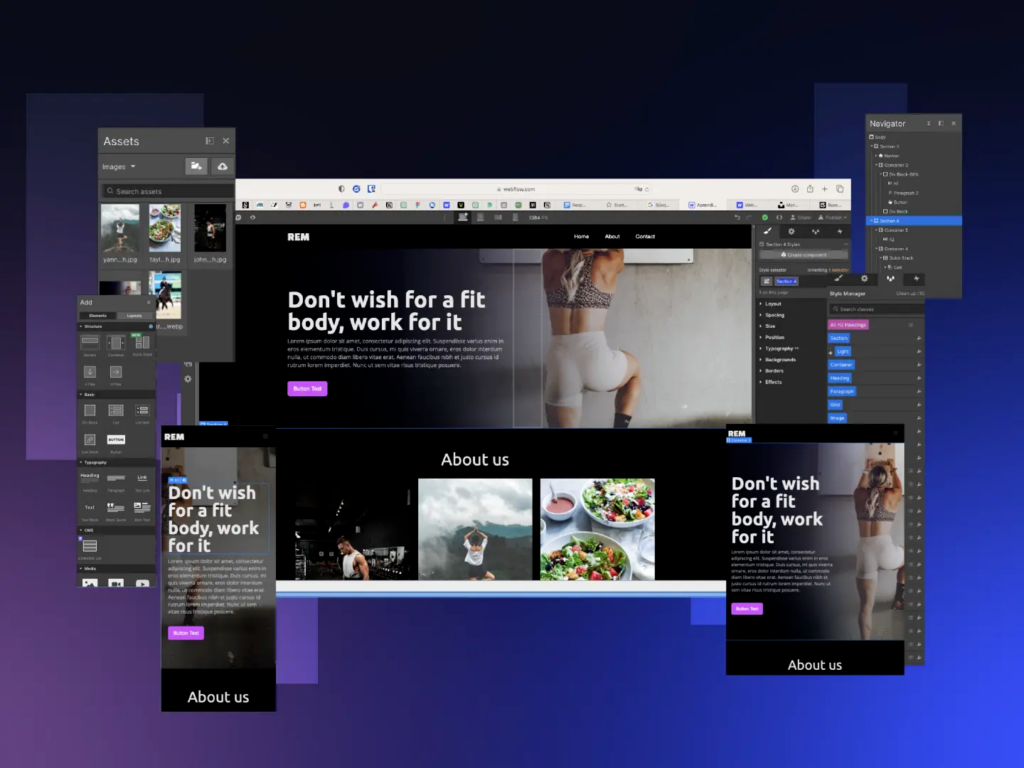
Responsive Webflow design shows how a fitness website performs across desktop, mobile, and tablet layouts to ensure consistent performance.
Performance-First Custom Development Approaches
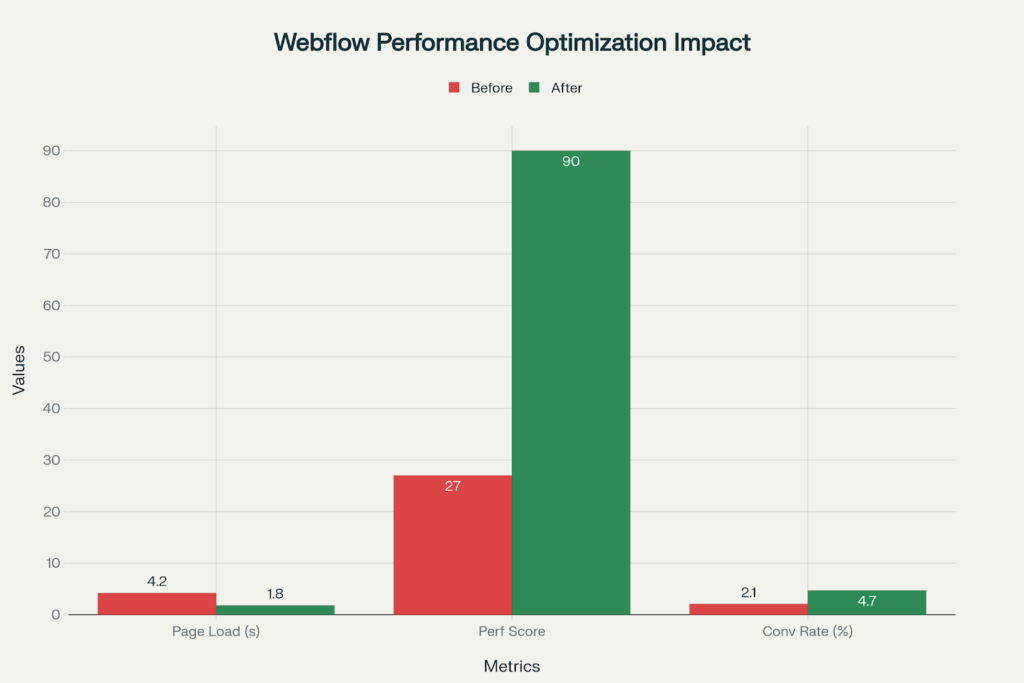
In 2025, performance of websites is not just for user experience-it will become survival. In addition to Google Core Web Vitals being a significant factor in ranking, data consistently shows that custom-optimized Webflow websites perform significantly better.
Performance optimization techniques can improve metrics of Webflow sites and applications effectively, with improved 57% load time and conversion rates improved by more than double.
Advanced Image Optimization Techniques
The base of any optimization of Webflow performance relies on a smart images strategy. All modern Webflow sites would implement some potential advanced strategies discussed below:
WebP Format Usage: Automatic conversion to the WebP format in Webflow can effectively shrink image file sizes by nearly 35% over JPEG formats. This potentially small difference in report card performance across the entire site, and would measure of the performance increase would be a benefit.
Responsive Delivery of Images: Custom uses of the responsive images system in Webflow, which utilize device capabilities and screen density to provide appropriately sized images, avoiding having to grow to the size of the mobile screen.
Optimizing Lazy Loading: While lazy loading was added to Webflow as the default option in 2020, there’s always the opportunity to implement lazy loading yourself to customize the loading triggers and load priority of above-the-fold content so it appears immediately.
Custom Code with Performance Considerations
The most complicated aspect may be making sure that you code your Webflow site customizations while keeping performance in mind.
Asynchronous Script Loading: For custom scripts with no dependencies, you can utilize async (think web analytics), and for script dependencies that need the DOM to be ready, you can use defer. This will keep your page from blocking the browser “rendering” process.
Strategic Placement: Knowing the proper placement of custom code is perhaps the most important piece. As one Webflow expert said, “Scripts that do not depend on content being on the page should use async. Scripts that need the page to be built first should use defer. This is a difference that can change your site’s performance.”
Modular Code Architecture: Advanced implementations will not load all functionality site-wide, but will determine functionality conditionally based on page needs so that only the code necessary is downloaded for the visitor.
The Integration of AI: The Game Changer of 2025
The integration of artificial intelligence into Webflow customizations will present the greatest opportunity for businesses in 2025. Much data has confirmed that AI-generated personalized experiences can engage users up to 12 times more than traditional methods, and we leave it to your imagination for conversion persistence.
Modern-day implementations of Webflow utilize AI to gear sites towards individual users. This goes way beyond geo-targeting to the following:
Behavioral Adaptation: AI evaluates an engagement in real-time to adjust the content, layout, and CTA based on behavior.
Predictive Content Delivery: AI equipped with machine learning algorithms evaluates what content users are most likely to be engaged with, as AI is able to objectively prioritize sections/areas of offers most relevant to users.
Intelligent Forms Optimization: AI-equipped forms will adjust their fields and flow, which are again based on user behavior, drastically reducing form abandonment rates by up to 40%.
Automated Design Optimization
Custom Webflow implementations in 2025 are using AI to constantly optimize layouts:
Layout experimentation: AI systems will automatically experiment with layouts and optimize based on conversion data.
Color Psychology: Machine learning algorithms will evaluate user responses to color and use that knowledge to adjust brand colors for optimal impact.
Typography Optimization: Leveraging artificial intelligence, Webflow evaluates reader metrics, engagement, and colors to provide font style and size recommendations that maximize reader engagement.
Progressive Animation and Interaction Design
Webflow’s animation features have long been lauded, but 2025 ushers in new levels of sophistication that embrace the custom implementations of animation and libraries for interaction design as well.
GSAP Implementation for Professional Animations
In 2024, Webflow acquired GreenSock (makers of GSAP), and the animation capabilities of Webflow are through the roof. Custom implementations will leverage this integration and produce:`
Timeline-based animations: The ability to implement complex animations based on user scroll, making storytelling really come alive.
Performance-optimized motion: Because of hardware-accelerated animations from GSAP, every Webflow user should be able to use animations smoothly without sacrificing frame rates, regardless of device (60 fps standard).
Interactive animation systems: Animations that will react to mouse movement, device orientation, and any user interaction, creating an entirely interactive experience.
Micro-Interactions at Scale
In 2025, the focus on micro-interactions will be less about ornamentation with animations, as we previously did, but more meaningful animations that will influence conversion rates. There are some more complex implementations, such as:
Contextual Feedback: animations that provide real-time feedback to users’ actions that, in turn, decrease or eliminate the perceived loading time for the user and build their user confidence.
Progressive Disclosure: more complex reveal animations that allow the user to rank their user-driven approach through complex screens without overwhelming the user.
State Management: Animations that provide system state changes along with loading animations and user progress through conversion funnels.
Custom CMS Architecture for Scalable Content
With the new generation of a Webflow CMS, the ability to construct a custom architecture at such a scale was impossible in the previous CMS. The implementation approaches support complex relationships of content and functionality dynamically.
Mastery of Multi-reference Fields
Advanced implementations of the CMS will use multi-reference fields to create complex relationships between content:
Dynamic Product Catalog: E-commerce implementations automatically update by managing relationships, recommendations, and displays via inventory.
Content Ecosystem Management: Blog content, case studies, team members, and services connected to an intelligent reference system.
Automated Content Workflows: CMS structures can be set up to automate publishing, going through a formal approval process, and scheduling.
API Integration for Real-Time Data
There is a growing trend of customizing Webflow builds to include external APIs for real-time, dynamic content:
Real-Time Pricing Updates: E-commerce sites that pull real-time pricing from inventory systems
Social Media Updates: Dynamic integrations with social media platforms that automatically update content
Analytics-based Content: CMS builds that use performance data to automatically update the top-performing content.
Mobile-First Responsive Customizing
The latest data continues to find that mobile traffic is over 54% of all web traffic worldwide and should not only be a consideration, but should be the focus of the design. Custom Webflow development to take place in 2025 will have mobile experiences planned from scratch.
Advanced Breakpoint Strategy
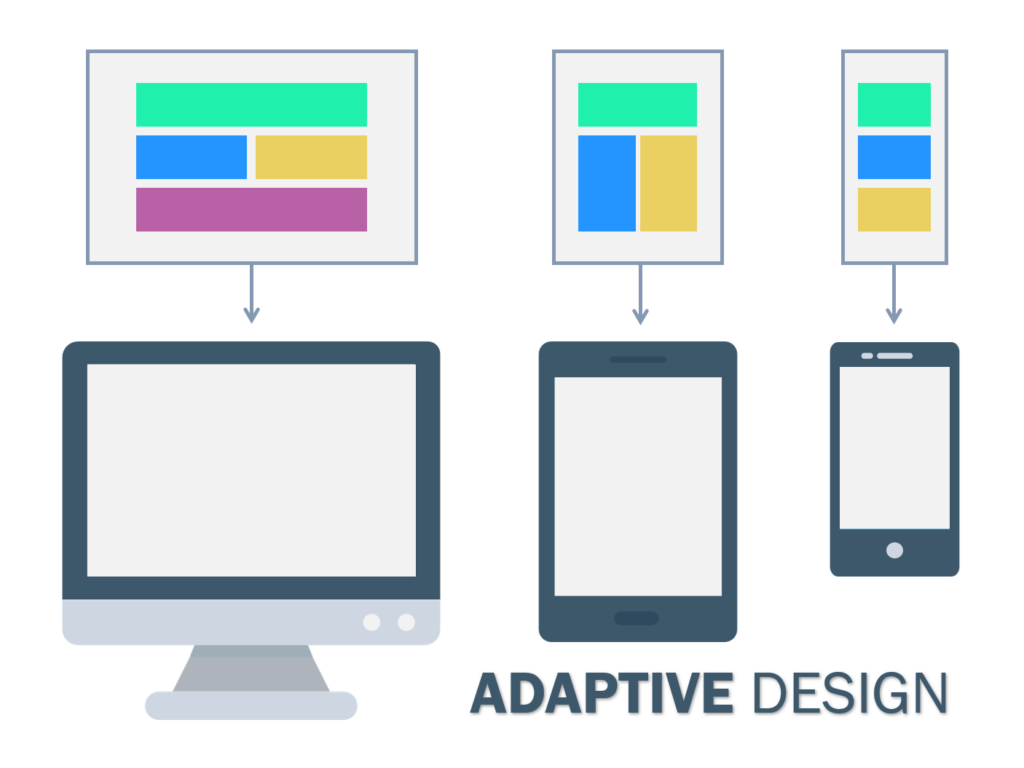
Modern implementations go beyond the default breakpoints within Webflow to create fully adaptive experiences:
Content priority systems: Mobile layouts that swap in different hierarchies based on conversion data and mobile analytics.
Touch-Centric Experiences: Utilize customized touch gestures and touch interactions that are consistent with the mobile device experience.
Progressive Web App Functionality: Include PWA features that include offline abilities, push notifications, and app-like navigation.
Continuity Across Devices
Advanced solutions create a seamless experience across devices:
Continuity of Sessions: Users can start a task on one device and continue it on another without losing their place.
Memory of Layout Adjustments: The system will remember the user’s preferences and apply them on each device.
Optimized for Devices: The content and method of interaction for devices will vary based on the capabilities of each device.
E-Commerce Customization for Greater Conversion Rates
Webflow’s out-of-the-box e-commerce features can provide functionality; however, higher conversion rates can be achieved via custom implementation, which can be 2-3 times greater than standard implementations.
While custom e-commerce implementations often place a heavy emphasis on optimizing checkout flow, optimizing checkout flow is also refined in standard custom implementations:
Smart Form Field: Dynamic forms prolong the item selection but alter based on the payment method selected, as well as the shipping address.
Real-Time Validation: Give users the right feedback in the form fields and be more aware of user error by helping prevent cart abandonment.
Progressive Checkout: Multi-step checkout with visible progress and the ability to save progress.
Dynamic Product Experiences
Custom development in advanced product pages creates a rich shopping experience:
Interactive Product Visualization: 360-degree product and zoom features, as well as Augmented Reality Preview.
Smart Product Recommendations: AI-powered recommendation engines that show products that are likely to be complementary products based on previous purchase history and user browsing behavior.
Social Proof has Integrated Review Features: 3rd party applications that allow users to review and rate products, as well as social ways to let a shopper know what other reviewers have said from their social purchasing decisions.
In 2025, custom Webflow solutions will prioritize technical SEO, initially designed behind the scenes so that your beautiful design doesn’t hinder searchability.
Advanced Schema Markup
You’ll leverage structured data for stronger visibility on search:
Rich Snippet Optimization: Marking up schema properly for articles, products, reviews, and local business information.
Knowledge Graph: Schema markup that helps Google comprehend relationships between entities and the context of your business.
Voice Optimized: Structure data tailored for voice searches as well as “featured snippets” capture.
Core Web Vitals Optimization
Optimizing technical speed and performance will focus on Google’s Core Web Vitals:
Largest Contentful Paint (LCP): Custom optimizations that load above-the-fold content within 2.5 seconds.
First Input Delay (FID): JavaScript optimizations that allow response across dynamic pages.
Cumulative Layout Shift (CLS): Optimizations in layout stability to avoid unexpected jumps.
With growing data privacy laws, custom Webflow implementations will leverage security and compliance from the first design.
GDPR and Privacy Compliance
Modern implementations will include complete privacy management:
Cookie & Privacy Management: Custom cookie consent implementation, up to compliance with GDPR, CCPA, etc..
Data Minimization: Forms and analytics implementation that only collect the data necessary.
User Rights: Actions that allow users the change, access, and remove relevant data, as well.
Advanced Security Protocols
Even though Webflow provides security at the server-side of things, implementations that are specific or customized help improve the security of the client-side security:
Form Security: Supercharged spam security and the ability to validate data beyond the built-in security functionalities that are traditionally available with Webflow.
Content Security Policies: Custom headers and policies that are joined together restrict XSS attacks and unauthorized content being injected.
Enhancement of User Authentication: Implementations that integrate into enterprise-level authentication systems for improved security.
Collaboration and Workflow Improvement for Teams
The collaboration features that allow for collaboration in a real-time environment, a 2025 feature would allow entire teams to be a part of Webflow side by side, collocated and remote.
Custom Workflow implementations will maximize and amplify on top collaboration features for agency & enterprise environments.
Advanced Components Systems
Custom libraries of components allow improved consistency and scalability of design systems:
Design Token support: Custom CSS variables that allow you to keep branding consistent through use in the components and pages you use them.
Component Versioning: systems for tracking component version changes with the ability to rollback if necessary.
Automated Style guides: living style guides that are updated automatically when the components change.
Collaboration towards Client Projects
Clients are considered a part of the workflow in on modern agency work via their custom implementation
Comment-only links: a secure way to share a client’s project with them in a review and feedback way, with no sharing of editing capabilities.
Approval workflow: custom systems that manage approval workflows for clients and requests for revisions.
Brand Consistency Validation: Validate changes made with rules that allow no off-brand changes to be made to components and templates.
Cost-Benefit of Custom Webflow Development
It is essential to grasp the cost implications of custom Webflow development to help with decision-making. The figures show real potential for ROI across various levels of implementation.
Investment Bands and returns
Small Business Implementations ($2,000 – $5,000): The cost to build custom landing pages or implement a basic CMS typically yields 40 – 60% improved conversion rates.
Mid-Market Projects ($5,000-$15,000): Comprehensive custom implementations with advanced animations, CMS architecture, and basic AI have been shown to deliver 100-200% ROI within the first year.
Enterprise Solutions ($15,000-$50,000+): Larger-scale custom implementations with sophisticated architectural integration for advanced integrations, security, and performance optimization can achieve 30-50% operational cost reduction while increasing high conversion rates by 150-300%.
Custom Webflow development is a financial and measurable competitive advantage.
Ideal Time-to-Market: Custom Webflow sites can develop 60-70% faster than traditional development methodologies.
Maintenance Cost: Regular ongoing maintenance with Webflow costs around 40-60% less than custom-coded development.
Scalability: Custom Webflow architectures can handle 10x increases in traffic without changing the infrastructure.
Implementation plan and methods
The custom Webflow development process should be a thought-out process. There are key structural plans and methods inside the implementation process that are proven to be the most effective at low risk and a greater impact.
Phased Implementation Approach
Phase 1: Foundation
Strategic Planning and Competitive Analysis
Systems design, development, and component library prototype
Basic CMS architecture and content strategy
Phase 2: Core Development
Custom layout and responsive development
Animation and interaction development
Systems performance development and testing
Phase 3: Advanced Features
AI systems integration and personalization features
Third-party services integration and headless API connections
Systems security and compliance exactitude
Phase 4: Optimization and Launch
Systems performance testing and optimization
SEO implementation and technical audits
Pre-launch preparation and post-launch monitoring
Quality Assurance Framework
Comprehensive testing is critically important for custom advanced implementations:
Cross-Browser User Experience: Ensure a progressively-enhanced web experience in testing on all major browsers and their versions. Use cross-browser testing tools like testRigor to automate compatibility checks, validate CSS and JavaScript behavior, and detect layout inconsistencies early.
Device Testing: Test on all desktops, tablets, and mobiles with different sizes and resolutions.
Performance Audits: Regular loading tests and core web vitals should always be monitored and audited for performance.
Accessibility Testing: WCAG 2.1 AA should always be checked in audits to ensure experiences are inclusive.
Future-Proofing Your Custom Webflow Investment
As the digital landscape continues to quickly evolve, custom Webflow solutions should be implemented and future-proofed to ensure that they can reflect future changes.
Emerging Technologies
AI Advancements: The capabilities of AI continue to evolve with Webflow’s AI functionality as well, so all custom implementations should strive to leverage these advancements moving forward.
Voice Interface: Although still an emerging technology, voice user interfaces represent the next generation of user interaction on the web.
AR/VR: As augmented and virtual reality become more widely accepted into the mainstream, Webflow implementations should be set up for the seamless delivery of immersive experiences.
Sustainability and Environmental Considerations
Green Web Development: Custom implementations are incorporating environmental impact as a core value through optimized code, effective hosting solutions, and optimized energy consumption.
Performance as Sustainability: Faster efficient websites consume less energy and create an improved user experience.
Long-Term Maintenance: Sustainable development practices that facilitate sustainable ongoing maintenance requiring reduced maintenance and reduced technical debt.
Conclusion
Custom Webflow development in 2025 represents much more than just making something more compelling in appearance—it’s a strategic business decision and an opportunity to create measurable competitive differentiation. The combination of the ability from no-code AI-enabled access personalization, advanced animation, performance, integration, and sophisticated CMS capabilities that the custom development provides organizations will enable organizations to deliver truly distinctive online experiences.
The most successful custom Webflow development incorporates technical excellence and the capacity to think strategically, focusing on not only what’s possible but what drives actual business outcomes. The gap between a custom implementation and a template-based implementation will continue to get wider as Webflow continues to evolve its platform capabilities.
The question is no longer about the decision to invest in custom Webflow development. Now the question is, how fast will you be able to act on these advanced strategies to get ahead of your competitors, who are still using a generic, template-based approach? Major companies like Dell, Upwork, and Discord are leveraging these capabilities right now. Don’t wait. The time to strategize is now.
The year will soon be 2026, and by then, custom Webflow implementations that utilize AI personalization, advanced performance optimization, and advanced content architectures will not be a comparative advantage; they will merely be the expectation. The brands that invest in these capabilities today will set the standards, and other brands will struggle to catch up.
Frequently Asked Questions (FAQs)
What is the predicted ROI timeline for custom Webflow development projects in 2025?
Most businesses can expect to see immediate ROI in 3-6 months, through improvement in conversion rates and reduced maintenance costs. Complete custom implementation projects will usually produce 100-200% ROI in the first twelve months and our enterprise clients have generally been able to achieve 150-300% ROI from improved operational efficiency or experience metrics.
Is custom Webflow development more effective than traditional coding development?
We have found that custom Webflow sites generally have improved performance over traditionally coded development, in terms of loading speed and Core Web Vitals metrics. Webflow development has some performance advantages in its hosting framework, automatic minification and CDN compatibility, which would be investment heavy to achieve with traditional coding.
How does AI integration in Webflow improve conversion rates?
AI integrations for personalized content in all Webflow implementations can lead to 10-12 times user engagement and 40-150% increase in conversion. The integration strategy can make all the difference; a focus that combines behavioral modification, predictive content and intelligent forms are far more effective than simply adding an AI component without an overall social engagement strategy.
Which e-commerce customizations will have the biggest impact on e-commerce success in 2025?
The most impactful e-commerce customizations include advanced checkout optimization (which can reduce cart abandonment rates by up to 35%), dynamic product visualization, AI-driven recommendation engines, and mobile-responsive first design. These customizations are typically 2-3 times more effective in conversion rates than standard Webflow e-commerce functionality.
To what extent are custom Webflow investments future-proofed with the fast evolution of the platform?
Webflow’s intention of backward compatibility and their acquisitions (like Intellimize for AI and GSAP for animations) indicate a high level of future-proofing. Custom implementations that are built on a modular approach and trained on the latest methodologies and technologies will generally adapt quickly to any platform updates. In addition, most of the improvements offered by Webflow (like AI capabilities) will automatically enhance the existing custom functionality.
Nisarg Pandya
Project Manager
Experienced Project Manager and Scrum Master at KrishaWeb, delivers expertise in Scrum methodologies, Laravel, React.js, UX design, and project management, ensuring efficient project delivery and agile implementation.




 KrishaStudio
 KrishaStore