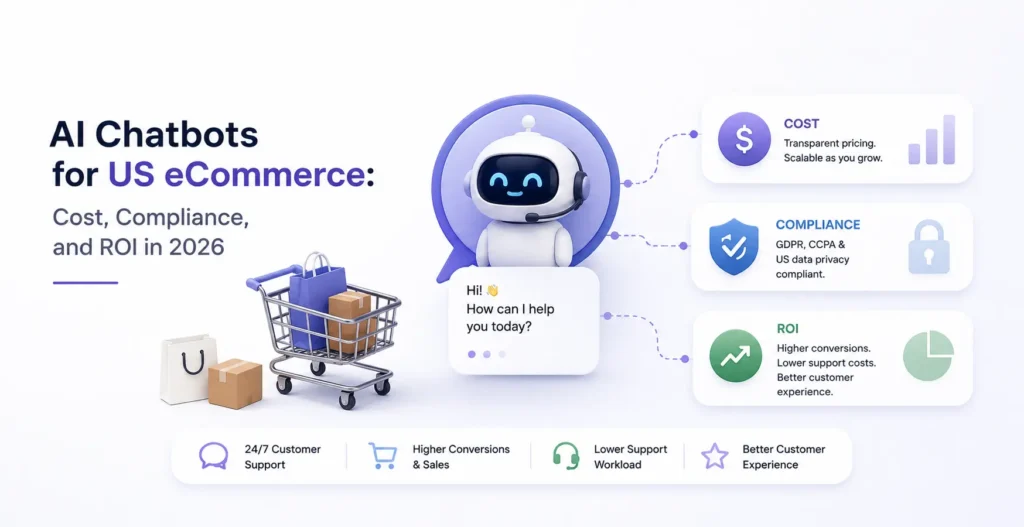
If you run eCommerce operations, an AI chatbot is one of the easiest ways to cut support costs and lift conversion at the same time. It’s also one of the easiest ways to blow your budget on a tool that bills you twice for the same conversation and, if you get the disclosure wrong, to attract the attention of the FTC. This guide covers all three: what it really costs, the ROI you can defend to finance, and the compliance you can’t skip.
Here’s the headline for a margin-conscious operator. A well-run eCommerce chatbot commonly returns several dollars for every dollar spent, deflecting 55% or more of support tickets while lifting conversion. Still, the advertised price is rarely the real price. The gap between the sticker and the invoice is where eCom margins quietly disappear.
So this is written the way you’d actually evaluate it: the true monthly cost (including the hidden fees), the two ways it makes you money, an ROI formula you can take to your CFO, the FTC rules that keep you out of trouble, and how to start: no hype, just the numbers and the rules.
Table Of Contents
Table Of Contents
What does an AI chatbot actually cost?
Chatbot costs split into two very different paths, and the right one depends on your volume and how deeply it integrates with your store.
Buying a SaaS chatbot platform is where most eCom brands start. A basic bot runs a few hundred dollars a month; a mid-level AI chatbot with real store integration runs into the low thousands monthly; enterprise assistants run much higher. Building a custom chatbot runs roughly $3,000 to $10,000 for a simple build, $10,000 to $50,000 for a mid-level build, and $50,000 to $150,000+ for an advanced enterprise system, plus ongoing maintenance of 15 to 25% of the build cost per year.
But the sticker price is a trap, and this is the part that protects your margin. The true monthly cost includes far more than the subscription:
Run that formula across platforms at the same volume, and the real cost can differ two- or threefold even when the advertised prices look nearly identical. Why? Because some platforms charge per resolution (often $1.50 to $2.00 per automated answer), which quietly converts your success into cost; the more the bot works, the bigger the bill. A flat-rate platform doesn’t. The quotable version: a per-resolution chatbot charges you more precisely when it’s doing its job best, so model your real ticket volume before you sign, not after.
Watch two more hidden costs specific to eCommerce. Seasonal spikes: a per-conversation bot’s bill balloons exactly when Black Friday traffic hits, the moment you can least afford a surprise. And setup and content prep: someone has to clean and structure your FAQs, policies, and product data before the bot is accurate; budget for that or expect a bot that gives wrong answers on day one.
The two ways a chatbot makes you money (one is bigger than you think)
Most ROI pitches only count support savings. For eCommerce, that’s the smaller lever. Here are both.
Support cost deflection is the obvious one. The bot resolves routine questions, order status, returns, and sizing so your team doesn’t. A mid-sized eCom brand can automate 55% of tickets, cut response time from hours to seconds, and reduce support costs 25 to 40%. With the average human support interaction costing $5 to $25, that deflection adds up fast.
Conversion lift is the bigger lever and the one operators underweight. A chatbot that answers a product-fit or shipping question in the moment stops a hesitating shopper from bouncing. Industry data shows chatbots lift conversion by around 23% when they guide a purchase decision and cut cart abandonment by answering instantly instead of making the customer wait for an email. For an eCommerce store, the conversion lever often dwarfs the support-savings lever entirely.
Do the quick math on conversion alone. Say 4% of your monthly visitors engage the bot, it lifts conversion by ~1.2 points on those sessions, and your AOV is $80. On 100,000 monthly visitors, that’s roughly $3,840 in extra revenue a month, before counting a cent of support savings. That’s why, for eCom specifically, the revenue side is the headline and the cost savings are the bonus. We break down a real revenue lift in our case study on how we increased net sales 29%.
The ROI formula you can take to finance
Here’s the number your CFO will actually want, stated as a formula you can defend.
ROI (%) = ((annual support savings + annual revenue gains − total annual AI cost) ÷ total annual AI cost) × 100
Three inputs and a conservative way to fill each. Support savings: tickets deflected × your cost per ticket ($5 to $25). Revenue gains: engaged sessions × conversion lift × AOV (use a conservative 1 to 1.2-point lift, not a fantasy number). Total AI cost: your true monthly cost from the formula above, times twelve, including the hidden fees.
One discipline that makes the number credible: for a conservative estimate, count only the support savings and treat revenue gains as upside. Revenue lift is real but harder to attribute cleanly, so a CFO trusts a model that clears the bar on savings alone and treats conversion as the bonus. A chatbot that pays for itself on deflection and then adds conversion revenue on top is an easy yes.
The compliance piece US eCom brands can’t skip: FTC disclosure
This is the section most chatbot articles ignore, and it’s the one that can turn a good ROI into a legal problem. If you sell in the US, your chatbot has rules.
The core principle is simple: don’t deceive the customer about the fact that they’re talking to AI, and don’t let the AI deceive them about your products. In practice, for a US eCommerce brand, that means a few things. Be transparent that customers are interacting with an AI assistant, not a human, especially in the moments that matter to their decision. Never use the bot to fabricate reviews, testimonials, or endorsements; the FTC has been explicit and active about fake AI-generated reviews. Make sure the bot’s claims about products, moments that matter, and pricing are accurate, because your business is liable for what your chatbot tells a customer, the same as if a human employee said it. And handle customer data the bot collects in line with your privacy policy and state privacy laws.
The quotable rule: your chatbot is a member of your staff. In the eyes of a regulator, everything it says is your brand’s. Build disclosure and accuracy in from day one, keep a human escalation path for anything high-stakes, and don’t deploy a bot that can invent answers about price or policy. This is practical guidance, not legal advice, so confirm your specific obligations with counsel, but ignoring the disclosure question is the one shortcut that can cost far more than the chatbot ever saves.
Build vs. buy, and how to start without overspending
For most US eCom brands, the smart path is staged, not a big-bang enterprise build.
Buy a SaaS chatbot when your volume is moderate and your needs are standard; it’s faster and cheaper to start, but model the true monthly cost first and negotiate caps so a traffic spike doesn’t trigger overage fees. Build custom when your volume is high enough that per-resolution fees stop making sense, when you need deep integration with your store and systems, or when you want full control over data and compliance. The break-even is about volume: high-volume stores eventually save by owning the bot; lower-volume stores are usually better renting.
However you start, start narrow. Deploy the bot on your highest-volume, most repetitive questions first (order status, returns, and sizing); prove the deflection and conversion numbers; then expand. A focused first deployment proves ROI fast and funds the next stage. This is the same phased logic we apply across AI projects, covered in ourAI automation cost for mid-sized businesses guide.
The hardest part isn’t deciding whether a chatbot pays off; the math usually says yes. It’s knowing where on your store it will lift conversion most, what it will truly cost at your volume, and how to deploy it compliantly. That’s exactly what we assess.
Get afree AI Website + CRO Audit from KrishaWeb. We’ll review your store, identify where an AI chatbot (and other AI features) would most lift conversion and deflect support, model the realistic cost and ROI at your traffic, and flag the FTC disclosure and compliance steps to get right from the start. No pitch, just a clear read on what’s possible and what it’s worth.
Disclaimer: This article is practical guidance, not legal advice. Confirm your specific FTC and state privacy obligations with a qualified professional.
Frequently Asked Questions
How much does an AI chatbot cost for a US eCommerce store in 2026?
It depends on whether you buy or build. SaaS chatbot platforms range from a few hundred dollars a month for a basic bot to low thousands for a mid-level AI bot with store integration and higher for enterprise. Custom builds run about $3,000 to $10,000 (simple), $10,000 to $50,000 (mid-level), and $50,000 to $150,000+ (enterprise), plus 15 to 25% of the build cost annually for maintenance. Critically, the sticker price isn’t the real cost: add setup, integration, per-resolution fees (often $1.50 to $2.00 each), overage charges, and compliance. The true monthly cost can be two to three times the advertised price, so model your real ticket volume before signing.
What is the ROI of an AI chatbot for eCommerce?
Strong when done right, often several dollars returned per dollar spent, from two levers. Support deflection: automating 55%+ of tickets cuts support costs 25 to 40%, valuable given human interactions cost $5 to $25 each. Conversion lift: chatbots raise conversion by around 23% when guiding a purchase and reduce cart abandonment, which for eCommerce often dwarfs the support savings. Use ROI = ((support savings + revenue gains − total AI cost) ÷ total AI cost) × 100, with conservative inputs. A credible model clears the bar on deflection savings alone and treats conversion revenue as upside.
Do I have to disclose that my eCommerce chatbot is AI?
In the US, transparency is the safe and expected standard. You should make clear that customers are interacting with an AI assistant rather than a human, particularly when it affects their decision, and you must never use the bot to generate fake reviews or endorsements, which the FTC actively enforces against. Your business is liable for what your chatbot tells customers about products, pricing, shipping, and returns, just as if an employee said it. Build disclosure and accuracy in from the start, keep a human escalation path, and confirm your specific obligations with legal counsel, since this is practical guidance rather than legal advice.
Should I build a custom chatbot or use a SaaS platform?
It depends mainly on volume. Buy a SaaS platform when your ticket volume is moderate and your needs are standard; it’s faster and cheaper to start, but model the true monthly cost and negotiate caps so seasonal traffic spikes don’t trigger overage fees. Build custom when volume is high enough that per-resolution fees stop making sense, when you need deep store integration, or when you want full data and compliance control. High-volume stores eventually save by owning the bot; lower-volume stores usually do better renting. Either way, start narrow on your highest-volume questions and expand once ROI is proven.
What are the hidden costs of an eCommerce chatbot?
The ones that inflate the invoice beyond the sticker: setup and content prep (cleaning and structuring your FAQs, policies, and product data), integration with your store and systems, per-resolution charges that scale with usage (often $1.50 to $2.00 each), overage fees when you exceed plan limits, seasonal spikes that balloon per-conversation bills during peak sales, ongoing tuning as your catalog changes, and compliance costs. Together these can make the true monthly cost two to three times the advertised price, which is why you should calculate true monthly cost = (subscription + setup + integration + AI fees + overages + compliance) ÷ 12 before choosing.
How do I make sure my chatbot actually increases sales, not just deflects tickets?
Deploy it where it influences buying decisions, not only where it answers support questions. Put it on product pages to answer fit, sizing, shipping, and returns questions in the moment, and trigger it during cart abandonment or hesitation, since guiding a purchase decision is where the ~23% conversion lift comes from. Make sure it’s connected to real product and inventory data so its answers are accurate, and keep a human handoff for complex cases. For eCommerce, the conversion lever usually outweighs support savings, so measure engaged-session conversion lift, not just tickets deflected, to capture the full ROI.
Parth Pandya
Founder & CEO
Founder & CEO of KrishaWeb, leads an Enterprise Web Agency. With contributions to WordPress and organization of WordCamps, he pioneers innovation and community engagement in the digital realm.




 KrishaStudio
  KrishaStore