How to connect your website to CRM, AI services, and business tools via API with implementation patterns that keep your site fast and your data secure.
API integration for business websites means connecting your website to external systems through standardized interfaces that exchange data in real time. Those external systems include your CRM, ERP, payment processors, AI services, and any third-party tool your business depends on. In 2026, the most strategically important category of these integrations is AI: LLM endpoints that add intelligence to your site, recommendation engines that personalize the experience, and chatbot APIs that handle customer conversations at scale. According to IBM research, enterprises use an average of 900 or more applications, but only 29% of them are integrated. The businesses closing that gap are pulling ahead.
CTOs and engineering leads searching for API integration guidance in 2026 are dealing with a problem that is genuinely more complex than it was three years ago. The CRM and ERP integration patterns have matured. But the AI API layer connecting websites to LLM providers, vector databases, and recommendation engines is new territory for most development teams. Most guides cover one or the other. This one covers both, with the security and performance considerations that make the difference between an integration that works in production and one that works in a demo.
Table Of Contents
Table Of Contents
What API Integration for Business Websites Actually Means
An API, or Application Programming Interface, is a defined contract between two software systems. Your website makes a call. The external system responds. Data moves between them in a structured, predictable format. REST is the standard for most web integrations in 2026. GraphQL works well where you need flexible, client-driven data queries rather than fixed endpoints. WebSocket connections are the right choice for real-time data like live chat or live inventory updates. gRPC fits high-performance microservice architectures where every millisecond of latency is measured and managed.
The four integration types your website likely needs
Integration Type
What It Does
Common Tools
Primary Use Case
CRM Integration
Syncs contact, lead, and customer data between website forms and your CRM
Salesforce, HubSpot, Pipedrive, Zoho
Lead capture, pipeline automation, customer history in support chat
ERP Integration
Connects website to inventory, order management, finance, and supply chain data
NetSuite, SAP, Microsoft Dynamics, Odoo
Live product availability, order tracking, pricing from ERP
AI Service Integration
Connects website to LLM endpoints, recommendation engines, and AI models
Connecting Your Website to a CRM: Patterns That Work
CRM integration is the most common API integration request KrishaWeb handles. The implementation pattern depends on what you need the data to do after it arrives.
The three CRM integration patterns
Pattern 1: Direct webhook integration
Your form submission fires a webhook call directly to the CRM API. HubSpot, Salesforce, and Pipedrive all support this. It is the fastest pattern to get running and the right choice for straightforward lead capture. The trade-off is that there is no transformation layer between your form and your CRM. Whatever your form sends is what arrives in the CRM. If your field names do not match your CRM fields exactly, the data quality problems start immediately and compound over time.
Pattern 2: Middleware layer (iPaaS)
A platform like Zapier, Make, n8n, or Workato sits between your website and your CRM. Your website sends data to the middleware. The middleware applies transformation rules and routing logic before forwarding it. This handles field mapping, conditional workflows, and multi-system routing without writing custom code. It works well for teams without dedicated engineering resources and for integrations that need frequent changes without a development cycle. The trade-off is an ongoing subscription cost and a dependency on a third-party platform sitting in the middle of your data flow.
Pattern 3: Custom API layer
Your website sends data to your own backend API. Your backend validates it, transforms it, and routes it to the CRM. This is the right architecture when you need custom business logic applied before data reaches the CRM, when you are sending the same data to multiple systems at once, or when the data is sensitive enough that routing it through a third-party middleware platform creates unacceptable risk. It takes longer to build and requires ongoing maintenance. In return, you own the entire data pipeline.
The pattern we see most often misapplied: direct webhook integration used in situations that need a custom API layer because the team wants to move fast. Three months later, the CRM contains inconsistent data, duplicate records, and field-mapping errors that require a rebuild. Choose the pattern for your scale and complexity, not for your deadline.
Connecting Your Website to an ERP: What Changes and What Does Not
ERP integration is a different category of complexity from CRM integration. CRMs are designed for web integration. ERPs are designed for internal business operations, and many were built before REST APIs were the standard. The integration layer between your website and an ERP is almost always more work than the CRM equivalent.
What website-to-ERP integration actually needs to cover
Product catalog sync: live pricing, availability, and product data from ERP to website product pages
Order creation: website orders written to the ERP for fulfilment processing
Order status: ERP order status updates surfaced on the customer-facing website (shipping, dispatch, delivered)
Customer account data: B2B pricing tiers, credit terms, and account history from ERP displayed in customer portal
Invoice and payment: website-generated invoices reconciled with ERP finance module
The synchronisation frequency decision
Real-time versus batch synchronization is the most common architectural decision in ERP integration and the one with the most significant performance implications for your website.
Data Type
Recommended Sync Frequency
Why
Implementation
Product pricing
Real-time or near-real-time (under 5 min)
Pricing errors on public pages are business-critical.
Webhook from ERP on price change, or short-poll interval
Product availability
Real-time for B2B, every 15 min for B2C
B2B orders on out-of-stock items are high-cost errors
Webhook from ERP on inventory event
Order status
Real-time
Customer expectation for order tracking is immediate
Webhook from ERP on status change
Product catalog content
Daily or on-change
Product descriptions change infrequently
Batch sync overnight or webhook on product update
Customer account data
On login, with cache
Balance and pricing tier do not change during a session
Fetch on authentication, cache in session
AI API Integration: The New Category That Changes What Websites Can Do
This is the section most API integration guides published before 2025 are missing. AI API integration connecting your website to LLM endpoints, recommendation engines, vector databases, and AI model providers is the fastest-growing category of website integration in 2026. API-driven retailers see 34% higher conversion rates through personalized product recommendations (McKinsey, 2026). The technology driving those recommendations is now accessible to mid-market businesses through API calls.
The four AI API use cases worth integrating into your website now
1. LLM Endpoints for Intelligent Features
Connecting your website to OpenAI, Anthropic, Google Vertex AI, or AWS Bedrock gives you access to large language model capabilities through a standard API call. The practical website use cases: intelligent site search that understands intent rather than matching keywords, content generation for dynamic product descriptions or personalized email previews, document summarization for knowledge bases, and conversational interfaces that understand context across multiple turns.
The implementation consideration that most guides omit: LLM API calls are expensive compared to traditional API calls and variable in latency. A ChatGPT API call for a complex query can take 3 to 8 seconds. That is unacceptable in a search interface where users expect sub-second responses. Solutions: streaming responses (displaying results character by character as they arrive rather than waiting for the full response), response caching for common queries, and model selection (a smaller, faster model for latency-sensitive features and a larger model for quality-sensitive features).
2. RAG (Retrieval-Augmented Generation) for Knowledge Bases
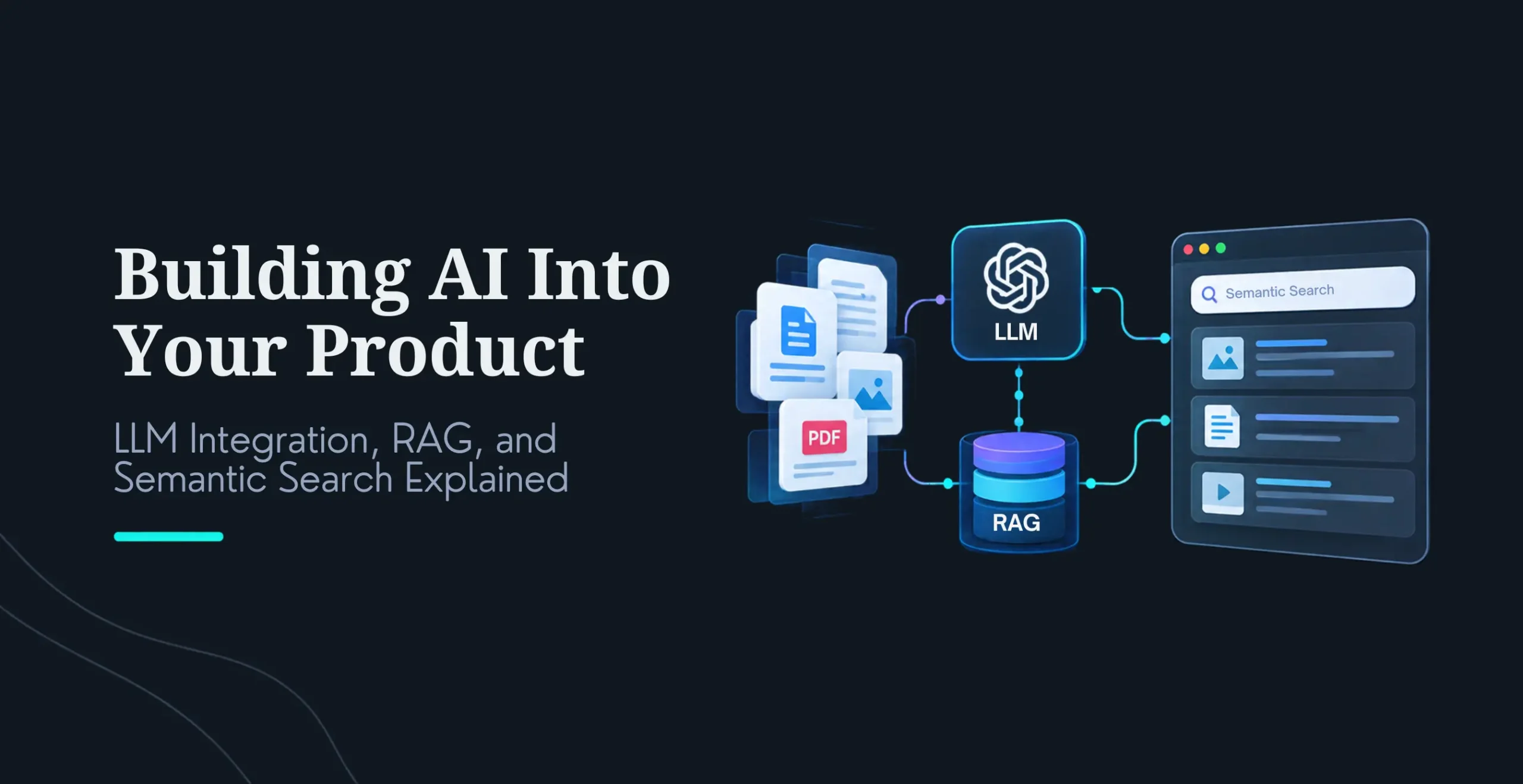
RAG connects an LLM to your own data. Instead of the LLM answering from its training data, it retrieves relevant documents from your knowledge base and generates a response grounded in those documents. For SaaS businesses with product documentation, professional services firms with case study libraries, and any business with large internal knowledge repositories, RAG turns a static knowledge base into an intelligent assistant.
The architecture: Your documents are chunked, embedded as vectors, and stored in a vector database (Pinecone, Weaviate, or pgvector in PostgreSQL). A user query is embedded and compared against stored document vectors. The most relevant document chunks are retrieved and sent to the LLM as context. The LLM generates a response grounded in your actual documentation.
3. Recommendation Engine APIs
Product and content recommendation APIs connect your website to a model trained on user behavior, product attributes, and purchase history to surface relevant items for each visitor. The implementation options range from cloud-managed services (AWS Personalize, Google Recommendations AI) that handle model training and serving to custom models built on your own transaction data for businesses with sufficient data volume.
The trigger for custom recommendation implementation: when a cloud-managed service returns generic recommendations because your product catalog has unusual attributes or your purchase patterns are domain-specific. A law firm knowledge base, a specialist components distributor, or a B2B SaaS with complex feature-usage patterns will outperform a generic recommendation model with a custom-trained one.
4. Chatbot and Conversational AI APIs
The gap between a basic chatbot (rule-based, scripted responses) and a conversational AI (LLM-powered, contextually aware) is the difference between a tool that deflects simple FAQs and a tool that handles complex, multi-turn customer conversations. The LLM-based conversational AI can hold context across a conversation, reference customer account data from your CRM, escalate to a human agent with full context, and handle queries it has never been explicitly trained on.
The integration pattern: your chatbot interface sends conversation history and the current message to an LLM API, along with relevant customer data retrieved from your CRM. The LLM generates a response grounded in that specific customer’s context rather than a generic answer. The response streams back to the interface as it generates. When the conversation hits a defined escalation trigger, the handoff to a human agent happens with the full conversation history intact.
KrishaWeb’s AI consulting practice helps businesses evaluate which AI API integration creates the most measurable impact for their specific website and customer workflow. For most mid-market SaaS and professional services businesses, intelligent search or conversational AI delivers the fastest ROI. See krishaweb.com/ai-strategy-consulting/
API Security: What Goes Wrong and How to Prevent It
API security is the section most integration guides treat as a footnote. It is not. Every API integration introduces a data pathway that, if misconfigured, exposes your customer data, your internal systems, or your API credentials to external access. Here are the patterns that create the most common vulnerabilities and how to address each.
Authentication and authorisation
Use OAuth 2.0 or scoped API keys. Never use master credentials for a website integration. Create a dedicated API user with only the permissions that specific integration needs and nothing more.
Rotate API keys on a defined schedule. Ninety days is the maximum for production integrations. Rotate immediately on any suspected exposure, not at the next scheduled rotation.
Keep API keys out of client-side JavaScript entirely. Any API call that uses sensitive credentials must go through your backend. Requests direct from the browser are readable by anyone who opens developer tools.
Rate limiting and abuse prevention
Every API endpoint your website exposes needs rate limiting. Without it, a single bad actor can exhaust your API quota fast, which creates costs, service interruption, or both.
For AI API endpoints specifically, rate limiting is critical. LLM API calls are priced per token. A form field that sends user input directly to an LLM without rate limiting and input validation is a cost exposure and a prompt injection risk.
Prompt injection for AI API integrations
Prompt injection is the AI-specific security risk that has no equivalent in traditional API integration. If your website sends user input directly to an LLM without sanitization, a user can craft input that overrides your system prompt, extracts confidential data from the context, or causes the model to generate harmful output. Every AI API integration that processes user input must sanitize that input before it reaches the LLM, validate that the model response meets expected format and content constraints, and log all inputs and outputs for audit purposes.
Data minimisation in API payloads
Only send the data the API actually needs. A CRM lead capture integration does not need to send IP address, browser fingerprint, or session data unless those fields map to a CRM field with a defined business purpose.
For integrations with AI APIs, do not include personally identifiable information in prompts unless the use case requires it and you have explicit consent. Most LLM use cases can be served with anonymized or pseudonymized data.
KrishaWeb’s web design and development services include API security review as part of every integration engagement. If your team has built integrations that have not been reviewed for the patterns above, a security audit is worth doing before the next incident makes it urgent.
API Performance: Keeping Your Website Fast When External Services Are Slow
The most common performance problem in website API integration is synchronous external calls blocking page rendering. Your website makes an API call, waits for the response, and only then renders the page. If the external service takes 400ms to respond, which is normal for a CRM API under load, that 400ms adds directly to your page load time. Multiply by three or four API calls per page load, and you have a performance problem.
The four performance patterns every integration architecture needs
1. Caching
Cache API responses that do not change frequently. Product pricing from your ERP does not need to be fetched on every page view. Cache it for five minutes. User-specific data (account balance, recent orders) can be cached for the duration of a session. Cache at the server level (Redis, Memcached), not the browser level, for sensitive data. Define cache invalidation strategies for data that changes on specific events (price change, order status update) rather than on a time interval.
2. Asynchronous loading
Non-critical data loads after the page renders. Product reviews, recommendation widgets, and personalization layers have no business blocking your above-the-fold content. Get the core structure on screen first. Everything else fills in as it arrives. The user sees a fast page. The extras populate in place.
3. Background sync
Not all data needs to be pulled in real time. For product information that updates regularly but not constantly, run a background job every few minutes to pull from the ERP and store it locally. The website serves from local data at sub-millisecond response time. The integration latency moves out of the user experience entirely and into the background job where it belongs.
4. Circuit breakers for resilience
An external API going down should not take your website down with it. A circuit breaker detects repeated failures on an API call, stops making calls to that service for a set period, and serves a fallback instead. On a product page that fetches pricing from your ERP: if the ERP is unavailable, show the last cached price with a note that prices may vary. The page loads. The customer can still complete a purchase. Your website availability stays independent of your ERP availability.
How to Plan a Website API Integration: The Eight Steps
Implement HowTo schema on these steps.
Define the data flows required: what data moves between which systems, in which direction, at what frequency, and triggered by what event. Write this before touching any code.
Before writing any code, read the full API documentation for each system. Check the authentication method, rate limits, available endpoints, and response formats. Older CRM and ERP APIs regularly have limitations that are not in the docs but show up mid-build. Time spent here saves days of rework later.
Pick your integration pattern based on what the integration actually needs, not how fast you want to ship it. Direct webhook, middleware layer, or custom API layer. Get the wrong one, and you are rebuilding in six months. The question to answer first: how complex is the data model, and how sensitive is the data?
Design the transformation layer on paper before you build it. Every field mapped from source to destination. Every validation rule defined. Every error case handled. Teams that design this as they build tend to discover the gaps when a record fails in production rather than in a test environment.
Build against a staging environment that mirrors production. Never test integrations directly on production CRM or ERP systems. Test events in production create real records with real downstream consequences.
Get authentication right from the beginning. Dedicated API users, minimal permissions, credentials in environment variables. Retrofitting security is harder than building it in from the start.
Rate limiting, input validation, and circuit breakers go in before launch. Not after. Treating these as improvements you will add later means launching with known vulnerabilities and fragile failure modes.
Test failure states as thoroughly as success states. What happens when the CRM API returns a 429 rate limit error? What happens when the ERP is unavailable for 20 minutes? Every failure mode should have a defined behavior.
How KrishaWeb Handles API Integration for Client Websites
KrishaWeb has built API integrations for websites across Salesforce, HubSpot, Pipedrive, NetSuite, SAP, Microsoft Dynamics, Shopify, Stripe, OpenAI, Anthropic, and custom internal systems. Our web development services cover the full integration stack: architecture design, implementation, security review, and performance optimization.
Integration Type
KrishaWeb Capability
Typical Project Scope
CRM (Salesforce, HubSpot, Pipedrive)
Direct webhook, middleware setup, custom API layer with transformation logic
1 to 4 weeks depending on data model complexity
ERP (NetSuite, SAP, Dynamics)
Custom middleware layer, real-time and batch sync, data transformation
AWS Personalize, Google Recommendations AI, custom model integration
4 to 8 weeks including data pipeline setup
Multi-system integration
Custom integration hub connecting website to CRM + ERP + AI simultaneously
8 to 16 weeks for full architecture build
Frequently Asked Questions
What is API integration for a business website?
API integration for a business website means connecting the website to external systems CRM, ERP, payment processors, AI services through standardised interfaces that exchange data. The website makes an API call, the external system responds, and the data flows between them without manual export or import. In 2026, the highest-value API integrations are AI connections. LLM endpoints that understand user intent, recommendation engines that personalize the experience, and conversational AI that handles real customer interactions. These are what separate a website that informs from one that actively works for the business.
What is the best way to connect a website to a CRM?
Start with your actual requirements, not the fastest option. For straightforward lead capture going into HubSpot, Salesforce, or Pipedrive, a direct webhook is the right call. For teams without engineering resources who need field mapping and conditional logic, a middleware layer like Zapier or Make is practical and maintainable. When your data model is complex, when sensitive data is involved, or when you are routing to multiple systems simultaneously, build a custom API layer. Most growing businesses find themselves rebuilding their CRM integration within 18 months because they chose the quick pattern for a problem that needed the proper one.
How do I integrate an AI chatbot or LLM API into my website?
Your website backend connects to the LLM provider through their REST API. OpenAI, Anthropic, and Google Vertex all follow the same basic pattern. The backend receives the user message, appends it to the conversation history and system prompt, calls the API, and streams the response back to the front end. For customer-specific conversations, pull relevant account data from your CRM and include it in the context before sending to the model. Three implementation requirements that cannot be skipped: rate limiting on the endpoint to prevent cost abuse, input sanitization to prevent prompt injection attacks, and streaming responses to avoid the 3 to 8 second freeze that an asynchronous LLM call creates in the browser.
What is RAG, and when do I need it?
RAG stands for Retrieval-Augmented Generation. It connects an LLM to your own data so the model answers questions grounded in your actual documents, knowledge base, or product catalog rather than its general training data. You need RAG when your website needs to answer questions about proprietary information, your specific products, your documentation, or your case studies that the LLM was not trained on. The architecture: your documents are chunked, embedded as vectors, and stored in a vector database. A user query is matched against stored vectors. The most relevant chunks are sent to the LLM as context for generating the response.
How do I keep API integrations from slowing down my website?
Four patterns address the core problem. Cache API responses for data that changes infrequently. Short windows for pricing, longer windows for catalog content. Load non-critical data asynchronously so it does not block the initial render. Pull data on a schedule through background sync rather than fetching it fresh on every request. Add circuit breakers so a struggling external API does not drag your page load down with it. For AI integrations, streaming is not optional. Display the response as it generates. Users tolerate watching text appear far better than staring at a loading state for the same amount of time. The generation time is identical. The experience is completely different.
What are the security risks of API integration, and how are they prevented?
The primary risks: exposed API credentials in client-side code (prevent by routing all sensitive API calls through your backend), insufficient authentication (prevent by using dedicated API users with minimal permissions, never master credentials), rate limit exposure (prevent by implementing rate limiting on every endpoint your website exposes), and prompt injection for AI integrations (prevent by sanitizing user input before it reaches the LLM and validating model output before displaying it). API security is not a post-launch task. It is a pre-launch requirement for every integration.
Free AI Website and CRO Audit
If your website has API integrations that have not been reviewed for security, performance, and architecture quality, or if you are planning new CRM, ERP, or AI integrations and want a second opinion on the right approach before building, the KrishaWeb audit covers both.
The audit reviews your current integration architecture, identifies security gaps and performance bottlenecks, and provides a prioritized recommendation list. If you are evaluating AI API integrations, specifically LLM endpoints, RAG, or recommendation engines, our AI consulting team assesses which use case creates the most measurable impact for your specific website and business model.
Schedule a call for an AI website and CRO audit: Tell us which systems your website connects to today, what you are planning to integrate next, and what is currently not working the way you need it to.
Nirav Panchal
Lead – Custom Development
Lead of the Custom Development team at KrishaWeb, holds AWS certification and excels as a Team Leader. Renowned for his expertise in Laravel and React development. With expertise in cloud solutions, he leads with innovation and technical excellence.




 KrishaLabs
 KrishaStudio
 KrishaStore