Almost every new SaaS project now prompts us to discuss headless CMS architecture, and the question has evolved. 2 years ago, it was about performance and multi-channel delivery. Those arguments still hold. In 2026, the reason clients are making the switch is AI. Not because headless CMS vendors have bolted on AI tools, but because the architecture itself is what makes AI features work properly at scale.
The core concept is simple: separate where your content lives from where it gets displayed. A headless CMS handles the first half, an API delivers the content, and whatever technology you choose handles the second half. That separation is what changes the AI equation entirely.
If you are a CTO or tech lead weighing whether to build headless from the start or migrate an existing platform, this is the article for you. We cover the architecture, the performance benchmarks, the honest trade-offs, and specifically why headless CMS is now the right foundation for any product roadmap that includes AI.
One sentence: A headless CMS makes it easier and cheaper to add AI features like personalization, chatbots, and dynamic content because your content is already structured as data that an AI can read, process, and act on.
What is Headless CMS?
Strip away the jargon, and a headless CMS does one thing: it stores your content and makes it available through an API. That is it. How the content gets displayed, on what device, and in what design, is somebody else’s problem entirely.
In a traditional CMS like WordPress or Drupal, the backend and frontend are tightly bound. The CMS stores your content, renders it into web pages through its own template engine, and controls how everything looks. That tight coupling is fine until it is not: until you need a mobile app, a second language site, a partner portal, or an AI service that needs to read your content without parsing HTML.
A headless CMS cuts that coupling. Content creation, storage, structure, and permissions live in the CMS backend. Everything else is up to the team building the frontend. That frontend can be Next.js, React, Vue, SvelteKit, or Astro. It can be a mobile app or a voice assistant. The CMS does not know and does not care. It just answers API requests.
The kitchen analogy
A traditional CMS is like a restaurant where the kitchen and the dining room are connected. The chef decides how food is prepared and how it arrives at the table. You either eat at that restaurant or not at all.
A headless CMS is like a central kitchen that supplies multiple restaurants, food trucks, and delivery services through a single hub. The kitchen does one thing: prepare the food. Each outlet decides how to serve it. Adding a new outlet does not change anything in the kitchen.
How Headless CMS Architecture Works
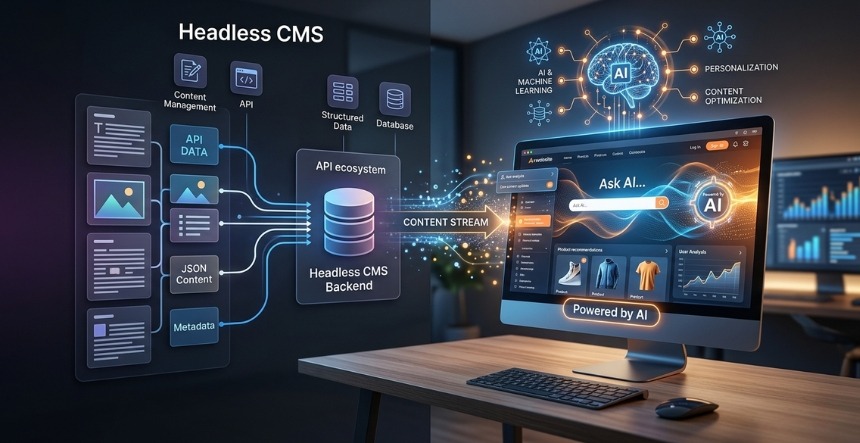
Architecture overview: Content lives in a structured backend database. Editorial teams create and manage content through the CMS interface. A REST or GraphQL API exposes that content. The frontend application (web, mobile, kiosk, voice) fetches content from the API and renders it independently. AI services connect to the API layer to read, process, personalize, or generate content without touching the CMS or the frontend directly.
3 layers matter in a headless architecture:
Content layer
Editorial teams live here. Content is stored as typed, structured data: articles have a title field, a body field, an author reference, and a published date. Products have a name, a description, a price, and a category. That structure is defined by a content model that the development team builds once and version controls. Platforms like Sanity let you write the schema in TypeScript. Contentful has a visual interface. Either way, the content has shape, not just text in a box.
API layer
GraphQL is where this architecture gets efficient. A blog listing page asks for title, slug, and thumbnail. It does not ask for the full body, the author bio, the related tags, or anything else that it is not going to render. That selective fetching cuts payload sizes significantly compared to REST endpoints that return whole objects. The API layer also handles authentication and rate limiting and acts as the CDN integration point for cached static delivery.
Presentation layer
The frontend is built by the development team using whatever framework suits the project. Pages that are mostly static get pre-rendered at build time into flat HTML files served from a CDN. Pages that need dynamic data use server-side rendering on demand. Both are dramatically faster than what a traditional CMS does: spin up a PHP process, query a database, run the template engine, send the response, repeat for every visitor.
Headless CMS vs Traditional CMS: The Comparison That Matters
The architectural difference shows up in five areas that matter for a product decision: raw performance, AI integration complexity, how fast your team can ship features, total cost over time, and what kind of developers you need on the team. The table below honestly covers all five.
Factor
Traditional CMS (e.g., WordPress)
Headless CMS
Page performance
Server renders on every request. Plugin overhead. Median WordPress desktop page is 2.9 MB.
Pre-rendered static pages from CDN. 40-60% faster load times.
Core Web Vitals
63% of pages in the 2-3 MB range fail Core Web Vitals. Plugin JS bundles hurt INP scores.
Headless CMS Performance: What the Numbers Actually Show
A one-second delay in page load time costs e-commerce sites up to 7% in conversions, and Google’s Core Web Vitals directly affect search rankings. Those two facts alone make performance a commercial question, not just a technical one. Headless architecture changes what is structurally possible in performance.
Load time
Static site generation on a CDN cuts latency by 40 to 60% compared to a traditional monolithic CMS. The reason is structural. A pre-rendered page is a flat HTML file sitting on an edge node three milliseconds from the user. A WordPress page is a PHP process querying a database, running the template engine, and executing whatever plugins are in the stack on every request. Enterprises moving from monolithic CMS to headless consistently report load times twice as fast.
Core Web Vitals impact
The 2025 HTTP Archive Web Almanac shows that around 60% of WordPress sites use a page builder, driving heavier DOM structures and larger JavaScript bundles. The median desktop homepage weighs 2.9 MB. Only 63% of pages in that range pass Core Web Vitals.
The improvement hits all three Core Web Vitals. LCP drops because the page is already rendered and sitting on a CDN edge node. INP improves because developers control exactly what JavaScript ships, and plugin overhead is zero. CLS improves because the HTML is written by developers, not generated by a page builder that stacks anonymous divs and conflicting stylesheets.
Scalability under load
When traffic spikes on a traditional CMS, you scale everything at once: the database, the application server, and the caching layer. They are coupled, so they all need to grow together. In a headless setup, the frontend is static files on a CDN. It absorbs a 10x traffic spike automatically. The CMS backend is only serving the editorial team, not your visitors.
Why Headless CMS Is the Right Foundation for AI Features
There is a lot of noise about which CMS platform has the best AI features. That conversation mostly misses what matters. The reason headless architecture is better for AI is unrelated to the tools included in a CMS editor. It is about what format your content is in when an AI service tries to use it.
AI works well when it has structured data, a clean integration layer, and the ability to act on content without touching the presentation logic. Headless architecture provides all three as a side effect of its design. A traditional monolithic CMS provides none of them without workarounds.
Content as structured data
In a traditional CMS, content is stored as rendered HTML inside page templates. A product description is not a product description; it is a block of HTML inside a template tied to a page layout. An AI trying to process that content has to parse HTML, infer structure, and deal with presentation artefacts mixed into the data.
In a headless CMS, content is stored as structured data. A product description is a field in a product content type with a defined schema. A blog post has a title, body, author, published date, and tags as separate structured fields. An AI connecting to the content API receives clean, structured JSON. It knows exactly what each piece of data represents without parsing presentation markup.
Run through any AI use case, and the same problem surfaces on a traditional CMS. Content generation has no structured place to write its output. Personalization has no content dimensions to vary because everything is rendered into a single template. Semantic search has to embed content from HTML strings with tags and scripts mixed in. Classification has no consistent fields to classify against. None of these problems exists when content is stored as typed fields in a structured schema.
AI connects at the API layer
One thing that makes Headless genuinely easier to work with is that there is already one place where everything integrates: the API. The frontend talks to it. Analytics connects to it. The email platform pulls from it. When you add an AI service, it connects to the same layer. There is no special integration path.
Adding a personalization AI to a headless site means connecting it to the content API, defining the personalization logic, and having the frontend render personalized content based on what the API returns. No changes to the CMS. No changes to the content model. The AI integrates at the same layer as every other service.
Adding the same personalization to a traditional CMS means modifying the theme, installing a plugin that may conflict with others, or building a custom workaround. The integration is harder, more fragile, and pricier to maintain.
AI features and how headless enables them
AI Feature
Headless Approach
Traditional CMS Approach
Personalisation
The personalization layer reads structured content from the API and returns the right variant.
Plugin-based. Constrained by the template system. Often requires full-page variants.
Chatbot and conversational AI
The chatbot queries the content API directly. Gets clean, structured JSON responses.
Must scrape rendered HTML. Inconsistent data quality. No structured context.
AI content generation
AI writes into specific typed fields via API. The editorial team reviews, structured output.
AI is integrated into the WYSIWYG editor. Loses field structure. Review harder.
Semantic search
Vector embeddings are built from clean, structured fields. High-quality input.
Embedding from rendered HTML. Template markup degrades search quality.
AI translation
Translation runs per structured field. Clean input, clean output.
Must handle HTML markup mixed with content. Error-prone for AI processing.
According to Gartner, 40% of organizations will fail to deliver impactful digital experiences due to weak AI-driven content strategies. Headless architecture is what makes an AI content strategy technically viable at scale.
Headless CMS Benefits for Business
The technical case for headless is easy to make for an engineering team. Making it to a business stakeholder requires translating the architecture into the outcomes they care about. Here is what headless actually means for a SaaS company when the invoice and the timeline are real.
Faster time to market on new features
Decoupling the frontend and backend allows frontend teams to operate independently. A new campaign page, a redesigned section, or a personalization experiment does not require coordination with the team managing content workflows. In a traditional CMS, a template change requires developer involvement, testing against the existing plugin stack, and often a review cycle to confirm nothing broke. In a headless setup, the frontend team owns its deployment pipeline.
Omnichannel without duplication
The content duplication problem is real. We worked with a client running a SaaS product where the same marketing copy existed in four places: the website CMS, the mobile app codebase, the in-app help tool, and the email marketing platform. Any update required four changes, and they rarely happened in sync. In a headless setup, that content exists once in the CMS, and every channel reads it from the same API. The problem disappears.
Future-proofing
The portability argument is underrated. We have migrated clients from Contentful to Sanity without touching the Next.js frontend because the content model and API contract stayed the same. We have rebuilt frontends for clients who kept their CMS because the content model was solid. That kind of independence between layers is only possible when they were decoupled to begin with.
Developer experience
Hiring developers to build a WordPress theme and hiring developers to build a Next.js application are not the same search. The Next.js pool is larger and more recent, and the developers in it are building the kind of product-focused frontend that a SaaS company needs. Developers working in React with TypeScript and a modern test suite produce code that is easier to maintain, easier to review, and easier to hand off than a WordPress theme with child theme overrides and plugin dependencies.
When Headless Makes Sense and When It Does Not
Headless is not always the answer, and recommending it for everything would be dishonest. We have talked clients out of headless when the project did not justify it. The wrong architecture is an expensive mistake either way.
Choose headless when:
Publishing to more than one channel: website plus mobile app, partner portal, in-product help
AI features are on the roadmap: personalisation, chatbot, semantic search, and content automation
Performance is a commercial priority: e-commerce conversion, SaaS trial activation, SEO ranking
Your team includes frontend developers, or you work with an agency that builds in React or Next.js
Starting a new SaaS product: where content infrastructure must scale with the product
Current platform is slowing development: plugin conflicts, template fragility, slow build cycles
Stick with traditional CMS when:
Single marketing site with no plans for additional channels
The team manages content without engineering and needs a fully integrated interface
Budget is limited:headless requires building the presentation layer from scratch
Timeline is tight: headless builds take longer upfront, even if faster to iterate later
For a lot of SaaS companies, the practical answer is both: WordPress for the marketing site where the content team can work independently, headless for the product documentation, the developer portal, or the in-app content layer where performance and AI integration matter. The architectures can coexist and often should.
Headless CMS Platforms Worth Evaluating in 2026
Platform selection matters as much as the architecture decision. We have worked with Contentful, Sanity, Storyblok, Strapi, and Payload across different client contexts, and each has genuine strengths. The market is growing fast (22.6% CAGR, projected $7.11 billion by 2035) because the category is finally past the early adopter phase. Here is how we think about the main options.
Platform
Best For
AI Capabilities
Pricing
Contentful
Enterprise, complex content models, Fortune 500
AI content generation, audience segmentation, component-level A/B testing
Usage-based, premium at scale
Sanity
Developer teams, content as data, product-led orgs
GROQ is ideal for AI queries. Real-time collaboration. Schema as code.
REST and GraphQL APIs. Customizable AI integrations.
Open-source free, cloud paid
Payload CMS
Next.js ecosystems, full stack control
Code-first. Deep Next.js integration. Strong TypeScript support.
Open-source free, cloud paid
Headless WordPress: A Middle Path Worth Considering
The most common objection we hear to headless migration is the WordPress investment. Years of content, a familiar editor, and plugins that the team depends on. None of that goes away with headless WordPress. The CMS stays as the content backend, accessed through the WordPress REST API or WPGraphQL, and the frontend is built separately in Next.js. Editorial teams keep working in WordPress. The frontend gets rebuilt with modern tooling.
Headless WordPress is not a compromise. It is genuinely the right architecture for clients who have solid content in WordPress and need headless performance and AI readiness without the cost of a full platform migration. It is the path we recommend most often for established sites with content that is worth keeping.
Migrating to Headless CMS: What to Expect
Migrations take longer than most people estimate upfront. Honest timeline for an enterprise site: 6 to 12 months for a phased migration. The four phases below explain where the time actually goes.
Phase 1: Content audit and modelling (weeks 1 to 4)
This is the phase that bites teams who skip it. We audit every content type: articles, products, authors, categories, landing pages, everything. Fields, relationships, how content is currently entered, which parts are structured data and which are blobs of HTML in a WYSIWYG. That HTML needs to become typed fields before it is useful through an API. A product description stored as raw HTML with inline styles from an old editor is useless to an AI service and mediocre for a modern frontend. This restructuring is unglamorous and takes longer than the CMS setup.
Phase 2: CMS setup and content migration (weeks 4 to 8)
Once the content model is locked, the CMS gets configured and content migrates through scripted ETL processes with field mapping. Manual re-entry at scale is not viable and introduces errors. This phase also sets up editorial roles, approval workflows, and publishing gates. Getting the workflows right here saves significant friction for content teams after launch.
Phase 3: Frontend build (weeks 6 to 16, parallel)
The frontend build runs in parallel with Phase 2 where possible. For a Next.js implementation, this means deciding which routes get static generation and which need server-side rendering, configuring ISR (Incremental Static Regeneration) for content that changes but does not need real-time updates, setting up CDN headers and cache rules, and integrating analytics, A/B testing, and any personalization layer. The Core Web Vitals performance of the finished site is determined here.
Phase 4: AI integration (post-launch or parallel)
With the headless foundation running, AI features slot in at the API layer without touching the CMS or the core frontend. A personalization engine reads user signals and queries the content API for variants. A semantic search index builds embeddings from the structured content fields without needing to strip HTML. A support chatbot queries the same documentation API the web frontend uses. Each AI service is an additional consumer of the API, not a modification to anything that already exists.
How KrishaWeb Builds Headless CMS Architectures
KrishaWeb has been building on CMS platforms since 2008. Our first projects were WordPress and Drupal. Over the following decade we watched those platforms do extraordinary things at scale, and we also watched them hit their limits when clients needed performance that plugins could not deliver, channel delivery that templates could not handle, or AI integration that a coupled architecture made fragile.
The headless projects we take on now fall into three categories. New SaaS product builds where getting the architecture right from the start is cheaper than migrating later. Migrations from WordPress or Drupal where the platform has become a ceiling rather than a foundation: too slow, too fragile to iterate on, or impossible to connect AI features to without hacking around the template system. And AI integration projects where a client already has good content in a structured CMS but needs to connect it to a personalization engine, a chatbot, or a semantic search layer.
What we build
Headless architecture design and implementation on Contentful, Sanity, Storyblok, Strapi, and Payload CMS
Headless WordPress using REST API and WPGraphQL with Next.js or React frontends
Content model design and migration from monolithic CMS platforms
AI integration on headless foundations: semantic search, personalization, chatbot content connections
Performance optimization: Core Web Vitals, CDN configuration, static generation pipelines
A headless CMS stores content in a structured backend and delivers it to any channel through APIs, completely decoupled from the frontend.
Headless architectures are 40 to 60% faster than traditional monolithic CMS through pre-rendered static pages and CDN delivery, directly improving Core Web Vitals and conversion rates.
The AI argument for headless is architectural, not a vendor feature list. Structured content stored as typed data is what AI needs. HTML rendered by a template engine is not.
Every major AI use case including personalization, chatbots, semantic search, and content generation is significantly easier on a headless foundation because AI connects to the same clean API as the frontend.
Headless makes sense for SaaS products, multi-channel publishers, and any organization with AI on the roadmap. It is overkill for a simple single-site marketing presence.
Headless WordPress is a viable migration path for organizations with WordPress investments who want headless benefits without a full platform change.
The headless CMS market is growing at 22.6% CAGR and projected to reach $7.11 billion by 2035.
Conclusion
The performance and omnichannel arguments for headless CMS were already strong enough to justify the migration cost for most enterprise organizations. We were recommending headless CMS solutions in cases where clients were running heavy traffic on WordPress sites buckling under plugin overhead, and where multi-channel content delivery had turned into a copy-paste maintenance problem across three separate systems.
What changed is that AI features moved from experimental to expected. If personalization, semantic search, or a content-aware chatbot is on your product roadmap in the next 12 months, the question is not whether to build it. The question is whether your content infrastructure can support it. HTML locked inside page templates is not what an AI service needs. Structured data in a typed schema accessed through a clean API is exactly what it needs, and headless CMS architecture provides that by design.
We have helped clients retrofit AI features onto traditional CMS platforms. It is doable. It involves scraping content, preprocessing HTML, and building middleware to bridge the gap between a coupled architecture and the AI service. It works, but it is expensive to build, fragile to maintain, and slower to iterate on than an architecture that was built for it from the start. Getting your headless CMS development right before you need the AI features costs significantly less than fixing it after. We are happy to look at what you have and tell you honestly whether headless CMS makes sense for your specific situation, whether that is a full migration, a headless WordPress implementation, or a phased approach that moves the highest-value parts of your content first.
Frequently Asked Questions
What is a headless CMS?
A headless CMS stores and manages content as structured data in a backend repository and delivers it through APIs to any frontend application or channel. Unlike a traditional CMS, it does not include a built-in presentation layer or template system. Content editors create and manage content in the CMS interface. Developers build the frontend separately and fetch content from the CMS API.
What are the main benefits of a headless CMS?
Performance is the one most people lead with: 40 to 60% faster load times through static generation and CDN delivery, which directly improves Core Web Vitals scores and conversion rates. Behind that are omnichannel delivery (one API serves web, mobile, and every other channel), developer freedom (build the frontend in any modern framework), structured content that AI services can actually use, and a significantly smaller security attack surface because the CMS backend is not publicly accessible.
How does headless CMS compare to WordPress?
WordPress is the most widely used CMS in the world for good reasons: it is mature, editorially comfortable, and has a huge ecosystem. For a single marketing website that a content team manages independently, it is still an excellent choice. Where it struggles is multi-channel delivery, heavy traffic without significant infrastructure overhead, and AI integration. Headless CMS is purpose-built for those scenarios. Headless WordPress is also a real option: keep WordPress as the content backend through its REST API, build the frontend in Next.js, and get headless benefits without abandoning the WordPress investment.
Is headless CMS good for SEO?
Done correctly, headless architecture is better for SEO than a traditional CMS. Static generation delivers pages with the fastest LCP and TTFB scores possible. Developers control the HTML structure completely, so metadata, canonical tags, and structured data schema are written precisely rather than generated by a plugin. The one requirement is that pages are pre-rendered, either statically or on the server, not client-side rendered JavaScript that the crawler might not execute. Next.js handles this correctly out of the box.
How does headless CMS help with AI features?
The architecture makes AI integration practical rather than painful. A personalization engine reads the content API and returns the right variant for a user without touching the template. A chatbot queries the same API the web frontend uses and gets clean structured JSON rather than HTML it has to parse. Semantic search builds embeddings from typed content fields rather than rendered markup mixed with navigation and footer HTML. Every AI service connects to the same layer and benefits from the same structured data model.
How long does a headless CMS migration take?
Realistic timeline: 6 to 12 months for an enterprise site, phased. Content audit and modelling: 2 to 4 weeks. CMS configuration and content migration: 4 to 8 weeks. Frontend build: 6 to 16 weeks depending on scope. AI integration can start after launch. Where teams consistently underestimate is the content modelling phase. Turning years of WYSIWYG HTML into a typed content schema is slow, detailed work, and the quality of the content model determines how well every downstream consumer including AI services can use the data.
What is headless WordPress?
Headless WordPress keeps the WordPress admin and editorial workflow intact while replacing the frontend with a separately built Next.js or React application. Editorial teams keep working in a tool they know. Developers build the presentation layer with modern tooling and fetch content from the WordPress REST API or WPGraphQL. It is the migration path we recommend most for clients who have real content investment in WordPress and want headless performance without starting over.
Girish Panchal
Technical Architect
A Technical Architect, proficient in WordPress, Drupal, Laravel, and DevOps tasks, crafts robust IT solutions with a blend of expertise and versatility in web development and infrastructure management.




 KrishaLabs
 KrishaStudio
 KrishaStore