I have been building with Laravel since version 4. Every year around Q1, I look forward to what Taylor will ship, and Laravel 13, released on March 17, 2026, was one I had been genuinely excited about. Not because of hype, but because I spent part of the last year working with the AI SDK while it was still in beta on client projects, and watching it go production-stable on the same day as the framework release felt like a proper payoff.
For those worried about a difficult upgrade: relax. Taylor committed to zero breaking changes from Laravel 12 at Laracon EU 2026, and for standard applications, that is accurate. The one thing that can slow you down is the requirement for PHP 8.3, but once that is sorted, the upgrade itself takes under ten minutes for most codebases.
This is my breakdown of every significant change in Laravel 13. I have tried to be honest about where a feature is genuinely useful and where the caveats matter, rather than just listing what shipped. Real code throughout, based on the official release notes and my own testing.
Support timeline: Laravel 12 receives bug fixes until August 2026 and security fixes until February 2027. Laravel 13 is supported through Q3 2027 for bugs and Q1 2028 for security. No emergency to upgrade, but for new projects, start on the 13th.
Laravel 13 at a Glance
Detail
Info
Release date
March 17, 2026
Announced
Taylor Otwell at Laracon EU 2026
PHP minimum
PHP 8.3 (required, up from 8.2)
Breaking changes from Laravel 12
Zero
Headline features
Laravel AI SDK (stable), PHP Attributes, Passkeys, Semantic Search, JSON:API
Bug fix support
Through Q3 2027
Security fix support
Through Q1 2028
PHP 8.3 Is the New Minimum
This is the one infrastructure change that might slow you down. PHP 8.2 is gone. If your server has not moved to 8.3 yet, sort that before anything else.
PHP 8.3 is worth having regardless of the framework. Typed class constants, a much more useful json_validate() function, cleaner readonly property handling, and JIT improvements that show up on repetitive workloads. Laravel 13 also strips out the polyfill code that existed purely to support PHP 8.2, so the framework core is a bit leaner because of it.
For teams managing client sites across multiple servers, audit PHP versions across all of them before planning the framework upgrade. On modern managed hosting, this is usually a quick change. In older shared hosting or legacy environments, it sometimes needs a support ticket or a server migration.
Before upgrading: run php -v on your server. If it shows 8.2, upgrade PHP first. Laravel 13 will not install on PHP 8.2.
Feature 1: The Laravel AI SDK Hits Production-Stable
The AI SDK going stable on the same day as the framework release was not an accident. It has been in beta throughout the Laravel 13 development cycle, and the timing signals that it is a first-class citizen of the framework now. It ships as a first-party package with a single, provider-agnostic PHP interface that covers every AI capability likely needed by a real application.
Text generation, tool-calling agents, image creation, audio synthesis, and embeddings for semantic search. Those are the five capabilities the SDK covers. OpenAI, Anthropic, and Gemini ship as first-party providers. Switching between them is a config change; nothing in your application code changes.
Text generation
Basic text generation uses the Completion facade. This is the pattern you will reach for most often for summaries, descriptions, and classification tasks:
use Laravel\Ai\Completion;
$summary = Completion::prompt(‘Summarise this review in 2 sentences: ‘ . $review)->generate();
The same call works regardless of which provider is configured. Your plugin, package, or service does not know whether the response is coming from OpenAI or Anthropic.
AI agents with tool calling
For workflows where you need the model to make decisions and call your application’s own methods, the SDK supports tool-calling agents:
use App\Ai\Agents\SalesCoach;
$response = SalesCoach::make()->prompt(‘Analyse this sales call: ‘ . $transcript);
return (string) $response;
Agents can be equipped with tools that map to Eloquent queries, third-party API calls, or any other application logic. The model decides when to call each tool based on the prompt and the tools available to it.
Image and audio generation
use Laravel\Ai\Image;
$image = Image::of(‘A clean SaaS dashboard with sidebar navigation’)->generate();
use Laravel\Ai\Audio;
$audio = Audio::of(‘Your order has been confirmed and will ship within two days.’)->generate();
$rawContent = (string) $audio;
Automatic failover between providers
Failover is built in. If the primary provider errors or goes down, the SDK routes to a configured fallback without any handling code on your side. On production apps where an AI call failing means a visible error to the user, that matters.
What does this changes in practice mean
I spent a good part of last year writing custom OpenAI integrations for clients. Every project had its own authentication wrapper, its own retry logic, its own error handling. None of it was hard, but all of it was the same work done again and again. The moment I saw the AI SDK proposal land in the Laravel core discussions, I knew that was the right call.
The first-party SDK means I can build AI features on a shared foundation that any configured provider can back. A client who starts on OpenAI and later wants to evaluate Anthropic for cost reasons is now a configuration change, not a refactoring exercise. That is a meaningful difference when making architectural decisions at the start of a project.
Feature 2: Semantic Vector Search in the Query Builder
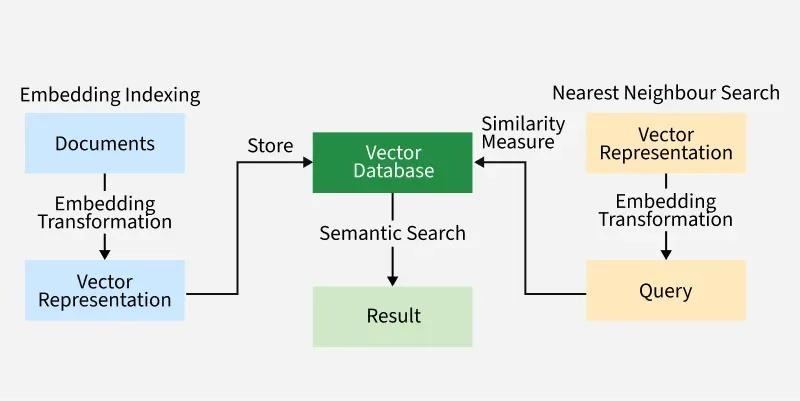
Vector-based similarity search is now in the query builder. PostgreSQL with pgvector under the hood. The practical shift is that your app can search by what the user means rather than the exact words they typed.
Basic usage
$documents = DB::table(‘documents’)
->whereVectorSimilarTo(’embedding’, ‘Best strategies for B2B customer retention’)
->limit(10)
->get();
The query finds records whose stored embeddings are semantically close to the input string. A document about reducing churn in subscription software would surface even if it shares no words with the search string.
Generating and storing embeddings
Embeddings are vectors generated by an AI model that represent the semantic meaning of a piece of text. You generate them using the AI SDK and store them alongside your content:
When a user searches, you generate an embedding for their query and use whereVectorSimilarTo to find the closest matches in the database.
Where this is useful
Product search: customers find what they need by describing it, not by guessing keywords the product was tagged with
Knowledge bases: support queries surface relevant articles even when the wording does not match the article title
Recommendation engines: find content, products, or profiles similar to a given item based on meaning rather than tags
RAG (Retrieval-Augmented Generation): retrieve relevant context from your database to include in AI model prompts before sending them
One important constraint: this feature requires PostgreSQL with the pgvector extension. If your application runs on MySQL or SQLite, vector search is not available in Laravel 13.
Feature 3: PHP Attributes as an Alternative to Class Properties
PHP Attributes have been part of the language since PHP 8.0 and Laravel 13 finally makes proper use of them. Across 15 or more framework locations, including models, controllers, jobs, commands, listeners, and mailables, you can now use Attributes instead of class property declarations. Nothing you have written before breaks. This is purely additive.
Models
Before, using class properties (still fully supported):
#[Description(‘Generate a scheduled report for the given type’)]
class GenerateReportCommand extends Command
{
public function handle() { … }
}
Should you switch to Attributes?
On a new project, I would use Attributes from the start. On an existing codebase, I would leave things alone and only switch when I am already touching a class for another reason. Laravel has been clear that property-based configuration is not going away, so there is no migration deadline hanging over you.
Feature 4: Passkey Authentication
Passkeys are finally a first-party feature in Laravel, handled through Fortify and the new starter kits. The underlying protocol is WebAuthn, which is what Apple, Google, and Microsoft already use for their own passwordless flows. Users authenticate with fingerprint, Face ID, or device PIN. No password, no reset email.
How it works for the user
Registration: the user registers a passkey on their device, which creates a public/private key pair stored on the device
Login: the user authenticates with a biometric or PIN, the device signs a challenge from the server, the server verifies the signature
No password to remember, reuse across sites, or expose in a data breach
No password reset email flows to support
How it works for the developer
The WebAuthn protocol implementation is handled in Fortify. You get the controller methods, challenge handling, and credential storage without building the protocol yourself. The new Laravel 13 starter kits ship with passkey login UI included.
Things to consider before adopting passkeys
Before going passkeys-only, check your analytics for what browsers and devices your users are actually on. WebAuthn is well supported now but not universal. For a consumer product I would offer passkeys alongside passwords as an option, not a replacement. For an internal tool where you control the device environment, passkeys-only is fine.
Feature 5: Cache::touch() for Expiry Extension
Extending a cache entry’s TTL without changing the value used to take three operations: get, forget, put. Every time. On anything using cache for session windows or rate limiting that was wasted work. Cache::touch() collapses it to one call.
// Before Laravel 13: three operations
$value = Cache::get(‘user_session_data’);
Cache::forget(‘user_session_data’);
Cache::put(‘user_session_data’, $value, 3600);
// Laravel 13: one operation
Cache::touch(‘user_session_data’, 3600);
The value is unchanged. Only the expiry is updated. For sliding session windows and active user heartbeat patterns, this is the version of the API that should have existed from the start.
Feature 6: Reverb Database Driver
If you have used Reverb for real-time features you know it previously required Redis for scaling across multiple instances. Laravel 13 adds a database driver so Redis is no longer mandatory:
‘scaling’ => [
‘driver’ => ‘database’,
],
Do not swap Redis out for the database driver on a high-volume production application. That is not what it is for. It is for projects where real-time is needed but Redis feels like overkill: a smaller app, a staging environment, a team that wants fewer moving parts. Having the option is the point.
Feature 7: First-Party JSON:API Resources
Building JSON:API-compliant responses in Laravel 12 meant either pulling in a third-party package or wiring up the spec by hand. Laravel 13 adds first-party support through Illuminate\Http\Resources\JsonApi\JsonApiResource.
use Illuminate\Http\Resources\JsonApi\JsonApiResource;
class ArticleResource extends JsonApiResource
{
public function attributes(\$request): array
{
return [
‘title’ => \$this->title,
‘body’ => \$this->body,
‘slug’ => \$this->slug,
];
}
}
return ArticleResource::make(\$article);
The resource handles serialization, relationship inclusion, sparse fieldsets, links, and the correct Content-Type response header automatically. If your API is consumed by a mobile application or a frontend that expects JSON:API format, this is worth using rather than constructing compliant responses manually.
Feature 8: Stronger CSRF Protection with PreventRequestForgery
CSRF protection gets a meaningful upgrade in Laravel 13 through the new PreventRequestForgery middleware. Beyond the token check that has always been there, it now validates the request origin using the Sec-Fetch-Site header that modern browsers send.
The Sec-Fetch-Site header tells you whether a request came from the same site, a different site, or a user navigation. The middleware checks that first and only falls back to token validation when the header is not present. It closes a gap that token-only CSRF could not cover.
Backwards compatible: no configuration changes are required. Applications benefit from the improved security automatically after upgrading to Laravel 13.
If your application has custom CSRF flows, unusual subdomain configurations, or older browser constraints, test the forgery protection on staging before pushing to production. The origin-based checks can surface edge cases in non-standard request flows that the token-only approach would have passed through silently.
Feature 9: Centralised Queue Routing
Queue configuration used to live either on the job class itself or scattered across every dispatch call in the codebase. When you needed to move a job to a different queue or connection you were hunting through files to find every place it was dispatched.
Queue::route() centralises job routing in a service provider:
Every job’s queue and connection configuration now lives in one place. Moving a job to a different connection or priority queue is one line change in the service provider. On large applications with many job classes, this makes queue topology significantly easier to reason about and adjust without touching individual job files.
Feature 10: HTTP Pool Requests in Parallel
Laravel’s HTTP client has supported concurrent requests through Http::pool() for some time, but using it required explicit pool setup at each call site. The pattern in Laravel 13 is cleaner, and the named response access makes it more readable:
Three sequential requests at 300ms each take 900ms total. Running them in parallel brings that to around 300ms. For product pages, dashboards, or any endpoint that aggregates data from multiple external APIs, this is the kind of change that makes a visible difference to response times without any architectural work.
Feature 11: Teams in Starter Kits
Teams are back in the starter kits, and the implementation is better than Jetstream’s original version. The old approach stored team context in the session, which meant switching teams in one tab changed the context everywhere. That was always a frustrating limitation.
Team context now lives in the URL rather than the session. Two different team contexts can be open in separate tabs simultaneously, each operating independently. Anyone managing accounts across multiple organizations will appreciate having that actually work.
Laravel 12 vs Laravel 13
Area
Laravel 12
Laravel 13
PHP minimum
PHP 8.2
PHP 8.3 (required)
AI SDK
Third-party packages only
First-party, production-stable
Semantic search
Not in core
whereVectorSimilarTo() in query builder
PHP Attributes
Not available
Optional across 15+ framework locations
Passkeys
Custom implementation required
Built into Fortify and starter kits
Cache expiry extension
Three-operation fetch/delete/write
Cache::touch() — one operation
Reverb scaling
Redis required
Redis or database driver
JSON:API responses
Third-party packages
First-party JsonApiResource
CSRF protection
Token-based
Origin-aware + token-based
Queue configuration
Per-job or per-dispatch
Centralised via Queue::route()
Breaking changes
Some from Laravel 11
Zero from Laravel 12
How to Upgrade from Laravel 12 to Laravel 13
The mechanics are quick. Two changes in composer.json, one composer update, one artisan call. The time is in testing, not the upgrade itself.
Step 1: Update composer.json
{
“require”: {
“php”: “^8.3”,
“laravel/framework”: “^13.0”
}
}
Step 2: Run the update
composer update
php artisan optimize:clear
What to verify before deploying
PHP version on the server. Run php -v. If it shows 8.2, upgrade PHP first.
Package compatibility. Livewire, Inertia, Filament, and Spatie all had Laravel 13 support on release day. Check your less common dependencies on Packagist before running the upgrade.
Custom cache behaviour. If your application has non-standard cache store implementations, test those specifically. Laravel 13 changes some internal cache serialization defaults.
CSRF flows. Test custom middleware or non-standard request flows around CSRF on staging. The origin-aware validation in PreventRequestForgery can surface edge cases in unusual setups.
Any code using methods deprecated in Laravel 11 or 12 that are now removed. Run your test suite against the new version before touching production.
Taylor’s zero-breaking-change commitment holds for standard applications. Where I have seen edge cases appear is in custom cache store implementations, non-standard CSRF handling, and code that integrates with Laravel internals rather than public APIs. If your test suite is decent you will catch them on staging before they cause a problem in production.
If you are on PHP 8.2 and cannot upgrade PHP immediately, stay on Laravel 12. It receives security fixes until February 2027. There is no need to force this before you are ready.
Should You Upgrade Now?
Situation
Recommendation
Reason
Starting a new project
Start on Laravel 13
No migration cost. AI SDK, vector search, and all new features from day one.
On Laravel 12, PHP 8.3 already running
Upgrade when ready
Under a day of work. Meaningful improvements including AI SDK and security.
On Laravel 12, PHP 8.2 still running
Upgrade PHP first, then framework
PHP is the only real blocker. Worth doing if you plan to stay on Laravel long-term.
Stable production app, no new features planned
Wait for planned maintenance
Laravel 12 is supported until early 2027. No emergency.
Building AI or semantic search features
Upgrade now
These features are not in Laravel 12 without third-party workarounds.
How KrishaWeb Works with Laravel 13
At KrishaWeb, I lead the custom development team, and Laravel is the framework we reach for most often when clients need a well-structured backend for a SaaS product, enterprise portal, or API-heavy application. I have AWS certification and have been working with the Laravel AI SDK since its early beta, which means our team is already applying these features in production rather than learning them for the first time.
Laravel 13 directly changes what we can offer clients, building anything that touches AI. The first-party SDK removes a layer of custom integration work we were building for every project independently. The vector search capabilities open up product features, particularly AI-powered search and recommendation systems, that previously required significant custom infrastructure outside of Laravel.
Laravel 13 development at KrishaWeb
I build new applications on Laravel 13 for clients who need AI-powered features, semantic search on PostgreSQL with pgvector, JSON:API-compliant backends, and real-time functionality with Reverb. If you are planning a new Laravel project or want to explore what the AI SDK makes possible for your use case, reach out.
Laravel 12 to 13 upgrades
I run pre-upgrade audits before touching production on client sites: PHP version check, package compatibility review, custom CSRF flow testing, cache implementation audit. If your team wants help planning or running the upgrade without the risk of finding problems after deployment, get in touch.
Laravel 13 was released on March 17, 2026, with zero breaking changes from Laravel 12. PHP 8.3 is the only hard requirement change.
The Laravel AI SDK is now first-party and production-stable. Provider-agnostic interface for text, agents, images, audio, and embeddings. Switching between OpenAI, Anthropic, and Gemini requires only configuration changes.
Semantic vector search arrives in the query builder via whereVectorSimilarTo(). Requires PostgreSQL with pgvector. Searches by meaning rather than exact keyword matching.
PHP Attributes are available as fully optional, non-breaking alternatives to class property declarations across 15 or more framework locations. Existing property-based code is not deprecated.
Passkey authentication is built into Fortify and the new starter kits. First-party WebAuthn-based passwordless login without building the protocol yourself.
Cache::touch() replaces the three-step fetch/delete/write pattern for extending cache expiry. Queue::route() centralises job routing in a service provider.
Reverb now supports a database scaling driver as an alternative to Redis for applications that do not need Redis-level throughput.
PreventRequestForgery adds origin-aware validation to CSRF protection using Sec-Fetch-Site headers in modern browsers before falling back to token validation.
Conclusion
I have been through a lot of Laravel major versions now, and this one genuinely does what it promises. Zero breaking changes, a ten-minute upgrade for most applications, and features that land in exactly the places where the ecosystem has been building workarounds for too long.
The AI SDK is what I am most excited about from a practical standpoint. Every client project that needed AI features in the last year involved writing custom provider wrappers. Having that as a first-party, provider-agnostic interface means future projects start from a much better place. The vector search, PHP Attributes, and passkeys are each real improvements to daily development rather than framework additions that exist only on the features page. Start new projects on Laravel 13. Upgrade existing ones when your schedule allows. If AI is on your roadmap in any form, the upgrade becomes more urgent because the tooling in 13 makes it significantly less complicated to build those features properly.
If your team needs hands-on help with the upgrade, wants to build new AI-powered features on Laravel 13, or is scoping a new SaaS product and wants the architecture done right from day one, our Laravel development team works exclusively on Laravel and has been through every major version since version 4. Reach out, and we can look at your specific situation.
Frequently Asked Questions
When did Laravel 13 release?
March 17, 2026, announced by Taylor Otwell at Laracon EU 2026 in Amsterdam.
Does Laravel 13 have breaking changes?
For standard Laravel 12 applications, no. The official upgrade guide estimates the process at under ten minutes for most codebases. Edge cases exist around custom cache implementations, non-standard CSRF flows, and any code using methods deprecated in Laravel 11 or 12 that are now removed. Run your full test suite on staging before deploying to production.
Which AI providers does the Laravel AI SDK support?
OpenAI, Anthropic Claude, and Google Gemini ship as first-party providers. The interface is provider-agnostic, so switching providers requires a configuration change without touching application code. Third-party provider packages can be built on top of the SDK’s provider interface.
Does Laravel 13 require PostgreSQL for vector search?
Yes. The whereVectorSimilarTo() method requires PostgreSQL with the pgvector extension. It is not available on MySQL or SQLite in the Laravel 13 release. If your application uses MySQL and you want semantic search, the options are migrating the relevant tables to PostgreSQL or using a dedicated vector database alongside your existing setup.
Do I have to use PHP Attributes in Laravel 13?
No. PHP Attributes are fully optional. Existing class property declarations continue to work exactly as they did in Laravel 12. Laravel has stated explicitly that property-based configuration is not deprecated and will not be removed.
Is Laravel 12 still getting security updates?
Yes. Bug fixes until August 2026, security fixes until February 2027. No immediate pressure to upgrade if your application is stable and your team has other priorities.
What is the quickest way to upgrade?
Update the PHP and laravel/framework version constraints in composer.json, run composer update, then php artisan optimize:clear. Most of the upgrade time is in testing, not the code changes. Laravel Shift can automate the mechanical parts of the upgrade for around $29 if you want assistance with the process.
Nirav Panchal
Lead – Custom Development
Lead of the Custom Development team at KrishaWeb, holds AWS certification and excels as a Team Leader. Renowned for his expertise in Laravel and React development. With expertise in cloud solutions, he leads with innovation and technical excellence.


 KrishaLabs
 KrishaStudio
 KrishaStore