WordPress 7.0 Armstrong Features: AI Client, Command Palette, and More

WordPress 7.0 Armstrong shipped on May 20, 2026. AI Client built into Core. Command Palette. Refreshed admin. Four new blocks. Abilities API for developers. 900+ contributors from across the world built this release. Seven of them are on the KrishaWeb team. Here is every WordPress 7.0 Armstrong feature that shipped, and a proper thank you to the developers who helped make it happen. (Source: WordPress.org, WordPress 7.0 Armstrong official release) KrishaWeb Developers Contributed to WordPress 7.0 Armstrong WordPress 7.0 was built by more than 900 contributors from countries across the world, including 279 first-time contributors. The release covers 419 Core Trac tickets, 76+ enhancements, 300+ bug fixes, and 411 Gutenberg enhancements. Seven members of our team are in that contributor list. Every one of these contributions came on top of client work, deadlines, and everything else that comes with building production software for KrishaWeb clients. Contributing to open source at this level takes time that does not come back. We are genuinely proud that seven of our people chose to give it. ● Dhruval Shah ● Dhruvang shah ● Parth Vataliya ● Gulamdastgir Momin ● Jaydip Ahir ● Hitesh Talpada ● Parag Jethva Dhruval Shah, Dhruvang Shah, Parth Vataliya, Gulamdastgir Momin, Jaydip Ahir, Hitesh Talpada, and Parag Jethva. Your names are in this release permanently. That is a contribution to a platform used by over 40% of the web. We are proud to have you on the team. About WordPress 7.0 Armstrong Named after jazz legend Louis Armstrong, the 7.0 release was led by Matias Ventura and represents the biggest structural change to WordPress in years. The release was originally planned for April 9, 2026, delayed to stabilise the AI infrastructure and finish the admin redesign, and shipped on May 20, 2026. The headline framing from the official WordPress.org release announcement: this is the start of a new era, laying the foundation for AI across the WordPress experience. That is not marketing language. The AI infrastructure in 7.0 is a genuine platform-level change that every WordPress developer, agency, and site owner needs to understand. (Source: SmartWP, WordPress 7.0 Armstrong: What's New in the May 2026 Release) WordPress 7.0 Armstrong Features: What Shipped Here is every WordPress 7.0 Armstrong feature that made it into the release, with the context you need to understand what it actually changes. 1. AI Client in Core The biggest structural change in 7.0. WordPress Core can now communicate with AI models natively through a built-in AI Client. This is not a plugin. It is infrastructure inside WordPress itself. The AI Client handles communication with generative AI models and connects to whatever AI provider you choose through the new Connectors Hub. For developers, this is the foundation for building AI-integrated WordPress products consistently, with a shared API rather than a custom connection layer per plugin. For site owners connected to an AI provider, it enables AI-powered block suggestions and content assistance directly in the editor. 2. Abilities API The Abilities API gives developers a structured, platform-level system for defining what AI can and cannot do within WordPress. It is the governance layer that sits alongside the AI Client and makes AI integration in WordPress responsible and controllable rather than a free-for-all. Themes and plugins can use the Abilities API to define permissions for AI actions within their specific context. 3. Connectors Hub A new centralized screen in the WordPress admin for managing external service integrations, starting with AI providers. Connect your preferred AI service from one place and use those integrations across the site. The Connectors Hub is where the AI Client, the Abilities API, and your chosen provider meet in a UI that non-developers can actually use. (Source: Linuxiac, WordPress 7.0 Released with AI Foundations, Refreshed Admin Experience) 4. Command Palette (Cmd+K / Ctrl+K) Type a command, find a page, jump to a setting, and trigger an action. The Command Palette is accessible from anywhere in the WordPress admin with Cmd+K on Mac or Ctrl+K on Windows and Linux. It is the interaction pattern that makes WordPress feel like modern software rather than a legacy platform with improvements grafted on top. For anyone who spends significant time in the WordPress admin (developers, editors, site managers): this is the change that will feel different every day. The navigation tax of clicking through menus to find settings and pages is gone. (Source: Pantheon Docs, WordPress 7.0 Armstrong release notes) 5. Modernised Admin Dashboard The WordPress admin has a new color scheme and smooth view transitions between screens. The visual refresh is clean and noticeably more contemporary without breaking existing workflows. A dedicated font management page is also new in 7.0, consolidating font uploads and activation in one place rather than spreading them across theme settings and the editor. 6. Visual Revision Scrubbing Slide through previous versions of a post or page and see exactly what changed, where, and when. The revision history interface has been rebuilt with a visual scrubbing model. For editorial teams managing content-heavy WordPress sites, this changes how revision review actually works in practice. 7. Four New Blocks WordPress 7.0 ships four new blocks. Responsive block controls allow different settings per viewport so a block styled for desktop can behave differently on mobile without a custom CSS override. Navigation overlays add a new pattern for mobile navigation design. The additional design tool improvements extend the block editor's capability for building sophisticated page layouts without leaving the WordPress interface. (Source: InstaWP, WordPress 7.0: Release Date, Features and What's New) 8. Developer APIs and Server-Side Block Registration If you build plugins or themes for WordPress, 7.0 gives you a cleaner surface to work with. Server-side block registration is more consistent. The new hooks and filters around AI integration mean you can tap into the AI Client and Abilities API from your own code without reinventing how the connection works. For developers building AI-powered WordPress products, having a shared platform API changes what is practical to build. 9. PHP 7.4 Minimum Requirement Before you update any site to WordPress 7.0, check what PHP version it is running. If it is below 7.4, update PHP first. That is the one prerequisite that will break things if you skip it. Most sites on decent hosting are already on 7.4 or above, but legacy sites on older managed plans sometimes are not. Two minutes in your hosting control panel now saves a support call later. (Source: webhosting.today, WordPress 7.0 Ships, PHP 7.4 Required) What Did Not Ship: Real-Time Collaboration Real-time collaborative editing was pulled from 7.0 on May 8, twelve days before launch. The WordPress core team cited race conditions, excessive server load, memory efficiency problems, and recurring bugs in fuzz testing as reasons it could not be included in this release cycle. It will be re-evaluated for a future release. The decision to pull a headline feature rather than ship it unstable reflects the project discipline that keeps WordPress reliable at the scale it operates at. What WordPress 7.0 Means If You Build on WordPress The AI foundations in 7.0 are infrastructure, not a finished product. Sites that do not connect to an AI provider see no change in behavior. The AI Client, Abilities API, and Connectors Hub are available and waiting. When you are ready to use them, the platform is ready too. The Command Palette, admin refresh, and visual revisions activate immediately on update. Your editorial team will notice the difference on the first login after updating. The PHP 7.4 requirement is the one item to check before updating. For most well-maintained sites on good hosting, PHP 7.4 is already the standard. For older sites, verify before updating production. KrishaWeb has built WordPress development services for clients across 42 countries since 2008. Our team works with every major version of WordPress core from theme and plugin development through to enterprise platform builds, headless WordPress, and white label WordPress development services for agencies. If your site needs a compatibility check before updating to 7.0, or if you want to build on the new AI capabilities in 7.0, talk to our WordPress team. Our web development services extend beyond WordPress to Shopify, Webflow, Laravel, React, and custom web application development. If your organization needs a digital partner for the full brief, not just WordPress, that is what we do. Why Open Source Contributions Matter to KrishaWeb WordPress powers 40% of the web. Every improvement to the platform benefits every site running on it. That reach is only possible because developers across the world contribute expertise without being paid to do so. At KrishaWeb, we have built our WordPress practice over 17 years. The platform that made that work possible was maintained by the global contributor community. Contributing back is not a marketing activity. It is the right thing to do for the ecosystem our business runs on. Seven KrishaWeb developers showing up in the WordPress 7.0 contributor list is something we will keep encouraging. We want more of our team involved in core, in Gutenberg, in documentation, in support. The WordPress project is better when more perspectives contribute to it. Interested in contributing to WordPress? Everything you need is at make.wordpress.org. The 7.0 release included 279 first-time contributors. There is room for more. Congratulations Again! Dhruval Shah, Dhruvang Shah, Parth Vataliya, Gulamdastgir Momin, Jaydip Ahir, Hitesh Talpada, and Parag Jethva. Your contributions are in WordPress 7.0, Armstrong, permanently. Thank you for giving your time to the project that the whole community builds on. Building on WordPress 7.0? Our WordPress development services cover everything from AI-powered WordPress builds to white label WordPress development for agencies.

WordPress 7.0 Armstrong shipped on May 20, 2026. AI Client built into Core. Command Palette. Refreshed admin. Four new blocks. Abilities API for developers. 900+ contributors from across the world built this release. Seven of them are on the KrishaWeb team. Here is every WordPress 7.0 Armstrong feature that shipped, and a proper thank you to the developers who helped make it happen. (Source: WordPress.org, WordPress 7.0 Armstrong official release

Table Of Contents
Table Of Contents

KrishaWeb Developers Contributed to WordPress 7.0 Armstrong

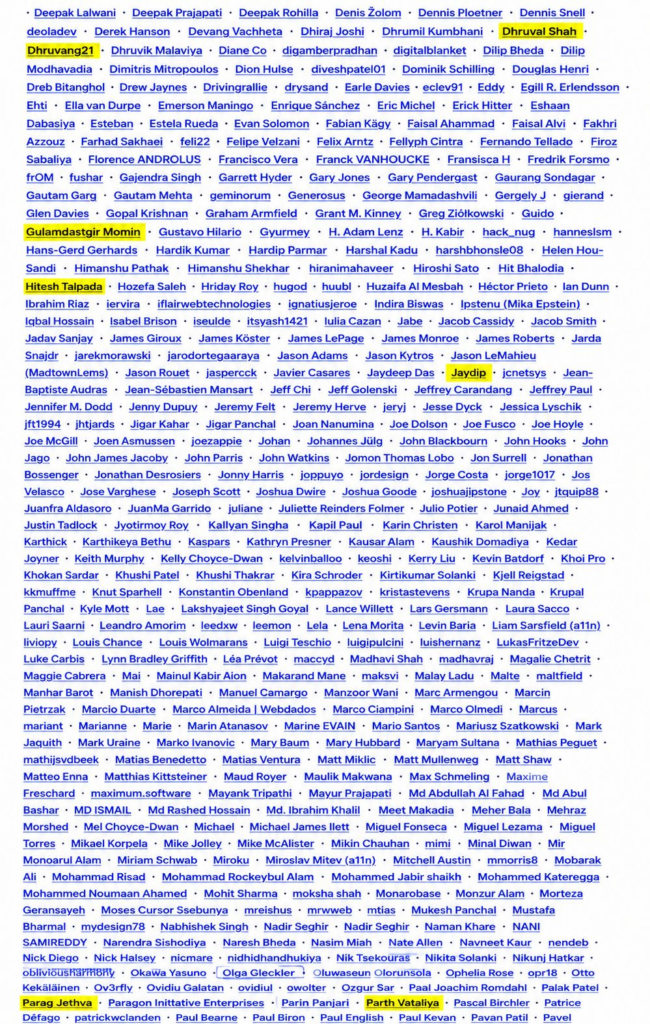
WordPress 7.0 was built by more than 900 contributors from countries across the world, including 279 first-time contributors. The release covers 419 Core Trac tickets, 76+ enhancements, 300+ bug fixes, and 411 Gutenberg enhancements. Seven members of our team are in that contributor list.

Every one of these contributions came on top of client work, deadlines, and everything else that comes with building production software for KrishaWeb clients. Contributing to open source at this level takes time that does not come back. We are genuinely proud that seven of our people chose to give it.

  • Dhruval Shah
  • Dhruvang shah
  • Parth Vataliya
  • Gulamdastgir Momin
  • Jaydip Ahir
  • Hitesh Talpada
  • Parag Jethva

Your names are in this release permanently. That is a contribution to a platform used by over 40% of the web. We are proud to have you on the team.

About WordPress 7.0 Armstrong

Named after jazz legend Louis Armstrong, the 7.0 release was led by Matias Ventura and represents the biggest structural change to WordPress in years. The release was originally planned for April 9, 2026, delayed to stabilise the AI infrastructure and finish the admin redesign, and shipped on May 20, 2026.

The headline framing from the official WordPress.org release announcement: this is the start of a new era, laying the foundation for AI across the WordPress experience. That is not marketing language. The AI infrastructure in 7.0 is a genuine platform-level change that every WordPress developer, agency, and site owner needs to understand. (Source: SmartWP, WordPress 7.0 Armstrong: What’s New in the May 2026 Release)

WordPress 7.0 Armstrong Features: What Shipped

Here is every WordPress 7.0 Armstrong feature that made it into the release, with the context you need to understand what it actually changes.

1. AI Client in Core

The biggest structural change in 7.0. WordPress Core can now communicate with AI models natively through a built-in AI Client. This is not a plugin. It is infrastructure inside WordPress itself. The AI Client handles communication with generative AI models and connects to whatever AI provider you choose through the new Connectors Hub.

For developers, this is the foundation for building AI-integrated WordPress products consistently, with a shared API rather than a custom connection layer per plugin. For site owners connected to an AI provider, it enables AI-powered block suggestions and content assistance directly in the editor.

2. Abilities API

The Abilities API gives developers a structured, platform-level system for defining what AI can and cannot do within WordPress. It is the governance layer that sits alongside the AI Client and makes AI integration in WordPress responsible and controllable rather than a free-for-all. Themes and plugins can use the Abilities API to define permissions for AI actions within their specific context.

3. Connectors Hub

A new centralized screen in the WordPress admin for managing external service integrations, starting with AI providers. Connect your preferred AI service from one place and use those integrations across the site. The Connectors Hub is where the AI Client, the Abilities API, and your chosen provider meet in a UI that non-developers can actually use.

(Source: Linuxiac, WordPress 7.0 Released with AI Foundations, Refreshed Admin Experience)

4. Command Palette (Cmd+K / Ctrl+K)

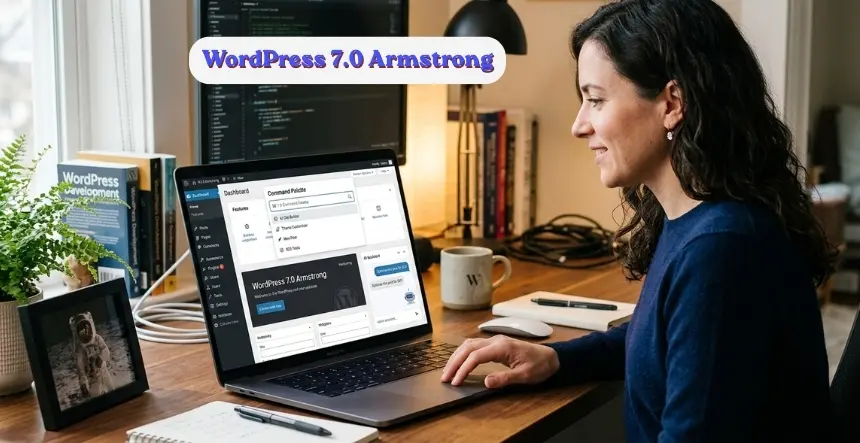
Type a command, find a page, jump to a setting, and trigger an action. The Command Palette is accessible from anywhere in the WordPress admin with Cmd+K on Mac or Ctrl+K on Windows and Linux. It is the interaction pattern that makes WordPress feel like modern software rather than a legacy platform with improvements grafted on top.

For anyone who spends significant time in the WordPress admin (developers, editors, site managers): this is the change that will feel different every day. The navigation tax of clicking through menus to find settings and pages is gone.

(Source: Pantheon Docs, WordPress 7.0 Armstrong release notes

5. Modernised Admin Dashboard

The WordPress admin has a new color scheme and smooth view transitions between screens. The visual refresh is clean and noticeably more contemporary without breaking existing workflows. A dedicated font management page is also new in 7.0, consolidating font uploads and activation in one place rather than spreading them across theme settings and the editor.

6. Visual Revision Scrubbing

Slide through previous versions of a post or page and see exactly what changed, where, and when. The revision history interface has been rebuilt with a visual scrubbing model. For editorial teams managing content-heavy WordPress sites, this changes how revision review actually works in practice.

7. Four New Blocks

WordPress 7.0 ships four new blocks. Responsive block controls allow different settings per viewport so a block styled for desktop can behave differently on mobile without a custom CSS override. Navigation overlays add a new pattern for mobile navigation design. The additional design tool improvements extend the block editor’s capability for building sophisticated page layouts without leaving the WordPress interface.

(Source: InstaWP, WordPress 7.0: Release Date, Features and What’s New)  

8. Developer APIs and Server-Side Block Registration

If you build plugins or themes for WordPress, 7.0 gives you a cleaner surface to work with. Server-side block registration is more consistent. The new hooks and filters around AI integration mean you can tap into the AI Client and Abilities API from your own code without reinventing how the connection works. For developers building AI-powered WordPress products, having a shared platform API changes what is practical to build.

9. PHP 7.4 Minimum Requirement

Before you update any site to WordPress 7.0, check what PHP version it is running. If it is below 7.4, update PHP first. That is the one prerequisite that will break things if you skip it. Most sites on decent hosting are already on 7.4 or above, but legacy sites on older managed plans sometimes are not. Two minutes in your hosting control panel now saves a support call later.

(Source: webhosting.today, WordPress 7.0 Ships, PHP 7.4 Required

What Did Not Ship: Real-Time Collaboration

Real-time collaborative editing was pulled from 7.0 on May 8, twelve days before launch. The WordPress core team cited race conditions, excessive server load, memory efficiency problems, and recurring bugs in fuzz testing as reasons it could not be included in this release cycle. It will be re-evaluated for a future release. The decision to pull a headline feature rather than ship it unstable reflects the project discipline that keeps WordPress reliable at the scale it operates at.

What WordPress 7.0 Means If You Build on WordPress

The AI foundations in 7.0 are infrastructure, not a finished product. Sites that do not connect to an AI provider see no change in behavior. The AI Client, Abilities API, and Connectors Hub are available and waiting. When you are ready to use them, the platform is ready too.

The Command Palette, admin refresh, and visual revisions activate immediately on update. Your editorial team will notice the difference on the first login after updating.

The PHP 7.4 requirement is the one item to check before updating. For most well-maintained sites on good hosting, PHP 7.4 is already the standard. For older sites, verify before updating production.

KrishaWeb has built WordPress development services for clients across 42 countries since 2008. Our team works with every major version of WordPress core from theme and plugin development through to enterprise platform builds, headless WordPress, and white label WordPress development services for agencies. If your site needs a compatibility check before updating to 7.0, or if you want to build on the new AI capabilities in 7.0, talk to our WordPress team.

Our web development services extend beyond WordPress to Shopify, Webflow, Laravel, React, and custom web application development. If your organization needs a digital partner for the full brief, not just WordPress, that is what we do.

Why Open Source Contributions Matter to KrishaWeb

WordPress powers 40% of the web. Every improvement to the platform benefits every site running on it. That reach is only possible because developers across the world contribute expertise without being paid to do so.

At KrishaWeb, we have built our WordPress practice over 17 years. The platform that made that work possible was maintained by the global contributor community. Contributing back is not a marketing activity. It is the right thing to do for the ecosystem our business runs on.

Seven KrishaWeb developers showing up in the WordPress 7.0 contributor list is something we will keep encouraging. We want more of our team involved in core, in Gutenberg, in documentation, in support. The WordPress project is better when more perspectives contribute to it.

Interested in contributing to WordPress? Everything you need is at make.wordpress.org. The 7.0 release included 279 first-time contributors. There is room for more.

Congratulations Again!

Dhruval Shah, Dhruvang Shah, Parth Vataliya, Gulamdastgir Momin, Jaydip Ahir, Hitesh Talpada, and Parag Jethva.

Your contributions are in WordPress 7.0, Armstrong, permanently. Thank you for giving your time to the project that the whole community builds on.Building on WordPress 7.0? Our WordPress development services cover everything from AI-powered WordPress builds to white label WordPress development for agencies.

author
Praful Patel
Lead – CMS Development

A Full-Stack Developer and Technical Project Manager with expertise spanning WordPress, WooCommerce, Headless WordPress, Next.js, React, and AI Automation, I deliver end-to-end web solutions that combine technical depth with practical, business-focused thinking.


author

Recent Articles

Browse some of our latest articles...

Prev
Next