Contact forms convert at 1 to 3%. AI chatbots convert at 10 to 15% on the same pages. That gap is not a rounding error. Here is what the data from 100+ B2B and eCommerce sites actually shows: when chatbots win, when they do not, and the one scenario where neither is the right answer.
Table Of Contents
Table Of Contents
The Problem With How Most Businesses Think About This
Every week, I talk to marketing directors and founders wrestling with the same decision: do we add a chatbot, or do we fix the contact form? The conversation usually goes one of two ways. Either they have heard that chatbots convert better and want to know if it is true, or they have tried a chatbot and it underperformed, and they want to know why.
The conversion rate gap is real. But the reason most businesses fail to capture it has nothing to do with the technology. It has to do with where they deploy it, how they configure it, and whether they understand what each tool is actually built to do.
Let me walk you through the actual data first, then the context that makes that data useful.
The Numbers: What the Research Actually Shows
I pulled data from multiple sources covering B2B lead generation and eCommerce sites for this comparison. The figures below are consistent across studies from Oscar Chat, Scalify, Which-50, Glassix, and Dashform covering more than 400 companies across 25 industries in 2025 and 2026.
1-3% average contact form conversion rate (Source:WordStream / HubSpot)
10-15% average AI chatbot conversion rate across B2B and eCommerce sites (Source:Oscar Chat / Scalify)
23% higher overall conversion rates for businesses using AI chatbots vs. those without (Source: Glassix study)
40% lift in conversions from proactive chat triggers compared to reactive chat (Source: Which-50)
$8 return for every $1 invested in chatbot implementation (Source: Botpress / Ringly.io)
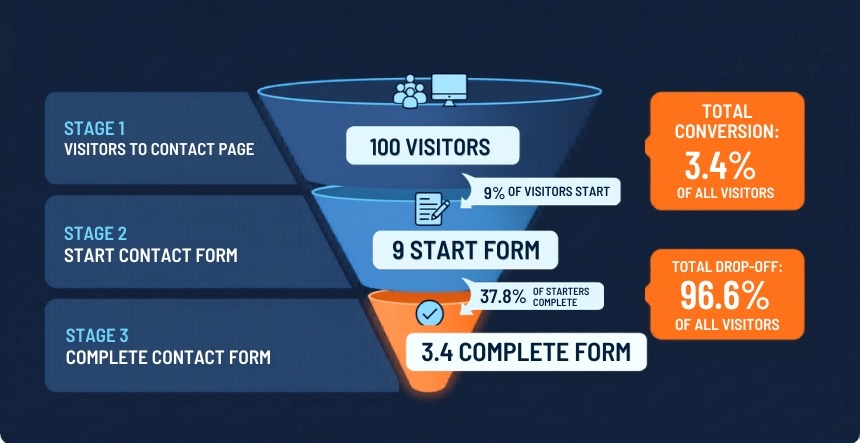
That 1 to 3% contact form figure deserves more context. According to Zuko Analytics, only 9% of visitors who reach a contact page even start filling out a form, and only 37.85% of those who start actually complete it. So you are not converting 2% of your site traffic with a contact form. You are converting a fraction of that.
The chatbot number looks dramatically better, partly because the comparison is not fair on first look. Chatbot conversion rates are typically measured as conversions among people who engage with the chat. People who engage with a chat widget are already showing higher intent than a random visitor browsing your site. Keep that in mind when reviewing your own numbers.
That said, the absolute lead volume advantage for chatbots is real because chatbots appear on every page, trigger proactively on high-intent pages, and engage visitors before they decide to leave. A contact form only converts the visitor who was already motivated enough to find it. That is a meaningful structural difference.
B2B vs. eCommerce: The Performance Gap Is Not the Same for Both
The conversion data looks very different depending on the sector, and understanding that difference is what separates a smart deployment decision from copying what someone else did on a different kind of business.
Phone still dominant; chat adds marginal lift over optimized forms in this sector
The B2B number deserves particular attention. A 15 to 25% conversion rate on chatbot interactions in B2B professional services sounds high until you understand the mechanism. The traditional B2B conversion path is: a visitor finds your site, fills out a contact form, and waits 24 to 48 hours for a response, by which point they have already had a demo call with your competitor who responded in 20 minutes. The chatbot does not just capture a name and email. It qualifies the lead, identifies the right use case, and books a calendar slot before the visitor leaves the page.
That response window matters more than most businesses acknowledge. The data from HBR research shows you are 21 times more likely to qualify a lead if you respond within 5 minutes versus 30 minutes. A contact form structurally cannot win that race. A chatbot wins it by default.
If your business has a sales cycle where speed-to-lead matters, the case for an AI chatbot is less about conversion rate and more about the leads you are currently losing in the response gap.
When a Contact Form Still Beats a Chatbot
I want to be direct about this because most articles pushing chatbot adoption skip it: there are situations where a well-designed contact form outperforms or is more appropriate than an AI chatbot. Deploying a chatbot in the wrong context creates friction, not conversion.
Formal submissions requiring documentation
Legal inquiries, compliance documents, job applications, grant submissions, and detailed RFP responses. These situations require the user to upload files, review all fields upfront before committing, and submit a complete, structured package. A chatbot cannot handle file uploads in most implementations, and it cannot give the user a clear picture of what the complete submission requires. Forms win here, and they should.
High-stakes, high-trust transactions
Only 18% of users trust chatbots with personal financial information, according to Marketing LTB research. For financial services, legal, and healthcare situations where the user is sharing sensitive data or making a significant commitment, a well-designed form with clear security signals frequently outperforms a chatbot. The form communicates formality and seriousness. A chatbot can feel casual in contexts where the user needs to feel their information is being handled carefully. [NOTE: “Users who know exactly what they want” below should be formatted as H3 in the published article] (Source: Marketing LTB)
Users who know exactly what they want
A returning customer who wants to submit a support ticket, report a specific issue, or request a specific document does not need a chatbot asking them qualifying questions. They want to fill in a form and be done. Forcing that user through a conversational flow when they have already made their decision creates friction. The best conversion tool is the one that matches the user’s intent at that moment, not the one with the highest average conversion rate.
Pros and Cons: The Honest List
AI Chatbot
Pros
Cons
Converts 3 to 5x better than forms for high-intent visitors (Scalify 2026)
Setup complexity: requires conversation design, knowledge base, and ongoing maintenance
Engages visitors on every page, not just the contact page
Poorly designed chatbots frustrate users faster than a bad form would
Qualifies leads through dynamic conversation before passing to sales
Some users distrust chatbots for sensitive or formal submissions
Available 24/7; captures leads when your team is offline
AI hallucination risk if knowledge base is thin or outdated
Reduces response lag that kills B2B leads after the 5-minute window
CCPA and GDPR compliance requirements add implementation overhead
23% improvement in overall site conversion rates (Glassix)
Higher upfront investment than a contact form ($0 vs $2,000+ for a proper build)
Contact Form
Pros
Cons
Universally understood; zero learning curve for visitors
1 to 3% average conversion rate, losing 97%+ of visitors
Structured data collection is consistent and CRM-friendly
Only catches visitors motivated enough to find the contact page
Required for formal submissions, file uploads, and legal inquiries
37.85% of users who start a form do not complete it (Zuko Analytics)
Lower cost; can be built in hours for free
24 to 48 hour response cycle loses B2B leads to faster-responding competitors
Signals seriousness for high-trust contexts (finance, legal, healthcare)
Cannot adapt questions based on user responses or intent
Easy to A/B test and iterate quickly
Poor mobile experience on multi-field forms drives abandonment
What the Highest-Converting Businesses Are Actually Doing
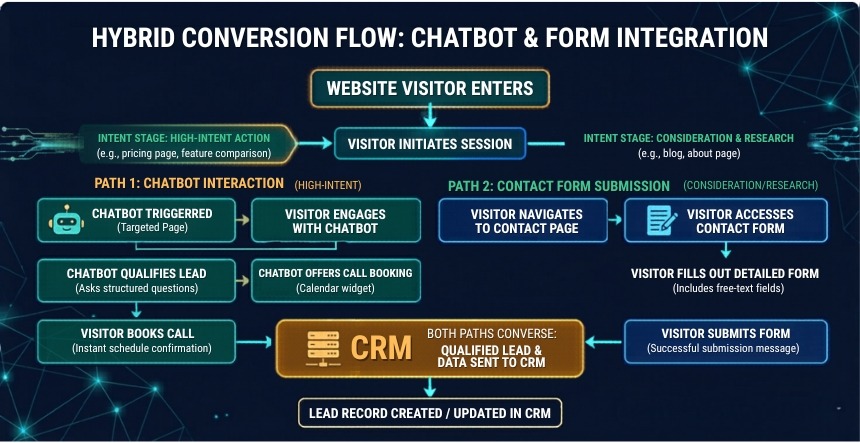
Here is something the chatbot-versus-form debate obscures: the highest-performing businesses in 2026 are not choosing one. They are running a unified system where the chatbot and the form serve different moments in the same conversion journey.
The pattern I see working most consistently across B2B and eCommerce sites is this: the chatbot triggers on high-intent pages (pricing, product, and services) after the visitor has been on the page for 30 to 45 seconds, showing genuine engagement. It qualifies the visitor and books the first touchpoint. The contact form handles formal requests, detailed briefs, and compliance-sensitive submissions where the visitor needs to see all fields up front and submit a complete document. Both feed into the same CRM with consistent lead scoring, so the sales team sees a complete picture regardless of which channel the lead came through.
The companies seeing 5x lead volume improvement are not running better chatbots than their competitors. They are running chatbots on the right pages, triggered at the right moment, feeding into a properly integrated CRM. The technology is a small part of it. The deployment logic is most of the work.
CCPA Compliance: What You Need to Know Before You Deploy a Chatbot
Legal note: This section provides general information, not legal advice. If your business serves California residents, consult a qualified attorney before deploying an AI chatbot that collects personal information.
Most chatbot implementations collect personal data from the first message: name, email, company, phone number, and the content of the conversation itself. Under the California Consumer Privacy Act (CCPA), this collection triggers compliance obligations if your business meets any of the CCPA thresholds (over $25M in annual gross revenue, data of 100,000+ consumers annually, or 50%+ of revenue from selling personal data).
Four areas come up most often when we review chatbot implementations for compliance:
Telling people what you are collecting, right when you collect it. The chatbot’s first message needs to say, in plain language, that it is collecting contact information and what you will do with it. Not buried in a footer link. In the opening exchange.
Opt-out if you share the data. If your chatbot feeds lead data into a third-party enrichment service or lead network, that counts as selling under CCPA. Users need a way to say no to that, and it needs to be findable without a law degree.
Not keeping data longer than you need it. Chat transcripts pile up fast. If you are holding six months of conversation logs you will never look at again, that is a compliance risk sitting on a server. Set a retention schedule and stick to it.
Checking what your platform does with your conversation data. This one catches people off guard. Some chatbot platforms use customer conversation logs to improve their own models. Before you go live, confirm your provider has a Data Processing Agreement and is explicit about not training on your users’ data.
None of this requires a compliance team to implement. For a standard lead generation chatbot, a two-sentence disclosure in the opening message, a visible link to your privacy policy, and a confirmed DPA with your platform provider cover most of what CCPA asks of you. It takes about an hour to set up correctly. Where things get harder is in healthcare or financial services, where the data is more sensitive, and the regulatory scrutiny is higher. In those sectors, do not skip the legal review.
KrishaWeb builds CCPA-compliant chatbot implementations with disclosure language, opt-out flows, and platform DPA verification included as standard. Schedule a 30 min call today!
How to Actually Make This Decision for Your Business
Skip the benchmarks for a moment. The conversion rate comparison is useful context, but your business does not run on averages. Here is the diagnostic I use with clients before recommending either option.
How fast do you currently respond to leads?
If your average response time to a form submission is more than one hour, a chatbot will almost certainly outperform your current setup for B2B and high-consideration eCommerce. The response window is where the conversion loss happens. If you respond within 15 minutes consistently, the gap between chatbot and form performance narrows considerably.
Where are your highest-intent visitors landing?
If most of your qualified traffic lands on your pricing page, services page, or a specific product page before reaching the contact form, you are losing visitors between the high-intent page and the conversion point. A chatbot placed on the high-intent page captures intent in the moment. A contact form only captures the visitors who have completed the journey to find it.
What is the quality of your current form submissions?
Look at what comes through your form right now. If half your submissions are wrong-fit, too early in the buying cycle, or require three back-and-forth emails to establish whether they are worth a call, a chatbot that qualifies upfront will save your sales team hours every week. On the other hand, if your form submissions are already well-qualified, adding a chatbot is more about catching the visitors who never made it to the form in the first place than about improving the leads you are already getting.
What does your ideal buyer expect from a first interaction?
Think about who you are actually selling to and how they buy. A startup founder evaluating a web development agency on a Tuesday night is probably fine with a chatbot. It fits the environment and the pace. A VP of Finance at a manufacturing company who found your site through a referral and wants to submit a detailed RFP is not going to type their requirements into a chat window. They want a form, a confirmation email, and a human response within 24 hours. The conversion rate benchmarks do not account for that difference. You have to.
What is the average conversion rate for an AI chatbot vs. a contact form?
Contact forms average 1 to 3% across visitors who reach the contact page, and that is generous, because Zuko Analytics data shows that over 70% of people who start a form abandon it before submitting. So the real conversion rate from site traffic to form completion is closer to a fraction of that 1 to 3%. Chatbots average 10 to 15% among visitors who engage with the chat, and businesses running chatbots alongside their forms report generating 20 to 35% more leads overall compared to forms alone (Scalify 2026). Keep in mind that people who engage with a chat widget are already showing more intent than a random visitor, so the comparison is not perfectly apples-to-apples. The absolute lead volume gain is real regardless.
Does an AI chatbot work for B2B lead generation?
Yes, and B2B is arguably where the conversion advantage is most pronounced. 60% of B2B companies now use chatbot software for lead generation, primarily because the traditional form-and-wait cycle loses leads to competitors who respond faster. B2B professional services and SaaS companies report 15 to 25% chatbot conversion rates when the chatbot is configured to qualify leads and book discovery calls directly. The key requirement is a chatbot connected to your calendar booking system and your CRM, so qualified leads enter the pipeline without a manual step. (Source: tidio.com | scalify.ai)
Do visitors trust AI chatbots with their personal information?
67% of users say chatbots protect their privacy when properly designed (Marketing LTB). The 18% figure for financial information is the important caveat: people draw a clear line between sharing a name and email to book a call and sharing account numbers or income details with a chat widget. That line makes sense. What moves the needle on trust is not the technology; it is how the chatbot introduces itself. Tell the user it is AI, tell them what you will do with what they share, and link to your privacy policy in the opening message. In most B2B lead generation contexts, that is enough. If you are in financial services or healthcare, assume the bar is higher and design accordingly.
How much does it cost to add an AI chatbot to a website?
Platform-configured chatbots on Intercom, Tidio, or HubSpot start from $50 to $200 per month with no build cost. A properly designed and deployed AI chatbot with knowledge base grounding, CRM integration, escalation paths, and conversation design typically runs $2,000 to $8,000 to build correctly. A custom AI chatbot built on your own data costs more. The relevant comparison is not chatbot cost versus zero; it is chatbot cost versus the current cost of the leads you are losing while visitors wait 24 hours for a form response.
Should I replace my contact form with a chatbot?
No. The right strategy is deployment based on page intent, not replacement. Keep your contact form for formal submissions, file uploads, detailed briefs, and compliance-sensitive requests where users need to see all fields and submit a structured package. Add a chatbot on your highest-intent pages (pricing, services, products, and homepage) where visitors have questions before they are ready to convert. The data from the highest-performing B2B and eCommerce sites consistently shows that the hybrid approach outperforms either tool used alone.
What makes a chatbot convert better than a form?
Four factors: proactive engagement (the chatbot comes to the visitor instead of waiting for them to find the contact page), immediate response (1.1 second average response vs. 24 to 48 hours for form follow-up), dynamic qualification (the chatbot adapts questions based on responses rather than collecting the same fields from every visitor), and 24/7 availability (capturing leads outside business hours when forms just sit). The conversion gap closes when forms are optimized for speed of follow-up, which is why the hybrid approach works better than either tool alone.
Conclusion
The conversion rate data is not subtle. Contact forms lose 97% of visitors before they submit. AI chatbots convert 10 to 15% of engaged visitors, trigger on every page instead of one, and respond in 1.1 seconds instead of 24 hours. For most businesses, the case for adding an AI chatbot to high-intent pages is strong.
The reason to be careful with that conclusion is that a poorly configured chatbot underperforms a well-designed form. Conversation design, knowledge base accuracy, escalation paths, and CRM integration are what separate a chatbot that generates pipeline from one that generates frustration. The technology is accessible. The implementation quality is where most businesses leave the conversion gains on the table.
If you are a marketing director deciding between these options, start with the diagnostic questions above. Map your current conversion drop-off, identify your highest-intent pages, and figure out where in the journey you are currently losing visitors. The answer to that question, more than any benchmark, tells you where to start.
KrishaWeb builds AI chatbots grounded in your specific knowledge base, connected to your CRM, and designed around your actual customer conversations, not a generic flow. If you want to understand what that looks like for your specific site, start with the free consultation.
Parth Pandya
Founder & CEO
Founder & CEO of KrishaWeb, leads an Enterprise Web Agency. With contributions to WordPress and organization of WordCamps, he pioneers innovation and community engagement in the digital realm.




 KrishaLabs
 KrishaStudio
 KrishaStore