SaaS teams running Webflow sites are closing the gap between homepage traffic and trial signup rates by using AI personalization to show different hero messages, CTAs, and social proof to different visitor groups. The data is clear: AI personalization lifts conversion rates by 40% on average, and personalized CTAs perform 202% better than generic ones. The approach is not complicated, but it needs proper ICP segmentation, the right tool stack, and a compliance setup before anything goes live for EU visitors.
Why Your Webflow Homepage Is Losing Trial Signups
Only 2% to 5% of SaaS website visitors sign up for a trial on any given visit (Source:Amra and Elma). That is a tough number to look at, especially when you have put real budget into paid ads, your product is solid, and your homepage genuinely looks good.
The issue most SaaS growth teams run into around month 6 or 12 is not the design. It is the message. A startup selling HR software might have three very different types of visitors land on the same page on the same day: a Head of HR at a 200-person company who clicked a LinkedIn ad, an IT director at a large enterprise who came from a Google search, and a founder of a 12-person startup who found the site through a newsletter. All three see the same hero section. All three read the same headline. And that headline was written for nobody in particular, or maybe one of them if the positioning work was lucky.
That is exactly the problem AI personalization is built to fix.
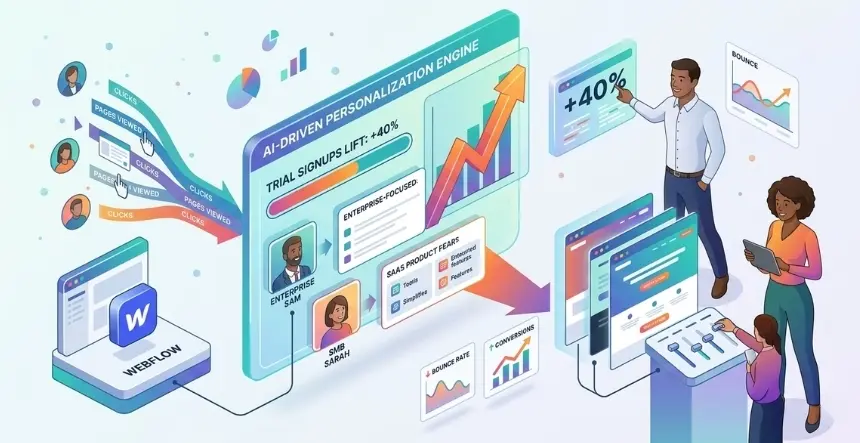
Instead of showing every visitor the same static homepage, AI personalization routes each group to a version of your hero, CTA, and social proof that speaks to where they are coming from: their industry, company size, the ad they clicked, or their browsing behavior. The Head of HR sees a headline about compliance. The enterprise IT director sees security details and a relevant case study. The startup founder sees a “get started in 10 minutes” CTA with a pricing card up front.
Same product. Same Webflow site. Three very different conversations.
What the Numbers Actually Show
Before getting into the how, it is worth looking at real data, because “personalization boosts conversions” gets said so often that it starts to sound like filler.
AI personalization delivers an average 40% lift in conversions by responding to visitor behavior in real time rather than showing the same static page to everyone (Source:Genesys Growth). Personalized CTAs convert 202% better than generic ones, according to research from Firework cited in the same study.
McKinsey’s findings put the business case in plain terms: companies that do personalization well generate 40% more revenue from these efforts than those that do not, while also cutting customer acquisition costs by up to 50% and improving marketing returns by 10% to 30% (Source:Envive AI).
On the B2B SaaS side, 71% of buyers now expect a personalized experience when they land on a site, and 76% say they get frustrated when a site treats them the same as everyone else (Source:Loopex Digital). When your buyer has already looked at three competitor sites before landing on yours, relevance is the tiebreaker.
Across multiple independent studies, AI personalization on websites improves conversion rates by an average of 43%, with the reason being simple: showing people content based on how they got there and what they have already looked at (Source:Right Marketer).
That 40% to 43% lift is where the blog title comes from. It is not a one-off result. It is the average across many real implementations.
The Three Personalization Signals That Drive the Most Results
Not every data signal is worth chasing. Trying to track every possible behavior from day one is the fastest way to build something that produces no useful output. These three signals consistently produce the biggest lift for SaaS homepages.
Signal 1: Where the Visitor Came From
A visitor arriving from a LinkedIn ad aimed at enterprise HR teams has a very different mindset than someone who found you through an organic search for “HR software for small businesses.” The UTM tags on your campaign links already carry that information. The personalization tool just needs to read those tags and load the right content.
This is the easiest place to start because it needs no behavioral tracking, no complex setup, and no additional cookie consent beyond what your existing analytics already uses. You set up UTM tags on your campaigns, write content variations for each audience group, and the tool swaps the right version on page load.
Signal 2: Company Data from IP Lookup
Tools like Clearbit, 6sense, and Demandbase can identify the company behind a visit using IP data, without the visitor ever filling out a form. When Webflow Optimize is connected to one of these tools, it can show a personalized hero based on company size, industry, or deal tier automatically.
Webflow Optimize’s higher tiers include native integrations with Demandbase, 6sense, HubSpot, Marketo, and Salesforce for this purpose (Source:Webflow Pricing). A mid-market company gets a relevant case study and a “request a demo” CTA. A small business visitor gets a free trial option and a self-serve setup message. All from one homepage, with no developer input needed between campaigns.
Signal 3: What the Visitor Has Already Done on the Site
First-time and returning visitors should not see the same page. Someone on their third visit who has already read your pricing page twice is much further along than someone who bounced in five seconds during their first visit. Personalization reads those signals and adjusts what they see.
A returning visitor who looked at pricing gets a “Compare plans” CTA and a customer story from someone with a similar company size. A first-time visitor from a cold ad gets a softer intro: what the problem costs them, why it matters, and then a low-effort trial CTA.
Research from Dynamic Yield shows that behavior-based personalization produces an 89% increase in conversions versus no personalization, with a 27.6% conversion rate lift from campaigns that touch visitors across multiple pages (Source: Envive AI). For SaaS, where a “conversion” means a trial signup or demo request, the same logic holds.
The Webflow AI Personalization Tool Stack
Webflow’s personalization options have changed significantly over the past 18 months. What is available to SaaS growth teams today is much better than what existed in 2023 and 2024.
Webflow Optimize (Built In)
In April 2024, Webflow purchased Intellimize. This company provides AIB’s clients with personalized experiences, including Sumo Logic, Dermalogica, and ZoomInfo (Source: TechCrunch). As such, Webflow has developed an A/B testing suite powered by AI through its Webflow Optimize software.
The idea is simple: run tests, show personalized content to different visitors, and let AI test multiple page elements at once without writing code or leaving Webflow.
Webflow Optimize Feature
What It Does
A/B testing
Tests page versions and tracks which one wins
AI-driven multivariate testing
Tests multiple page elements at the same time, AI picks the winners
Audience targeting
Group visitors by company data, behavior, traffic source, or CRM info
CRM connections
Works natively with HubSpot, Marketo, Salesforce, Demandbase, and 6sense
AI Assistant
Sets up tests and personalizations in just a few clicks
Pricing starts at $299 per month for the entry plan, which covers up to 5 active tests, A/B testing, personalization, and audience reporting (Source:Foursets). Higher tiers with company-level targeting and CRM audience matching are priced by request.
This is the right choice for SaaS teams that want everything inside one platform and have enough conversion volume to make the monthly cost worthwhile.
Optibase (Built for Webflow, Lower Cost)
Optibase was designed from the ground up for Webflow, not adapted to support it after the fact. It has a native Webflow plugin, a no-code test builder, and live reporting available inside either the Webflow app or the Optibase dashboard.
Plans start at $19 per month on annual billing for smaller sites, going up to $79 per month for higher-traffic accounts (Source:Optibase). It is the right pick for teams that want a solid A/B testing setup without the $299 per month cost, or for those still building toward the traffic volume that makes Optimize worth it.
Optibase is built to be GDPR-compliant and splits traffic without slowing the page, which is a common issue with some third-party testing tools.
Mutiny (Company-Based Personalization)
Before Webflow Optimize reached its current level, Mutiny was the standard choice for B2B SaaS teams that wanted account-based personalization on Webflow. It uses IP lookup to identify company names and segments, then swaps hero content in real time based on that data.
Webflow now lists Optimize as a direct replacement for Mutiny on its features page (Source: Webflow). Mutiny still makes sense for teams with complex account-based needs and existing intent data infrastructure. Pricing runs around $1,500 to $3,500 per month and is not publicly listed.
RightMessage (Good for Smaller Traffic Volumes)
RightMessage sits between a basic A/B testing tool and a full personalization platform. It groups visitors by traffic source, behavior, and survey responses, then swaps copy and CTAs without any developer work. It is lighter than Mutiny and more affordable than Webflow Optimize for earlier-stage teams.
The best fit: a SaaS company getting 3,000 to 8,000 monthly visitors that is not yet ready for full company-level targeting but needs more than a simple A/B test.
Tool
Best For
Price Range
Webflow Native?
Webflow Optimize
Teams wanting one platform with CRM and company data integration
From $299/month
Yes, built-in
Optibase
A/B testing without the enterprise cost, Webflow-first teams
$19 to $79/month
Yes, built for Webflow
Mutiny
Company-based personalization for mid-market and enterprise SaaS
$1,500 to $3,500/month
Needs integration
RightMessage
Segment-based personalization at lower traffic volumes
$79 to $229/month
Needs integration
Map Your Visitor Segments Before Touching Any Tool
The most common reason Webflow personalization does not perform is that the team chose a tool before deciding who they were personalizing for. You cannot build a useful personalization system if you have not first worked out who your main visitor types are and what you want each of them to see.
For a SaaS product that serves more than one type of buyer, map each main group across four areas before you do anything else.
Visitor Group
Main Problem
Hero Message
CTA
Social Proof to Show
HR leaders, mid-market
Compliance risk, manual tracking
“Stop managing HR in spreadsheets. Stay compliant automatically.”
“Start free trial”
Case study from a 300-person SaaS company with a compliance outcome
IT directors, enterprise
Security, integrations, procurement
“Enterprise-grade security. 250+ integrations. No IT tickets required.”
“Talk to enterprise sales”
SOC 2 badge, Fortune 500 logo row
Founders, under 30 people
Speed, simplicity, price
“Get your HR sorted in 10 minutes. No HR team needed.”
“Try free, no card required”
G2 rating badge, startup customer quotes
Build this table before you configure a single variant. The tool is just how the message gets delivered. The message itself is what drives the lift.
The Setup Sequence That Gets Results
Teams that see 30% to 40% conversion gains within 60 days of going live tend to follow the same order of steps. Teams that see no movement usually skip one of them.
Step 1: Set up cookie consent first, before anything else.
EU visitors must actively agree to behavioral tracking before your personalization tools can fire. That is a legal requirement under GDPR, not just a recommendation. Use Complianz or CookieYes on your Webflow site to block personalization scripts until the visitor gives consent. Personalization based on UTM tags or IP-based company data without storing personal information has a lighter compliance requirement than full behavioral tracking. Know which category your setup falls into before you go live.
Step 2: Pick two or three visitor groups to start with.
Do not try to build personalized experiences for every possible visitor type right away. Check your traffic sources in GA4, look at which customer types you win most often in your CRM, and pick the two or three groups with the most traffic and the biggest gap between what they currently see and what would actually speak to them.
Step 3: Write the copy for each version before opening any tool.
Every variant needs a defined hero headline, supporting line, CTA text, and main social proof element. Write all of this in a shared document. Get it reviewed by product marketing. Then open Webflow Optimize or Optibase and build the page versions.
Step 4: Run a basic 50/50 test.
Split traffic equally between your current default hero and your best personalized version for your top visitor group. Give it at least two weeks, ideally four. Do not draw conclusions from the first few days of data.
Step 5: Roll out the winner and move to the next group.
Once you have a clear winner for Group 1 with sufficient data to back it, make that the default experience for that segment. Then build and test the Group 2 version.
Step 6: Add company-level data enrichment after the basics are working.
Tools like Clearbit, 6sense, and Demandbase that identify visitors by their company sit on top of a working personalization foundation. They cost more and take more setup. Add them once you have proven the core system works.
Cookie Consent and EU Compliance: What You Need to Know
Growth teams regularly underestimate this section, and skipping it is the quickest way to create legal risk while also breaking the data your personalization depends on.
Here is what GDPR actually requires when you run AI personalization on a Webflow site.
EU visitors must opt in before behavioral tracking starts. If your personalization tool uses cookies, records browsing sessions, or saves behavioral history to decide which version to show, EU visitors must say yes before any of that begins. Pre-ticked consent boxes are not allowed under GDPR. There are no workarounds.
Before someone consents, use only non-personal data. UTM tags in the URL are not personal data. IP-based company lookup without saving any personal details sits in a gray area, but most legal guidance treats it as acceptable under legitimate interest if no personal data is stored. Configure your tools to run only on these signals before consent is given.
Keep a record of every consent. Each consent action must be logged with a time stamp, a note of what the visitor agreed to, and what they were told before agreeing. Complianz and CookieYes both do this automatically for Webflow sites.
Tell visitors that personalization is running. Your privacy policy needs a clear section explaining that you use AI personalization tools, what data they collect, how long you keep it, and which third parties see it. GDPR requires this level of openness.
For California visitors under CCPA. If any behavioral data collected through your personalization tools is passed to third-party platforms, California visitors must be able to opt out through a “Do Not Sell or Share My Personal Information” link on your site. Fines for deliberate violations reach $7,988 per case (Source:Secure Privacy).
The practical fix: Complianz’s Webflow setup blocks Webflow Optimize, Optibase, and any tracking-based scripts for EU visitors until they give consent. Test it in staging before you go live.
What to Track and What to Ignore
Many growth teams make the same mistake here. They set up personalization, see a “winning” variant in the tool’s dashboard, and call it a success without checking whether that result actually moved the numbers that matter for revenue.
Track these:
Metric
Why It Matters
Where to Find It
Trial signup rate by visitor group
Checks if the personalized message is actually converting the right people
GA4 custom conversion events, split by UTM or company data
Demo request rate by ICP
For enterprise groups, shows whether personalization is getting people to book calls
CRM conversion tracking by source
Homepage drop-off rate by version
Shows whether the personalized content is landing or causing confusion
GA4 Engagement Rate report, split by test
Scroll depth by version
Shows whether visitors are reading the content before leaving
Hotjar or Webflow Analyze used alongside Optimize
Lead quality score by group
Checks whether personalized traffic brings better leads, not just more of them
CRM win rate by traffic source over 90 days
Do not track these as success metrics:
Do not use total page views or raw form submission counts as your measure of whether personalization is working. When personalization is set up correctly, fewer unqualified visitors reach high-commitment CTAs. That means total submissions often decline even as lead quality improves. A drop in raw form volume alongside a rise in lead quality is a good result, not a bad one.
Do not make decisions before hitting 95% confidence in your test results. A/B tools show live numbers, and it is tempting to act on early trends. Early results almost always mislead because traffic shifts day to day, and sample sizes are too small to trust.
Most teams see measurable improvement in trial signup rate for at least one visitor group within 30 to 60 days of the first test going live. Getting all major groups optimized with company-level data active usually takes one full quarter.
Key Takeaways
SaaS homepages converting at 2% to 5% almost always have a message problem, not a design problem. An enterprise IT director, a mid-market HR leader, and a startup founder will not all interpret the same hero section in the same way.
AI personalization consistently delivers 40% to 43% conversion lifts across research studies. Personalized CTAs perform 202% better than generic ones. These are averages, not best-case results.
Webflow Optimize (from $299 per month) is the built-in choice for Webflow AI personalization, with A/B testing, AI-driven multi-element experiments, and CRM audience matching. Optibase ($19 to $79 per month) is the right starting point for teams not yet ready for that level of investment.
Map your visitor segments before you open any tool. Define your three main visitor groups, what message works for each, and which CTA each should see. That work is what drives the lift, not the tool itself.
GDPR requires clear opt-in consent before behavioral tracking starts for EU visitors. Set up Complianz or CookieYes to block personalization scripts until consent is given. Make sure any pre-consent personalization uses only UTM data or non-personal company signals.
Measure trial signup rate by group, lead quality by source, and page drop-off rate by version. Total form submissions are not a useful success metric when personalization is working correctly.
Conclusion
One-size-fits-all messaging is the most fixable reason SaaS homepages lose trial signups. The traffic is already there. The product is real. The fact that visitors are not converting at the rate they should is telling you something clear: the hero your enterprise IT director sees is the same one your startup founder sees, and neither of them feels like it was written with them in mind.
Webflow AI personalization closes that gap. KrishaWeb’sWebflow development team works with SaaS growth and product marketing leaders to design, build, and improve personalization setups that are tied to real visitor data, compliant with GDPR from day one, and ready to show results within 60 days of launch.
If you want to know exactly where your homepage is losing the visitor groups that matter most, the free AI Website and CRO Audit covers your Webflow personalization setup, ICP segment gaps, current trial signup rate versus what is typical for your category, and a clear action plan for your site.
You will have a full personalization review in your inbox within 5 business days.
Frequently Asked Questions
What is Webflow AI personalization for SaaS?
It is the practice of using AI tools within or alongside Webflow to change homepage headlines, CTAs, and social proof sections based on who is visiting: their industry, company size, where they came from, or what they have already viewed on the site. Different visitor groups see content that speaks to their specific situation rather than a single page that tries to speak to everyone at once.
How much does Webflow personalization cost?
Webflow Optimize, the built-in tool Webflow created after buying Intellimize in 2024, starts at $299 per month for up to 5 active tests with A/B testing and personalization included. Optibase, a tool built specifically for Webflow, starts at $19 per month. Third-party platforms like Mutiny run $1,500 to $3,500 per month for company-based personalization.
What conversion lift is realistic from Webflow AI personalization?
Multiple independent research sources report average lift of 40% to 43% in conversion rates. Personalized CTAs outperform generic ones by 202%. Your actual results depend on how well you define your visitor groups, your traffic volume, and how much effort goes into tuning after launch.
Does Webflow personalization work with HubSpot and Salesforce?
Yes, Webflow Optimize is Integrated with HubSpot, Marketo, Salesforce, Demandbase, and 6sense. You can Target Groups of Visitors by using CRM Contact Information, Matched Accounts, and Deal Stage, which makes it Perfect for Account-Based Marketing Programs.
Do I need cookie consent for Webflow AI personalization?
Yes, for EU visitors. If your personalization tool uses cookies or tracks browsing behavior, GDPR requires visitors to actively say yes before any tracking begins. Install Complianz or CookieYes and set them up to block tracking-based personalization scripts until the visitor gives consent. Personalization based only on UTM tags or non-personal company data has a lighter requirement.
How many visitor groups should I start with?
Start with two, at most three. Find your highest-traffic visitor types by looking at traffic source data and your CRM win history. Write distinct message versions for each group. Running too many tests at once before any of them have produced good data is the main reason early personalization setups feel like they are doing nothing. Get one group working well, then expand.
How long before I see results?
Most SaaS teams see measurable improvement in trial signup rates for at least one visitor group within 30 to 60 days of the first test going live. Getting all main groups optimized with company-level data active usually stabilizes within one quarter. Do not end a test early. You need to reach 95% confidence before the result is reliable.
What is the minimum traffic level needed for personalization to work?
For an A/B test to reach a reliable result in a reasonable time frame, you generally need at least 500 to 1,000 monthly visitors on the page being tested. For AI-driven multi-element testing, 2,000 or more monthly visitors provide faster, more reliable learning. Below 500 monthly visitors, focus on building traffic first before adding personalization tools.
Nisarg Pandya
Project Manager
Experienced Project Manager and Scrum Master at KrishaWeb, delivers expertise in Scrum methodologies, Laravel, React.js, UX design, and project management, ensuring efficient project delivery and agile implementation.




 KrishaLabs
 KrishaStudio
 KrishaStore