Use rel=”sponsored” for paid and affiliate links, rel=”ugc” for user-generated content, and rel=”nofollow” when you do not want to vouch for a link and neither of the others fits. That is the whole decision behind nofollow vs sponsored vs UGC links. These attributes are signals you give Google about how you relate to a link. They are not ranking switches, and they are not indexing controls.
The rest of this guide covers what Google says today, where people get it wrong, and how to check your own site. The first version of this post went out when the attributes were new. Back then the story was “Google just changed the rules.” In 2026 the useful question is different: are your links labeled correctly, and does your site behave the way you think it does?
Key Takeaways
Use the right label. sponsored is for paid and affiliate links, ugc is for user-generated content, and nofollow is for links you do not want to vouch for when neither of the other two fits.
Attributes are signals, not switches. They tell Google how you relate to a link. They do not block indexing, and they do not guarantee a ranking outcome.
Following, crawling, indexing, and ranking are four different things. Mixing them up is the most common mistake we see.
Use noindex to keep a page out of search. Nofollow will not do it, and robots.txt can stop Google from ever seeing your noindex tag.
Qualify paid links. Google treats unqualified paid links as link spam. sponsored is the label it prefers.
Combine values when it helps. rel=”ugc nofollow” is valid, and most comment systems already output it.
Audit at the template level. A crawl of your outbound links, grouped by rel value, finds most problems in an afternoon.
What Are Nofollow, Sponsored, and UGC Links?
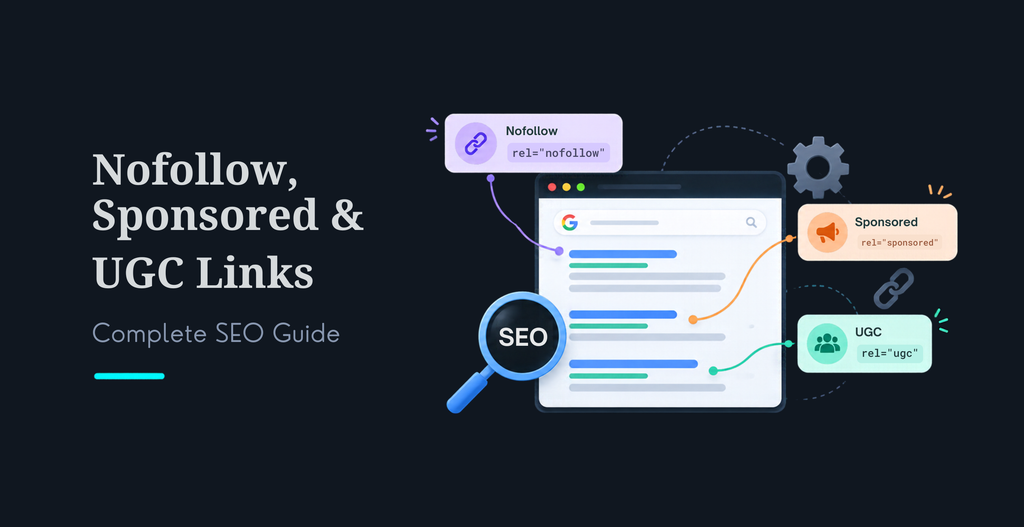
They are three values of the rel attribute on an HTML link. Each one tells Google something about why the link exists. Google’s outbound link documentationdescribes them this way: sponsored for advertisements, paid placements, and other compensated links; ugc for user-generated content such as comments and forum posts; and nofollow for cases where the other two do not apply, or where you would rather not be associated with the page.
A link with none of these values is an ordinary editorial link. It says “I chose to point here.” That is still the right default for sources and references you trust.
Nofollow vs Sponsored vs UGC Links: What Is the Difference?
The difference is the relationship, not the effect. Here is the quick comparison.
You can stack values. Google accepts a space-separated or comma-separated list, so rel=”ugc nofollow” works. Use the most specific label first, and add nofollow only if you want the broader signal as well.
One caution. Google’s current documentation says links with these values “will generally not be followed.” The word is generally. Google first described the three values as hints in 2019, in its announcement of the change, and that is how I treat them: a strong signal, not a guarantee.
Attribute
Use it for
Typical examples
Notes
rel=”nofollow”
Links you do not want to vouch for when sponsored and ugc do not apply
Untrusted sources, pages you would rather not be associated with
The general-purpose option. Also valid for paid links, though sponsored is preferred.
Google recommends it for user-generated links. You may choose to relax it for contributors you trust.
No rel value
Editorial links you stand behind
Sources, references, partner pages you chose freely
Still the right default for trusted links.
Do Nofollow Links Affect SEO in 2026?
Yes, but not in the way old advice says. The 2019 version of this post said nofollow links do not pass authority and are not a ranking factor. That is too blunt. Google treats the attributes as signals about the link, and it does not publish a rule for how much value, if any, a labeled link passes. Anyone who gives you a precise number is guessing.
What you can say with confidence is narrower, and more useful. Labeling paid links correctly keeps you on the right side of Google’s spam policies. Those policies treat links created mainly to manipulate rankings as link spam, and they say paid links are “a normal part of the economy of the web” when they are qualified with nofollow or sponsored. Labeling comments with ugc keeps spam from hurting your site’s reputation.
Four things people confuse
Question
What controls it
Does a link attribute control it?
Will Google follow this link?
The link and its rel value
Mostly. Treated as a signal.
Will Google crawl the target page?
Robots.txt, sitemaps, other links to the page
No. The page can still be crawled if found elsewhere.
Will the target page be indexed?
noindex meta tag or X-Robots-Tag header
No.
Will the target page rank higher or lower?
Hundreds of signals
It is one input among many, and the weight is not published.
Does this change for AI search?
Not in any special way. Google’s guide to optimizing for AI features says you do not need special files, markup, or schema for generative AI search. It points back to the same basics: helpful, original content and a technically sound site. Clean, correctly labeled links are part of that foundation. For the bigger picture, read our post onhow AI search is changing website discovery.
When Should You Use Nofollow vs Sponsored vs UGC Links?
Situation
Recommended attribute
Banner ad, sponsored post, or paid placement
sponsored
Affiliate link in a review or comparison post
sponsored (add an on-page disclosure)
Product received free in exchange for a review that links to the seller
sponsored
Comment on your blog, with a link in the comment or name field
ugc nofollow
Forum post or user profile link
ugc nofollow
Reference to a source you cannot vouch for
nofollow
Link to a trusted source, partner, or your own page
No attribute
Link to a login, cart, or internal utility page
Usually no attribute. See “Common mistakes” below.
Two edge cases come up often. First, affiliate links. Google’s outbound-link page does not name them, but they are compensated links, so sponsored is the closest fit. Second, free product reviews. Google’s spam policies list products sent for review that include a link as an example of a paid link, so label those too. If you are not sure whether something counts as paid, label it.
How Do You Add Nofollow, Sponsored, and UGC Attributes in HTML?
Add the rel attribute inside the anchor tag. These are copyable examples.
<!– Ordinary editorial link –> <a href=”https://example.com/source”>Example source</a>
A few implementation notes. Google reads these values on crawlable anchor elements. Its crawlable links guidancesays Google generally needs an a element with an href attribute, and that most other link formats will not be parsed. If a button or a script event acts as the link, the attribute has nothing to attach to.
CMS considerations
Most platforms can do this without custom code, but they rarely do it by default for everything. WordPress comment links usually get ugc and nofollow from the core software, but affiliate links and sponsored posts need a manual rel value or a plugin setting. Page builders and visual editors often have a “nofollow” checkbox in the link dialog and no sponsored option. Check the rendered HTML, not the editor panel. A template change that adds sponsored to a whole block of affiliate links is safer than asking every editor to remember.
Can Google Crawl or Index Nofollow Links?
Yes, in effect. A nofollow link tells Google how you relate to the link. It does not stop the target page from being crawled or indexed. Google’s documentation says pages may still be crawled if Google finds them another way, such as through a sitemap or a link on another site.
If you want a page kept out of search results, use noindex. Google’s guide to blocking indexinggives two ways. Add a meta tag in the page head, or send an HTTP header. The header also works for PDFs and images.
<!– In the page head –> <meta name=”robots” content=”noindex”>
<!– Or as an HTTP response header –> X-Robots-Tag: noindex
There is one trap. The page must be crawlable for Google to see the noindex rule. If robots.txt blocks the page, Google never reads the tag, and the URL can still appear in results if another page links to it. Google also does not support noindex inside robots.txt. Use robots.txt to control crawling and noindex to control indexing. Do not use one to do the job of the other.
What to check when a nofollowed page still shows up
Work through it in order. Is the URL in your XML sitemap? Do other pages or other sites link to it without a rel value? Is it blocked by robots.txt, which would stop Google from seeing noindex? Does it have a noindex tag or header? Inspect the live URL in Google Search Console to see what Google found, rather than guessing.
Common Link Attribute Mistakes
These are the mistakes I run into most in audits. Most come from treating the attribute as a bigger lever than it is.
Using nofollow to hide a page from search. It does not. Use noindex, and keep the page crawlable.
Combining robots.txt blocks with noindex. Google cannot read a noindex tag on a page it is not allowed to fetch.
Leaving paid and affiliate links unqualified. This is the one that can cause real trouble. Add sponsored.
Marking every external link nofollow. It adds no benefit and makes your trusted editorial links look like ads.
Using nofollow on internal links to “sculpt” authority. Google’s documentation points to robots.txt for blocking crawling of your own pages. Internal nofollow is rarely the right tool.
Never relaxing ugc. A blanket ugc rule is fine. Relaxing it for contributors you trust is a choice you can make, not a requirement.
Putting the attribute on something that is not a crawlable link. A button with a script event has no rel value Google can read.
Trusting the editor view. The visual editor can show a nofollow checkbox that the front end never outputs. Check the rendered HTML.
Treating the old “March 2020” framing as news. The hint model has been in place for years. Old posts that describe it as an announcement are out of date.
How Do You Audit Link Attributes on Your Website?
1. Crawl the site. Use a crawler such as Screaming Frog, Sitebulb, or Ahrefs Site Audit and export all outbound links with their rel values. Google Search Console’s Links report covers links to your site, so it will not show this.
2. Group external links by rel value. You should see four buckets: none, nofollow, sponsored, and ugc.
3. Find unlabeled paid links. Search for ad networks, affiliate domains, sponsored posts, and partner pages that sit in the “none” bucket.
4. Check user-generated areas. Comments, forums, reviews, and profiles should use ugc, and often nofollow as well.
5. Check internal nofollow. List every internal link with nofollow. Most should not be there.
6. Check crawlability. Look for links that are not a elements with an href attribute, such as buttons and script-driven links.
7. Check indexing rules. For pages that should stay out of search, confirm they carry noindex and are not blocked by robots.txt.
8. Fix at the template level. Change the component or plugin setting, not individual posts, so the fix holds.
9. Recrawl and record. Run the crawl again, save the before and after, and note the date.
What to measure
Track a small set of numbers each quarter. The count of external links per rel value. The number of paid or affiliate links without sponsored, which should be zero. The count of internal links with nofollow. The number of indexed URLs that should be noindexed. Any manual action notices in Search Console. These need no special tools and show drift quickly.
Final Checklist for Managing Link Attributes in 2026
Paid, advertising, and affiliate links use rel=”sponsored”.
User-generated links use rel=”ugc”, with nofollow added if you want it.
Links you cannot vouch for use rel=”nofollow”.
Trusted editorial links have no attribute.
Links are real a elements with an href attribute.
Pages that should stay out of search use noindex and are not blocked by robots.txt.
Internal nofollow is rare and intentional.
Rel values are set in templates, not by hand on every post.
You recrawl after changes and save a before and after record.
The post, plugin, or CMS setting that adds rel values is documented for your editors.
Frequently Asked Questions
Are nofollow links still worth using in 2026?
Yes, but for a narrow job. Use nofollow when you link to a page and do not want to vouch for it, and neither sponsored nor ugc fits. Google says links with these values will generally not be followed. Do not expect nofollow to change rankings on its own, hide a page, or stop it from being indexed. For indexing control, use noindex. For a crawl block on your own site, use robots.txt.
Should affiliate links use rel=”sponsored” or rel=”nofollow”?
Use sponsored. Google describes it for ads, paid placements, and other paid links, and affiliate links are compensated, so they fit best there. It still accepts nofollow for paid links, but sponsored is the more precise label and the one it prefers. Google does not name affiliate links directly in its outbound-link documentation, so treat this as the closest match rather than a quoted rule. Add the FTC disclosure on the page as well.
Can I use ugc and nofollow together on the same link?
Yes. Google allows several rel values in one attribute, separated by spaces or commas, so rel=”ugc nofollow” and rel=”ugc,nofollow” are both valid. Many comment systems add both by default. The same works for sponsored, for example rel=”sponsored nofollow”. You only need one qualifier for Google to understand the link, so the second value is optional and mostly helps other crawlers that do not read sponsored or ugc.
Will a nofollow link stop Google from crawling or indexing the page it points to?
No. Google says a page may still be crawled if it finds the URL elsewhere, for example in a sitemap or on another site. Nofollow on one link only changes how Google treats that link. To keep a page out of search results, allow crawling and add a noindex meta tag or an X-Robots-Tag: noindex header. If robots.txt blocks the page, Google never sees the noindex and may still show the URL.
Do I need to add nofollow to every external link?
No. A normal link to a source you trust is fine. Linking out to good sources is part of writing a useful page. Add a qualifier only when the link is paid, user-generated, or something you cannot vouch for. Putting nofollow on every outbound link adds no benefit and makes your editorial links look no different from your ads. Most sites need a small, deliberate set of rules, not a blanket one.
What happens if I do not qualify paid links?
Google treats links bought or sold mainly to manipulate rankings as link spam. Its spam policies say paid links are a normal part of the web when they are qualified with nofollow or sponsored. Unqualified paid links can lead to those links being ignored, or, in serious cases, a manual action. If you find unqualified paid links, add sponsored, fix them at the template level, and document the change.
Ready to Scale Your Agency?
Tell us what you are trying to deliver. Schedule a call to talk it through, or contact us with your project.




 KrishaStudio
 KrishaStore